Reference Icon Table

- Mark as New
- Bookmark
- Subscribe
- Mute
- Subscribe to RSS Feed
- Permalink
- Report Inappropriate Content
03-25-2026 09:13 AM
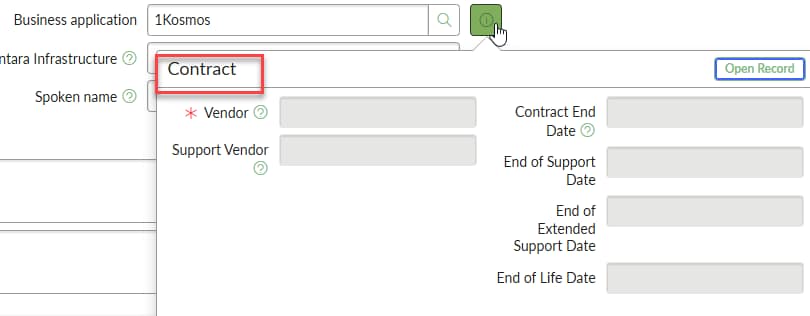
We have a field on a table that extends cmdb_ci called cmdb_ci_service_calculated. On it is a field referencing Business Application. When the field is populated, I get the standard "i" preview icon. When I click on it, it's the wrong table. If I go to the dictionary for for this field, it says the correct table.
Everything I've found says this is a sys_popup view but none of the other reference fields on this form have a sys_popup entry and they work as intended. It seems every article shows how to configure what is seen on this popup but not how to change the table in the preview popup. Any leads are appreciated.

- Mark as New
- Bookmark
- Subscribe
- Mute
- Subscribe to RSS Feed
- Permalink
- Report Inappropriate Content
03-25-2026 10:30 AM
Hi @kerr_jamese
Refer this articles/posts, if it helps:
KB0696831 popup displaying wrong view / fields
https://www.servicenow.com/docs/r/platform-administration/c_ReferenceIcon.html
Regards
Tanushree Maiti
ServiceNow Technical Architect
LinkedIn: https://www.linkedin.com/in/tanushreemaiti
- Mark as New
- Bookmark
- Subscribe
- Mute
- Subscribe to RSS Feed
- Permalink
- Report Inappropriate Content
03-30-2026 10:49 AM
Tanushree, as specified I have looked at the articles that say how to customize the fields that are shown. I don't need that. I see where it says to create a sys_popup but none of the other reference fields that I can see have a sys_popup and they work correctly. Unless, I'm just missing something.