- Post History
- Subscribe to RSS Feed
- Mark as New
- Mark as Read
- Bookmark
- Subscribe
- Printer Friendly Page
- Report Inappropriate Content
on 06-30-2019 12:07 AM

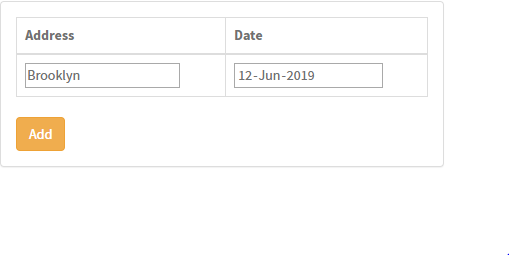
Try the below service portal widget of adding rows and sending data to the server.
//HTML
<div class="panel panel-default">
<div class= "panel-body m-b-m">
<table class="table table-bordered">
<thead>
<tr>
<th>Address</th>
<th>Date</th>
</tr>
</thead>
<tbody>
<tr >
<td><input type='text' ng-model="c.data.address"></td>
<td><input type='date' ng-model="c.data.date"></td>
</tr>
<tr ng-repeat="m in c.data.dataFromFields track by $index">
<td>{{m.address}}</td>
<td>{{m.date}}</td>
</tr>
</tbody>
</table>
<div class="input-gorup-btn">
<button type="button" ng-click="c.add()" class="btn btn-warning">Add</button>
<button type="button" ng-click="c.remove($index)" class="btn btn-warning">Remove</button>
</div>
</div>
</div>
//Client Script
function() {
/* widget controller */
var c = this;
c.add = function(){
c.data.action = "add";
c.server.update().then(function(){
c.data.action=undefined;
//Clear the Boxes.
c.data.address = "";
c.data.date= "";
});
}
c.remove = function(indexToRemove){
c.data.index=indexToRemove;
c.data.action ="remove";
c.server.update().then(function(){
c.data.action=undefined;
})
}
}
//Server Side Script
(function() {
data.dataFromFields = []
if(input!="" && input.action=="add"){
data.dataFromFields = input.dataFromFields;
var dataArray={};
dataArray.address = input.address;
dataArray.date = input.date;
data.dataFromFields.push(dataArray)
gs.addInfoMessage(input.address)
gs.addInfoMessage(input.date)
}
if(input.action=="remove"){
data.dataFromFields.splice(input.index,1)
}
})();
- 3,228 Views