- Post History
- Subscribe to RSS Feed
- Mark as New
- Mark as Read
- Bookmark
- Subscribe
- Printer Friendly Page
- Report Inappropriate Content
on 04-19-2019 01:14 AM
Hi
Have you ever wondered, how you can find out, which workflow definition is using a given Workflow Activity?
For example, if you want to know, which workflows are using the "Approval - Group" Workflow Activity, to review or investigate on the implementation used.
To find out, navigate to
> Workflow > Administration > Activity Definitions
and open the form for the "Approval - Group" Workflow Activity.
Add the Related List (by using the hamburger menu on the top left and choosing "Configure > Related Lists") as shown in the screenshot below:

Click on "Save"
Note: Do not get confused by the "Workflow Actions - xxx" and "Workflow Activity - xxx" Related Lists!
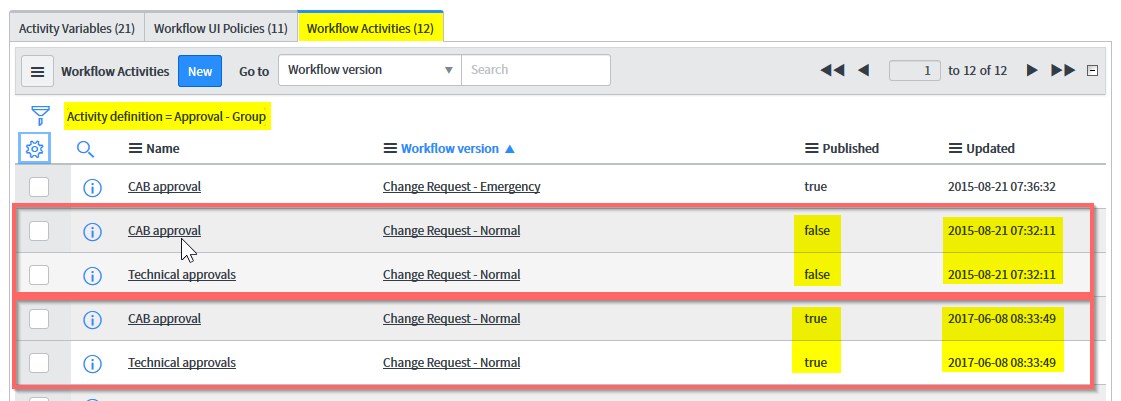
Back on the Workflow Activity Definition form, scroll down to the Related Lists section and select the "Workflow Activities" TAB (of the Related List).

Here, you can see, that the "Approval - Group" Workflow Activity is used in the "Change Request - Normal" Workflow - a total of four times. As you can see in the column "published" (on the right side), TWO are published and TWO are NOT published - each with the same timestamp).
You can also review those Workflow Versions, by navigating to:
>Workflows > Administration > Workflow Versions
You need to replace the default filter of the List to the one shown in the screenshot below.

Just let me know, if this was helpful (mark as helpful please) for you!
Thanks a lot and
Have fun to build something awesome on ServiceNow
Dirk
---------------------------------------------------------------------
If you like to also review my other articles on the ServiceNow Community, please have a look at the overview here:
NOTE: The content I provide here is based on my own experiences and does not necessarily represent my employer's views.
- 2,581 Views

- Mark as Read
- Mark as New
- Bookmark
- Permalink
- Report Inappropriate Content
Awesome! Thank you!