- Post History
- Subscribe to RSS Feed
- Mark as New
- Mark as Read
- Bookmark
- Subscribe
- Printer Friendly Page
- Report Inappropriate Content
on 08-15-2017 05:45 AM
The support for users to easily copy / paste images, often times screenshots, to Service Portal is a requirement often seen. Here is how I have accomplished this.
You need to apply this change to any widget that you want to support copy/paste. In this example we will use the "Ticket Conversations" widget, but the same logic can be applied to "SC Catalog Item" or "Ticket Attachments" widget.

Open your instance and go to /sp_config. The click the Widget Editor and open "Ticket Conversations".

We cannot edit this widget as it is read only. Thus you need to create a copy of it by clicking the burger icon to the right and select "Clone "Ticket Conversations""

Giv your new copy a meaningfull name.

Place a checkmark in "HTML Template" and "Client Script". These are the only places we will make changes.

On line 6 add the attribute ng-paste="paste($event)" inside the <div> tag on the HTML part to the left.

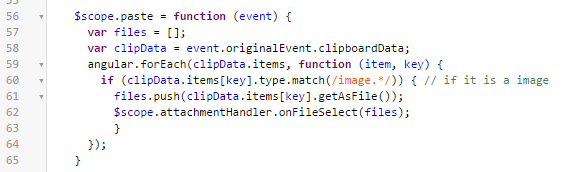
In the "Client Script" window to your right add the $scope.paste function. It is not so important where you add it, just make sure not to place at the same level as the other functions. I added mine on line 56. Here is the code for copy/paste:
$scope.paste = function (event) {
var files = [];
var clipData = event.originalEvent.clipboardData;
angular.forEach(clipData.items, function (item, key) {
if (clipData.items[key].type.match(/image.*/)) { // if it is a image
files.push(clipData.items[key].getAsFile());
$scope.attachmentHandler.onFileSelect(files);
}
});
}

Click the Save icon in the upper right corner and close the widget editor.

Go back to /sp_config and open the Designer

Open the "Ticket Form" page,

Hover the "Ticket Conversations" instance in the main window and click the little trash icon. This will not delete the widget, but only remove the instance of the widget. Next drag your newly created Widget to the place where the "Ticket Conversations" was.
That is it. You can now copy paste/images into the Ticket Conversation. Only requirement is that the user clicks the conversation before pasting.
You may also want to add the following business rule on the sys_attachment table to avoid the creation of files with the name "blob" without any extensions.


I hope that you find this usefull. Any suggestions for improvements are welcomed 🙂 Please endorse if this works for you or like if you want to see more like this.
- 42,148 Views

- Mark as Read
- Mark as New
- Bookmark
- Permalink
- Report Inappropriate Content
Working great for me!
Also made it working for when creating the incidents, client is happy with the outcome!
- Mark as Read
- Mark as New
- Bookmark
- Permalink
- Report Inappropriate Content
Thanks Pedro. Let me know if you experience any issues or have ideas for improvements. 🙂
- Mark as Read
- Mark as New
- Bookmark
- Permalink
- Report Inappropriate Content
Hi Lasse,
Great solution! I've copied your steps and got it working - however it only appears to work on Chrome and not browsers such as Firefox or Internet Explorer 11.
Is this by design?
Thanks
- Mark as Read
- Mark as New
- Bookmark
- Permalink
- Report Inappropriate Content
oh yes, you are right 😕
On FF is working when creating the incident.. but not when pasting in comments
Works on Chrome though
- Mark as Read
- Mark as New
- Bookmark
- Permalink
- Report Inappropriate Content
Hi Graham,
No, this was not the intention. I will see if I can find a solution to this bug. Thank you for reporting it and let me know if you have any suggestions.
/Lasse
- Mark as Read
- Mark as New
- Bookmark
- Permalink
- Report Inappropriate Content
Hi Graham,
I have investigated this a little further and it turns out that for Firefox to work you need to paste into an input field and that input field must be in focus. In other words you need to first click an input tag where you would be able to paste in text and then paste the image in here. I have tested this with Firefox 55. For Internet Explorer it should be the same thing.
There is a little more knowledge about the topic here:
http://caniuse.com/#feat=clipboard
Let me know how this works out for you.
/Lasse
- Mark as Read
- Mark as New
- Bookmark
- Permalink
- Report Inappropriate Content
Hi Lasse,
I was on an earlier version of Firefox but after upgrading I can confirm that this now works (version 55) as you said where I click the input field first. However I retested on Internet Explorer 11 and this still failed. I thought I'd give Microsoft Edge a go and can confirm that it works there too. So to summarise:
Chrome - Works as expected
Firefox (version 55 -latest) - Works as expected
Microsoft Edge - Works as expected
Internet Explorer 11 - Fails
Thanks
- Mark as Read
- Mark as New
- Bookmark
- Permalink
- Report Inappropriate Content
Hi Graham,
I am not sure if it is worth the trouble to fix the code to also support IE11. I suspect that it would cause more trouble than benefits going forward. I know that there can be a lot of religion around browsers, but from my point of view IE11 is a legacy browser and people using it should not expect something like this to work.
Let me know if you see it differently. I am willing to change my opinion 🙂
/Lasse
- Mark as Read
- Mark as New
- Bookmark
- Permalink
- Report Inappropriate Content
Hi Lasse,
I agree that we should use the latest browsers where possible, however depending on the company it can take years to roll out the latest browsers due to their incompatibilities with other systems (local and 3rd party).
IE is still a widely used browser compared to its successor - below are stats from last month (source Browser market share Worldwide | StatCounter Global Stats) where you can see that IE usage is double the current usage of its successor (Edge).
| Date | Chrome | Safari | Firefox | IE | Edge |
| 2017-08 | 54.89% | 14.88% | 5.9% | 3.69% | 1.8% |
Don't get me wrong, the solution that you have made is fantastic and feel that it is a valuable contribution to the ServiceNow community, as it absolutely is a heavily requested feature that businesses require - so thank you! I appreciate that it can be time consuming to try to make this work on IE11 and it's completely your prerogative to support this or not - I just believe that ServiceNow is used on IE11 for lots of companies that are restricted in upgrading/using alternative browsers and this would be very beneficial to them also if it can be done. Either way...

Thanks
- Mark as Read
- Mark as New
- Bookmark
- Permalink
- Report Inappropriate Content
Hi Graham,
I understand your point and have given IE11 another shot.
I have done some debugging in IE 11, and it seems that the browser is not allowing me to paste images. Thus the paste event is never triggered and I cannot capture anything from the clipboardData.
I am sure that there is a way to hack this somehow, but I am afraid that it is going to be a rather complex procedure. I am not saying that I am giving up, but I will park this for now. Any input is more than welcomed!
/Lasse

- Mark as Read
- Mark as New
- Bookmark
- Permalink
- Report Inappropriate Content
Hi Pedro,
Can you share how you were able to implement this when creating an incident via record producer?
- Mark as Read
- Mark as New
- Bookmark
- Permalink
- Report Inappropriate Content
Hi Lasse,
Do you have an idea on how to make this work for record producers on Service Portal? We want to allow pasting of images as well when user is creating an incident, currently we only made it worked on the ticket view based on your post.
- Mark as Read
- Mark as New
- Bookmark
- Permalink
- Report Inappropriate Content
Absolutely. You need to edit the "SC Cat Item" widget to accomplish this.
Open the widget with the Widget Editor and make a copy that you can work with.
Then add the ng-paste option to the second div element in the HTML template. Mine looks like this:
<div class="row" ng-if="::data.sc_cat_item" ng-paste="paste($event)">
Next add the function to the client script as described above.
Then edit the "sc_cat_item" page and replace the standard widget with the one you just created. Note that you may need to use the "Page Editor" to remove the old one, as the preview of this widget tends to break the Designer.
- Mark as Read
- Mark as New
- Bookmark
- Permalink
- Report Inappropriate Content
Hi JC,
Sorry for the late reply. It is pretty much the same approach needed. Only the ng-paste needs to be placed in another div tag in the HTML template.
Please see my answer above.
/Lasse
- Mark as Read
- Mark as New
- Bookmark
- Permalink
- Report Inappropriate Content
This worked great. However, when you paste multiple images, the file name remains "image.png" for all of them - is it possible to have the names be sequential like image001.png, image002.png and so on?
- Mark as Read
- Mark as New
- Bookmark
- Permalink
- Report Inappropriate Content
Yes, you should be able to do this. I would think that the easiest approach is to create a business rule on the sys_attachment table that executes if the filename is "image.png". Click the "advanced" tab and create a script that counts the number of attachments and then add that number to the filename.
- Mark as Read
- Mark as New
- Bookmark
- Permalink
- Report Inappropriate Content
Is there any way this functionality can be included inside of a cloned ticket form ? I tried adding the paste event in html in various spots, and moved the client script portion around in the code making sure not to interrupt the functions but was not able to get it working. When i paste into the activity section, the post button greys out and nothing happens.
As a workaround I added this functionality to the ticket attachments widget, added to the bottom of the page and changed the HTML with a quick instruction.
Works like a charm inside of RP's.

- Mark as Read
- Mark as New
- Bookmark
- Permalink
- Report Inappropriate Content
Hi Brian,
I am not sure that I understand the issue that you are describing. Could you elaborate on exactly which widget you are trying to implement this on?
If possible feel free to share the code of your cloned widget and I will be happy to look into it.
/Lasse
- Mark as Read
- Mark as New
- Bookmark
- Permalink
- Report Inappropriate Content
I can elaborate.
In our SP, for our end users to view their incidents, they can go either go to the "my requests" at the top of the header, or from clicking into specific incidents from the homepage widget i created with help from the forum "List with keyword search" widget. Either way brings them into the form view. In that form view the widget is named "clonedform" which was a clone of the default "form" widget. The clonedform widget is the one i was wondering if this could be added to.
The HTML code and CS code has been added as well in case you can see where it should be placed or if it wont work in this configuration.
To allow the ability to paste in screenshots to already existing incidents i just modified the attachment widget with your steps and the paste works there and updates the ticket form in real time.


HTML code from clonedform widget.
<div ng-if="!data.isValid && !data.emptyStateTemplate" class="panel panel-default" ng-paste="paste($event)">
<div class="panel-body wrapper-lg text-center">
${Record not found}
</div>
</div>
<div ng-if="!data.isValid && data.emptyStateTemplate" class="panel-shift">
<div class="empty-state-wrapper panel panel-default" ng-include="data.emptyStateTemplate"></div>
</div>
<div ng-if="data.isValid" class="panel-shift">
<div class="" ng-if="!data.f._view.length && data.hideRelatedLists && data.emptyStateTemplate">
<div class="empty-state-wrapper panel panel-default" ng-include="data.emptyStateTemplate"></div>
</div>
<div class="" ng-if="!data.f._view.length && data.hideRelatedLists && !data.emptyStateTemplate">
<div class="panel panel-default">
<div class="panel-heading"><span class="panel-title">{{data.f.title}}</span> <span ng-if="options.showFormView == 'true' && data.f.view != ''">[{{data.f.view_title}} view]</span></div>
<div class="panel-body wrapper-lg text-center">
${No elements to display}
</div>
</div>
</div>
<div class="panel panel-default" ng-if="data.f._view.length || !data.hideRelatedLists" >
<div class="panel-heading" ng-if="data.f.title.length" sp-context-menu="getUIActionContextMenu(event)">
<span class="dropdown m-r-xs" ng-if="(data.isAdmin || getUIActions('context').length > 0) && options.omitHeaderOptions != 'true'">
<span class="dropdown-toggle glyphicon glyphicon-menu-hamburger" style="line-height: 1.4em" id="adminMenu" data-toggle="dropdown" aria-haspopup="true" aria-expanded="true"></span>
<ul class="dropdown-menu" aria-labelledby="adminMenu">
<li ng-if="::data.isAdmin"><a href="/{{data.f.table}}.do?sys_id={{data.f.sys_id}}" target="_blank">${Open in platform}</a></li>
<li ng-if="::data.isAdmin" class="dropdown-header">${Configure}</li>
<li ng-if="::data.isAdmin"><a href="/slushbucket.do?sysparm_referring_url={{adminMenu.encodedPageUrl}}&sysparm_list={{data.f._sections[0].id}}&sysparm_form=section&sysparm_view={{data.f.view}}" target="_blank">${Form Layout}</a></li>
<li ng-if="::data.isAdmin"><a href="/slushbucket.do?sysparm_referring_url={{adminMenu.encodedPageUrl}}&sysparm_list={{data.f.table}}&sysparm_form=related_list&sysparm_view={{data.f.view}}" target="_blank">${Related Lists}</a></li>
<li ng-if="::data.isAdmin"><a href="/list?id=lf&table=sys_ui_policy&filter=table%3D{{data.f.table}}%5EORtableIN{{data.f.table}},sys_metadata%5Eactive%3Dtrue%5Eui_type%3D1%5EORui_type%3D10" ng-click="openRelatedList($event, {id:'lf', table: 'sys_ui_policy', filter: 'table%3D{{data.f.table}}%5EORtableIN{{data.f.table}},sys_metadata%5Eactive%3Dtrue%5Eui_type%3D1%5EORui_type%3D10'})">${UI Policies} <span class="badge pull-right" ng-if="f.policy.length">{{f.policy.length}}</span></a></li>
<li ng-if="::data.isAdmin"><a href="/list?id=lf&table=sys_script_client&filter=table%3D{{data.f.table}}%5EORtableIN{{data.f.table}},sys_metadata%5Eactive%3Dtrue%5Eui_type%3D1%5EORui_type%3D10" ng-click="openRelatedList($event, {id: 'lf', table: 'sys_script_client', filter: 'table%3D{{data.f.table}}%5EORtableIN{{data.f.table}},sys_metadata%5Eactive%3Dtrue%5Eui_type%3D1%5EORui_type%3D10'})">${Client Scripts} <span class="badge pull-right" ng-if="adminMenu.getClientScriptCount()">{{adminMenu.getClientScriptCount()}}</span></a></li>
<li ng-if="getUIActions('context').length > 0 && data.isAdmin" role="separator" class="divider"></li>
<li ng-repeat="action in getUIActions('context')"><a href="" ng-click="triggerUIAction(action)">{{action.name}}</a></li>
<li ng-if="::data.isAdmin || getUIActions('context').length > 0" role="separator" class="divider"></li>
<li><a target="_new" href="/{{data.f.table}}.do?PDF&sys_id={{data.sys_id}}&sysparm_view={{data.f.view}}">${Export to PDF}</a></li>
<li><a target="_new" href="/{{data.f.table}}.do?PDF&landscape=true&sys_id={{data.sys_id}}&sysparm_view={{data.f.view}}">${Export to PDF (landscape)}</a></li>
</ul>
</span>
<span class="panel-title">{{data.f.title}}</span> <span ng-if="options.showFormView == 'true' && data.f.view != ''">[{{data.f.view_title}} view]</span>
<div ng-if="attachmentHandler && data.canAttach" title="{{::data.addAttachmentMsg}}" class="pull-right attachment-button">
<sp-attachment-button></sp-attachment-button>
</div>
</div>
<div class="panel-body">
<!-- performance debug -->
<div ng-if="data.show_sql">
<div class="comment">
<span ng-if="data.f._perf.sql_count">${SQL Statements {{data.f._perf.sql_count}}}, </span>
<span>${Time {{data.f._perf.time}}}</span>
</div>
<div ng-repeat="s in data.f._perf.sql" class="{{s.type}}">
{{s.statement}}
</div>
</div>
<!-- attachments -->
<sp-attachment-manager table="data.table" sys-id="data.f._attachmentGUID" omit-edit="!data.canAttach"></sp-attachment-manager>
<!-- form -->
<div>
<sp-model form_model="data.f" mandatory="mandatory"></sp-model>
</div>
<!-- UI Action Links -->
<div ng-if="getUIActions('link').length > 0">
<label style="margin: 0;">${Related Links}</label>
<div ng-repeat="action in getUIActions('link')">
<a href ng-click="triggerUIAction(action)">{{action.name}}</a>
</div>
</div>
<!-- related lists -->
<div ng-if="!data.hideRelatedLists">
<label style="margin: 0">${Related Lists}</label>
<div style="margin-bottom: 7px; padding-bottom: 7px; border-bottom: 1px solid #f5f5f5;">
<span ng-repeat="rl in data.f._related_lists" ng-if="rl.visible">
<a ng-if="rl.type != 'REL'" href="?id=lf&table={{rl.table}}&filter={{rl.field}}%3D{{data.f.sys_id}}&view={{data.f.view}}" ng-click="openRelatedList($event, {id: 'lf', table: '{{rl.table}}', filter: '{{rl.field}}%3D{{data.f.sys_id}}'})">{{rl.plural}}
<span class="label label-as-badge label-primary" ng-if="rl.count">{{rl.count}}</span>
</a>
<a ng-if="rl.type == 'REL'" href="?id=lf&table={{rl.table}}&relationship_id={{rl.relationship_id}}&apply_to={{rl.apply_to}}&apply_to_sys_id={{rl.apply_to_sys_id}}&view={{data.f.view}}" ng-click="openRelatedList($event, {id: 'lf', table: '{{rl.table}}', apply_to: '{{rl.apply_to}}', apply_to_sys_id: '{{rl.apply_to_sys_id}}', relationship_id: '{{rl.relationship_id}}'})">{{rl.label}}
<span class="label label-as-badge label-primary" ng-if="rl.count">{{rl.count}}</span>
</a>
<span ng-if="!$last" style="padding-left: .5em; padding-right: .5em;"> | </span>
</span>
</div>
</div>
</div>
<div class="panel-footer">
<button ng-mousedown="triggerUIAction(action)" ng-repeat="action in getUIActions('button')" class="btn btn-default action-btn">{{action.name}}</button>
<span>{{status}}</span>
<!--<button ng-if="getPrimaryAction()" type="submit" ng-mousedown="triggerUIAction(getPrimaryAction())" class="btn btn-primary action-btn pull-right">${Save} <span ng-if="saveButtonSuffix">(${{{saveButtonSuffix}}})</span></button>-->
<div style="clear: both;"></div>
<div ng-if="mandatory.length" class="alert alert-info" style="margin-top: .5em">
<span ng-if="mandatory.length > 0">${Required information} </span>
<span ng-repeat="f in mandatory" class="label label-danger" style="margin-right: .5em; display: inline-block;">{{f.label}}</span>
</div>
</div>
</div>
</div>
CS from the clonedform widget.
function ($scope, $rootScope, $timeout, spUtil, $location, $window, nowAttachmentHandler) {
$scope.mandatory = [];
$scope.data.show_sql = false;
$scope.saveButtonSuffix = spUtil.getAccelerator('s');
$scope.adminMenu = {
encodedPageUrl: encodeURIComponent($location.url()),
getClientScriptCount: function() {
var count = 0;
if ($scope.data.f.client_script) {
count += $scope.data.f.client_script.onChange.length;
count += $scope.data.f.client_script.onLoad.length;
count += $scope.data.f.client_script.onSubmit.length;
}
return count;
}
};
$scope.getUIActions = function(type) {
if ($scope.data.disableUIActions)
return [];
if (type) {
return $scope.data.f._ui_actions.filter(function(action) {
//We handle the primary action button separately.
return !action.primary && action['is_' + type];
});
} else {
return $scope.data.f._ui_actions;
}
}
$scope.getPrimaryAction = function() {
var primaryActions = $scope.data.f._ui_actions.filter(function(action) {
return action.primary;
});
return (primaryActions.length) ? primaryActions[0] : null;
}
$scope.paste = function (event) {
var files = [];
var clipData = event.originalEvent.clipboardData;
angular.forEach(clipData.items, function (item, key) {
if (clipData.items[key].type.match(/image.*/)) { // if it is a image
files.push(clipData.items[key].getAsFile());
$scope.attachmentHandler.onFileSelect(files);
}
});
}
$scope.getUIActionContextMenu = function(event) {
var menu = [];
if (event.ctrlKey)
return menu;
var contextActions = $scope.getUIActions('context');
contextActions.forEach(function(action) {
menu.push([action.name, function() {
$scope.triggerUIAction(action);
}]);
});
if (contextActions.length > 0)
menu.push(null);
menu.push([$scope.data.exportPDFMsg, function() {exportPDF("");}]);
menu.push([$scope.data.exportPDFLandMsg, function() {exportPDF('true');}]);
return menu;
}
function exportPDF(landscape) {
$window.open("/" + $scope.data.f.table + ".do?PDF&landscape=" + landscape + "&sys_id=" + $scope.data.sys_id + "&sysparm_view=" + $scope.data.f.view);
}
//trigger the primary UI Action on save (if there is one)
var deregister = $scope.$on('$sp.save', function() {
var primaryAction = $scope.getPrimaryAction();
if (primaryAction)
$scope.triggerUIAction(primaryAction);
});
$scope.$on('$destroy', function() {deregister()});
$scope.triggerUIAction = function(action) {
if ($scope.data.disableUIActions)
return;
if (g_form) {
$timeout(function() {
g_form.submit(action.action_name || action.sys_id);
});
}
}
$scope.$on("spModel.uiActionComplete", function(evt, response) {
var sysID = (response.isInsert) ? response.sys_id : $scope.data.sys_id;
loadForm($scope.data.table, sysID).then(constructResponseHandler(response));
});
function constructResponseHandler(response) {
return function() {
var message;
var eventName = "sp.form.record.updated";
if (response.isInsert) {
message = $scope.data.recordAddedMsg;
var search = $location.search();
search.sys_id = response.sys_id;
search.spa = 1;
$location.search(search).replace();
} else
message = $scope.data.updatedMsg;
$scope.data.hideRelatedLists = hideRelatedLists();
$scope.$emit(eventName, $scope.data.f._fields);
$rootScope.$broadcast(eventName, $scope.data.f._fields);
$scope.status = message;
spUtil.addTrivialMessage(message);
$timeout(clearStatus, 2000);
}
}
var ctrl = this;
// switch forms
var unregister = $scope.$on('$sp.list.click', onListClick);
$scope.$on("$destroy", function() {
unregister();
})
function onListClick(evt,arg) {
loadForm(arg.table, arg.sys_id);
}
function loadForm(table, sys_id){
var f = {};
$scope.data.table = f.table = table;
$scope.data.sys_id = f.sys_id = sys_id;
f.view = $scope.data.view;
return $scope.server.update().then(setupAttachmentHandler);
}
function openRelatedList(e, queryString){
// todo: Open this in a modal
$location.search(queryString);
e.preventDefault();
}
$scope.$on('spModel.fields.rendered', function() {
if (ctrl.panels)
ctrl.panels.removeClass('shift-out').addClass('shift-in');
});
var g_form;
$scope.$on('spModel.gForm.initialized', function(e, gFormInstance) {
if (gFormInstance.getTableName() == $scope.data.f.table)
g_form = gFormInstance;
});
// Show or hide related lists
$scope.$watch('data.f._related_lists', function(){
$scope.data.hideRelatedLists = hideRelatedLists();
}, true);
function hideRelatedLists() {
if (!$scope.data.f._related_lists)
return true;
if ($scope.options.hideRelatedLists == true)
return true;
if ($scope.data.sys_id == '-1')
return true;
// If all related lists are visible=false then hide
if ($scope.data.f._related_lists.length > 0) {
for (var i in $scope.data.f._related_lists) {
var list = $scope.data.f._related_lists[i];
if (list.visible) {
return false;
}
}
}
return true;
}
function clearStatus() {
$scope.status = "";
}
function setupAttachmentHandler(){
$scope.attachmentHandler = new nowAttachmentHandler(appendSuccess, appendError);
$timeout(function() {
var sizeLimit = 1024 * 1024 * 24; // 24MB
$scope.attachmentHandler.setParams($scope.data.table, $scope.data.f._attachmentGUID, sizeLimit);
});
$scope.$on('dialog.upload_too_large.show', function(e){
console.log($scope.data.largeAttachmentMsg);
spUtil.addErrorMessage($scope.data.largeAttachmentMsg);
});
}
setupAttachmentHandler();
function appendSuccess() {
spUtil.addTrivialMessage($scope.data.attachmentUploadSuccessMsg);
$scope.$broadcast("sp.attachments.update", $scope.data.f._attachmentGUID);
}
function appendError(error) {
$scope.errorMessages.push(error);
}
}
- Mark as Read
- Mark as New
- Bookmark
- Permalink
- Report Inappropriate Content
Hi Brian,
Looking at your HTML I can see that the ng-paste attribute is placed in the wrong div tag. When you add the ng-paste attributed it will apply to the div tag you are placing it in and all children of that div tag. You placed the attribute in the first div tag, but this div tag is closed again on line 5. Also note that the first div tag is only visible if data is not valid and there is an empty state template (record not found). Thus the paste event will not capture your input. Instead you need to move the ng-paste attribute to line 13, as this is the parent div tag of the actual form. Here are the first 13 lines of how the HTML code should look like:
<div ng-if="!data.isValid && !data.emptyStateTemplate" class="panel panel-default" >
<div class="panel-body wrapper-lg text-center">
${Record not found}
</div>
</div>
<div ng-if="!data.isValid && data.emptyStateTemplate" class="panel-shift">
<div class="empty-state-wrapper panel panel-default" ng-include="data.emptyStateTemplate"></div>
</div>
<div ng-if="data.isValid" class="panel-shift" ng-paste="paste($event)">
I hope this helps 🙂
- Mark as Read
- Mark as New
- Bookmark
- Permalink
- Report Inappropriate Content
This helped tremendously. Its working now. Thank you Lasse.
Now I can remove my workaround!
- Mark as Read
- Mark as New
- Bookmark
- Permalink
- Report Inappropriate Content
Hi Lasse,
I introduced this functionality to a business group in our SP pilot, that uses the copy/paste for alot of screenshots within internal applications and low and behold, they use IE11 and this modification does not work at all within that browser. I noticed that there was a little bit of a discussion in regards to this browser in earlier posts. Were you able to sort that out with that browser? or do you have any information or a place for me to look to see if there is a hack i can include to have this work in all browsers regardless of the version ? We unfortunately use IE11 as a company standard because its what works with our old CRM solution and a majority of other business applications. Any assistance would be greatly appreciated, i looked through the forum but cant find a way to make it work.
- Mark as Read
- Mark as New
- Bookmark
- Permalink
- Report Inappropriate Content
Hi Brian,
I am sorry, but it does not seem that this approach is easily made backward compatible with a legacy browser like IE11. I think that a completely different approach might be needed if IE11 support is what you need.
I know that larstange has worked on something that might solve your issue. The code is available on share. See this post: Copy paste screenshot as attachment to any task
However please note that the missing copy/paste feature is unlikely to be the only thing that is going to limit your use of Service Portal on IE11. Simply put IE11 is a legacy browser and should not be used for modern web applications. At customers where IE11 was needed due to legacy applications requiring a legacy browser we have done one of two option:
1) Use Microsoft Edge as the standard browser with a policy that if a URL of a legacy application is requested the application will open in IE 11. This is something that you can manage centrally using group policies. (It only works from Edge to IE11 and not the other way)
2) Installed IE11 and Google Chrome and educated the users to use IE11 for legacy applications and Chrome for modern applications.
/Lasse


- Mark as Read
- Mark as New
- Bookmark
- Permalink
- Report Inappropriate Content
Works for me on Jakarta with Chrome and Firefox, will try other browsers soon.
Hmm doesn't appear to be working on IE.
But it's still very helpful for Chrome as that is the major browser we all use.
- Mark as Read
- Mark as New
- Bookmark
- Permalink
- Report Inappropriate Content
Great. Works as intended

- Mark as Read
- Mark as New
- Bookmark
- Permalink
- Report Inappropriate Content
Seems that IE11 is fussy on what it will fire the paste event on. If you use a text object on the clipboard then it will fire, but when it's an image it fails.
Please see more detail here.
*** Ignore this, I can get the IE11 event to fire if I set the container to contentseditable, but that means everything on the page is editable. Labels for example. I do think that IE11 cannot be used for this type of functionality. ***

- Mark as Read
- Mark as New
- Bookmark
- Permalink
- Report Inappropriate Content
This was really helpfull for chrom and FF! Did anyone have a solution for IE11?
Thank you!
- Mark as Read
- Mark as New
- Bookmark
- Permalink
- Report Inappropriate Content
You need to take a totally different approach if you want to enable support for legacy browsers such as IE11.
You can look into something like this, which can also be used with Service Portal: https://developer.servicenow.com/app.do#!/share/contents/7877086_copy_paste_screenshot_as_attachment_to_any_incident_or_task?v=1.04&t=PRODUCT_DETAILS
- Mark as Read
- Mark as New
- Bookmark
- Permalink
- Report Inappropriate Content
I modified SC Catalog Item as described to allow users to copy/paste image when creating a new incident via a Record Producer.
Attachment is displayed at the bottom of the form which allow to remove it which is nice.
Is it possible to change the label (attachment.file_name , attachement.size ?

I also noticed that attachment is stored twice in sys_attachment table

Do I need to create a BR to remove the thumb_xxxxx file ?
Thanks
- Mark as Read
- Mark as New
- Bookmark
- Permalink
- Report Inappropriate Content
Hi Boutet,
I am not sure that I understand your question regarding the label. The attachment list is provided by an Angular Directive called "spAttachmentManager". You should be able to copy and modify it to fit your needs. See Service Portal => Angular Providers in the application menu. But what is it that you wish to change?
I do not think that you should remove the thumb file. It is a thumbnail used to show a small version of the attachment. This is useful to lower the bandwith needed and thereby increase performance by not having to download the entire attachment.
/Lasse

- Mark as Read
- Mark as New
- Bookmark
- Permalink
- Report Inappropriate Content
Hi
Thank you for this wonderful article.
Did anyone find a solution for IE?
I have gone through
https://developer.servicenow.com/app.do#!/share/contents/7877086_copy_paste_screenshot_as_attachment_to_any_incident_or_task?v=1.04&t=PRODUCT_DETAILS
but this looks like only for Application view and not Service Portal.
Any ideas how to tackle the problem with IE?
Thank you
- Mark as Read
- Mark as New
- Bookmark
- Permalink
- Report Inappropriate Content
Hi,
Many thanks for this great article.
Is it this solution is compatible with the plugin Onsite File from Attlantic puffin ?
Maybe I need to modify the client script in order to redirect the attachement within the plugin ?
Regards

- Mark as Read
- Mark as New
- Bookmark
- Permalink
- Report Inappropriate Content
Works great. But Is there a way to have the same functionality at the incident form and the catalog task fulfillment form in the ITIL view?
Thank you!
- Mark as Read
- Mark as New
- Bookmark
- Permalink
- Report Inappropriate Content
I am not sure that I understand your question. Are you referring to be using this on a view available on the Service Portal or is this because you want to use it in the backend?
- Mark as Read
- Mark as New
- Bookmark
- Permalink
- Report Inappropriate Content
hello ,
Can you tell me in incident creation time how it is working and which type of field you are using ?

- Mark as Read
- Mark as New
- Bookmark
- Permalink
- Report Inappropriate Content
I've adapted this slightly to just adding the following code into a clone of the 'widget-sc-cat-item-v2' widget client controller:
	document.addEventListener('paste', function(event) {
		var files = [];
		var clipData = event.clipboardData;
		angular.forEach(clipData.items, function(item, key) {
			if(clipData.items[key].type.match(/image.*/)) {
				files.push(clipData.items[key].getAsFile());
				$scope.attachmentHandler.onFileSelect(files);
			}
		});
});- Mark as Read
- Mark as New
- Bookmark
- Permalink
- Report Inappropriate Content
Great solution on SP. Any way you know to encrypt the attachment that gets pasted into the Comments?
- Mark as Read
- Mark as New
- Bookmark
- Permalink
- Report Inappropriate Content
Hello Pedro,
Do you have steps for this . How you have added for Incident .
My customer is looking for similar solution .
Any help is appriciated.
- Mark as Read
- Mark as New
- Bookmark
- Permalink
- Report Inappropriate Content
Even though this post is pretty old, i've decided to push by answering herby.
I strongly advice not to use method introduced here because it is based on cloning the OOTB widget. If you do this:
- you will not only no longer receive hotfixes
- you introduce a potential security risk
- you risk introducing an outdated widget because your widget is not showing up in the upgrade records
- you will be responsible for maintaining ServiceNow OOTB code
Instead, please take a look at this solution which:
- enables the same copy & paste functionality (alongside with fixed script that doesn't break when doing copy & paste multiple times)
- is upgrade save
- works on the all OOTB pages (form, ticket [= after you submitted a catalog item], sc_cat_item)
- does *NOT* require cloning the OOTB widget
- is scoped and therefore using the modern scoped application mechanism (can still be global scoped if you desire)
Here is the link to my article:
Enable Copy & Paste of files on Service Portal (Without insecure and upgrade risky widget clone)