- Post History
- Subscribe to RSS Feed
- Mark as New
- Mark as Read
- Bookmark
- Subscribe
- Printer Friendly Page
- Report Inappropriate Content
on 10-29-2020 08:06 PM
Using IntegrationHub in Flow Designer with a PowerShell Step you can Start | Stop | Restart a Windows Service remotely.
Prerequisites:
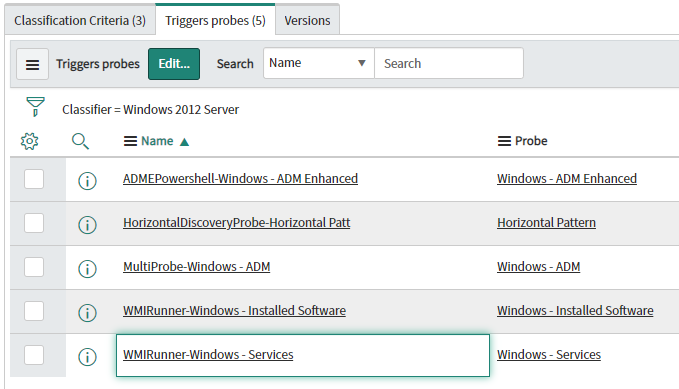
Add to the Windows CI Classification the Probe "WMIRunner-Windows - Services" in the "Triggers probes" related list as shown in the image below.
Go to: Discovery Definition > CI Classification > Windows and select the version of Windows you want to configure.

Windows Service Action
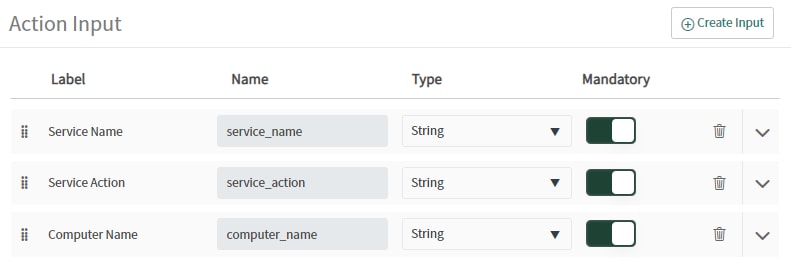
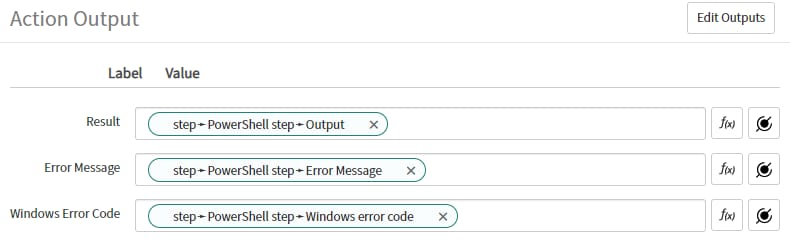
Using Flow Designer create a new custom Action with the following configuration.
Inputs:

PowerShell Step

Outputs:

PowerShell Script
<#
  This script is used to Start, Stop or Restart a Windows Service
  Developed by: Oscar Lopez
  oscar.lopez@ittroopers.com
  @oslovanet
#>

# Get current data/time stamp
function getDT()
{
	(Get-Date -Format "yyyy-MM-dd HH:mm:ss ")
}

# Checks if Service exists
function existService($ServiceName, $ComputerName) {
	Get-Service -Name $ServiceName -ComputerName $ComputerName -ErrorAction SilentlyContinue
}

# Gets the Service
function getService($ServiceName, $ComputerName) {
	Get-Service -Name $ServiceName -ComputerName $ComputerName
}

# Validates if Service exists and provides Service Status
function getServiceStatus ($ServiceName, $ComputerName) {
	if ( (existService $ServiceName $ComputerName) ) {
		$ServiceStatus = (getService $ServiceName $ComputerName).Status
		Write-Host (getDT) $ServiceName "-" $ServiceStatus
	} else {
		Write-Host (getDT) "$ServiceName not found"
	}
}

# returns true when Service is Running
function isServiceRunning($ServiceName, $ComputerName) {
	(getService $ServiceName $ComputerName).Status -eq 'Running'
}

#returns true when Service is Stopped
function isServiceStopped($ServiceName, $ComputerName) {
	(getService $ServiceName $ComputerName).Status -eq 'Stopped'
}

Write-Host (getDT) "Initiating $ServiceAction of the Service $ServiceName hosted by $ComputerName"

# Validates if Service Name exists
if (existService $ServiceName $ComputerName) {
	# STOP condition
	if ($ServiceAction -eq 'Stop') {
		if ( (isServiceRunning $ServiceName $ComputerName) ) {
			Write-Host (getDT) $ServiceName "is running, preparing to stop..."
			getService $ServiceName $ComputerName | Stop-Service -ErrorAction SilentlyContinue
			getServiceStatus $ServiceName $ComputerName
		} elseif ( (isServiceStopped $ServiceName $ComputerName) ) {
			Write-Host (getDT) $ServiceName "already stopped!"
		} else {
			Write-Host (getDT) $ServiceName "-" $ServiceStatus
		}
	}

	# START condition
	elseif ($ServiceAction -eq 'Start') {
		if ( (isServiceRunning $ServiceName $ComputerName) ) {
			Write-Host (getDT) $ServiceName "already running!"
		} elseif ( (isServiceStopped $ServiceName $ComputerName) ) {
			Write-Host (getDT) $ServiceName " is stopped, preparing to start..."
			getService $ServiceName $ComputerName | Start-Service -ErrorAction SilentlyContinue
			getServiceStatus $ServiceName $ComputerName
		} else {
			Write-Host (getDT) $ServiceName "-" $ServiceStatus
		}
	}

	# RESTART condition
	elseif ($ServiceAction -eq 'Restart')
	{
		if ( (isServiceRunning $ServiceName $ComputerName) ) {
			Write-Host (getDt) $ServiceName "is running, preparing to restart..."
			getService $ServiceName $ComputerName | Stop-Service -ErrorAction SilentlyContinue
			getServiceStatus $ServiceName $ComputerName
			getService $ServiceName $ComputerName | Start-Service -ErrorAction SilentlyContinue
			getServiceStatus $ServiceName $ComputerName
		} elseif ( (isServiceStopped $ServiceName $ComputerName) ) {
			Write-Host (getDT) $ServiceName "is stopped, preparing to start..."
			getService $ServiceName $ComputerName | Start-Service -ErrorAction SilentlyContinue
			getServiceStatus $ServiceName $ComputerName
		}
	}

	#Condition if action is anything other than stop, start, restart
	else
	{
		Write-Host (getDT) "Action parameter is missing or invalid!"
	}
}

#Condition if provided ServiceName is invalid
else
{
	Write-Host (getDT) "$ServiceName not found"
}
Leave your comments and mark helpful if you fin this article useful.
Enjoy!!!
@oslovanet
- 9,001 Views

- Mark as Read
- Mark as New
- Bookmark
- Permalink
- Report Inappropriate Content
Hello Oscar,
Great article. I am trying to test my action with the credential setup you showed and it fails. I tried a few others and it fails with the error below.
Basically, for my test I want the MID server to try and turn off / on one of it's unused services.
Any suggestions on how to setup the credential part to avoid the error?

- Mark as Read
- Mark as New
- Bookmark
- Permalink
- Report Inappropriate Content
Amazing article!
Yet I tried to follow, but I probably missed something as when I execute a test of the script I always end up with "service name not found".
However, if I type the Get-Service command on my MID Server or on the target computer, I always get a result.

Any idea where I might got something wrong?
- Mark as Read
- Mark as New
- Bookmark
- Permalink
- Report Inappropriate Content
Hi ,
Do I just need to pass one Service name "Spooler" ?
I am trying however it is not working -


- Mark as Read
- Mark as New
- Bookmark
- Permalink
- Report Inappropriate Content
Hi Nicolas,
Were you able to fix this ??
- Mark as Read
- Mark as New
- Bookmark
- Permalink
- Report Inappropriate Content
For those of you that are getting the error message: "service name not found", I had the same issue and had to work with ServiceNow and our infrastructure team to resolve it. The issue was that whenever the script ran on the remote host, it would only use the service account that the mid server is running on to execute the script, because that is not the account we wanted to use because it didn't have the privileges, it would give us the Service not found error. We modified the PowerShell script to create a remote PowerShell session (using the ‘New-PSSession’ cmdlet), and it’s that cmdlet for which we've used the ‘-Credential’ parameter to set a credential for the connection to the remote server since our other cmdlets that we need to use don’t support the ‘-Credential’ parameter. We're using an ‘Invoke-Command’ cmdlet, then, to execute our other cmdlets in the remote PowerShell session.
Here is the PS we used:
<#
  This script is used to Start, Stop or Restart a Windows Service
  Developed by: Oscar Lopez
  oscar.lopez@ittroopers.com
  @oslovanet
#>

### Input variables
# $cred, $ritm, $ComputerName, $ServiceName, $ServiceAction

Clear-Host
Start-Transcript C:\Log\Restart_Windows_Service\$ritm.txt

### Get current timestamp
Function getDT() {
  (Get-Date -Format "yyyy-MM-dd HH:mm:ss ")
}

### Checks if service exists
Function existService($ServiceName) {
  Invoke-Command -Session $Session -ArgumentList $ServiceName -ScriptBlock { Get-Service -Name $Args[0] -ErrorAction SilentlyContinue }
}

### Gets the service
Function getService($ServiceName) {
  Invoke-Command -Session $Session -ArgumentList $ServiceName -ScriptBlock { Get-Service -Name $Args[0] }
}

### Validates if service exists and provides service status
Function getServiceStatus ($ServiceName) {
  If ((existService $ServiceName)) {
    $ServiceStatus = (getService $ServiceName).Status
    Write-Host (getDT) "Service '$ServiceName' status = '$ServiceStatus'"
  }
  Else {
    Write-Host (getDT) "Service '$ServiceName' not found"
  }
}

### Returns 'true' when service is running
Function isServiceRunning($ServiceName) {
  (getService $ServiceName).Status -eq 'Running'
}

### Returns 'true' when service is stopped
Function isServiceStopped($ServiceName) {
  (getService $ServiceName).Status -eq 'Stopped'
}

Write-Host (getDT) "Initiating '$ServiceAction' of the service '$ServiceName' hosted by '$ComputerName'"

### Create PS session
$Session = New-PSSession -ComputerName $ComputerName -Credential $cred
Write-Host (getDT) "Created PS session '$Session'"

### Validates if service name exists
If (existService $ServiceName) {
  ## 'Stop' condition
  If ($ServiceAction -eq 'Stop') {
    If ((isServiceRunning $ServiceName)) {
      Write-Host (getDT) "Service '$ServiceName' is running, preparing to stop..."
      Invoke-Command -Session $Session -ArgumentList $ServiceName -ScriptBlock { Stop-Service -Name $Args[0] -ErrorAction SilentlyContinue }
      getServiceStatus $ServiceName
    }
    ElseIf ((isServiceStopped $ServiceName)) {
      Write-Host (getDT) "Service '$ServiceName' already stopped!"
    }
    Else {
      Write-Host (getDT) "Service '$ServiceName' status = '$ServiceStatus'"
    }
  }

  ## 'Start' condition
  ElseIf ($ServiceAction -eq 'Start') {
    If ((isServiceRunning $ServiceName)) {
      Write-Host (getDT) $ServiceName "already running!"
    }
    ElseIf ((isServiceStopped $ServiceName)) {
      Write-Host (getDT) "Service '$ServiceName' is stopped, preparing to start..."
      Invoke-Command -Session $Session -ArgumentList $ServiceName -ScriptBlock { Start-Service -Name $Args[0] -ErrorAction SilentlyContinue }
      getServiceStatus $ServiceName
    }
    Else {
      Write-Host (getDT) "Service '$ServiceName' status = '$ServiceStatus'"
    }
  }

  ## 'Restart' condition
  ElseIf ($ServiceAction -eq 'Restart')	{
    If ((isServiceRunning $ServiceName)) {
      Write-Host (getDt) "Service '$ServiceName' is running, preparing to restart..."
      Invoke-Command -Session $Session -ArgumentList $ServiceName -ScriptBlock { Stop-Service -Name $Args[0] -ErrorAction SilentlyContinue }
      getServiceStatus $ServiceName
      Invoke-Command -Session $Session -ArgumentList $ServiceName -ScriptBlock { Start-Service -Name $Args[0] -ErrorAction SilentlyContinue }
      getServiceStatus $ServiceName
    }
    ElseIf ((isServiceStopped $ServiceName)) {
      Write-Host (getDT) "Service '$ServiceName' is stopped, preparing to start..."
      Invoke-Command -Session $Session -ArgumentList $ServiceName -ScriptBlock { Start-Service -Name $Args[0] -ErrorAction SilentlyContinue }
      getServiceStatus $ServiceName
    }
  }

  ## Condition if action is anything other than 'Stop', 'Start', 'Restart'
  Else {
    Write-Host (getDT) "Service action parameter is missing or invalid!"
  }
}

### Condition if provided service Name is invalid
Else {
  Write-Host (getDT) "Service '$ServiceName' not found"
}

Write-Host "Closing PS session '$Session'"
Remove-PSSession $Session

Stop-Transcript
- Mark as Read
- Mark as New
- Bookmark
- Permalink
- Report Inappropriate Content
@chadhopkins Where did you store the values for $cred
- Mark as Read
- Mark as New
- Bookmark
- Permalink
- Report Inappropriate Content
Your detailed walkthrough on using IntegrationHub for Windows services is a lifesaver! Managing services remotely can be tricky, but your step-by-step guide demystifies the process. I'm about to buy windows 11 professional, and I hope this will help me to install it on my laptop. Thanks for making it accessible, even for those not well-versed in tech jargon. Your contribution to simplifying tech tasks is invaluable!