- Historial del artículo
- Suscribirse a un feed RSS
- Marcar como nuevo
- Marcar como leída
- Favorito
- Suscribir
- Página de impresión sencilla
- Informe de contenido inapropiado
08-10-2022 09:34 PM - editado 08-03-2024 10:22 AM
Articles, Blogs, Videos, Podcasts, Share projects - Experiences from the field
Hi there,
Some of you already know, and some of you might have missed it: With the introduction of the Next Experience UI, also a Dark Theme was introduced. Unfortunately though, after meeting the prerequisites you would find out that the Dark Theme is working for for example Workspaces, though that it did not apply to Core UI experiences, like good old forms and lists...
With the Tokyo release, eureka! Let's have a look.
Enabling Dark Theme
Assuming you are working on the Next Experience UI, to be able to select the Dark Theme you would need to update the value of System Property "glide.ui.polaris.dark_themes_enabled" and set it to "true". After refreshing your browser, when clicking on your User Profile icon and selecting Preferences, a "Theme" menu option would get visible under which you can select the Dark Theme. Selecting the Dark Theme would update the User Preference involved which actually holds which Theme you are using. After refreshing your browser again, the Dark Theme would be active.
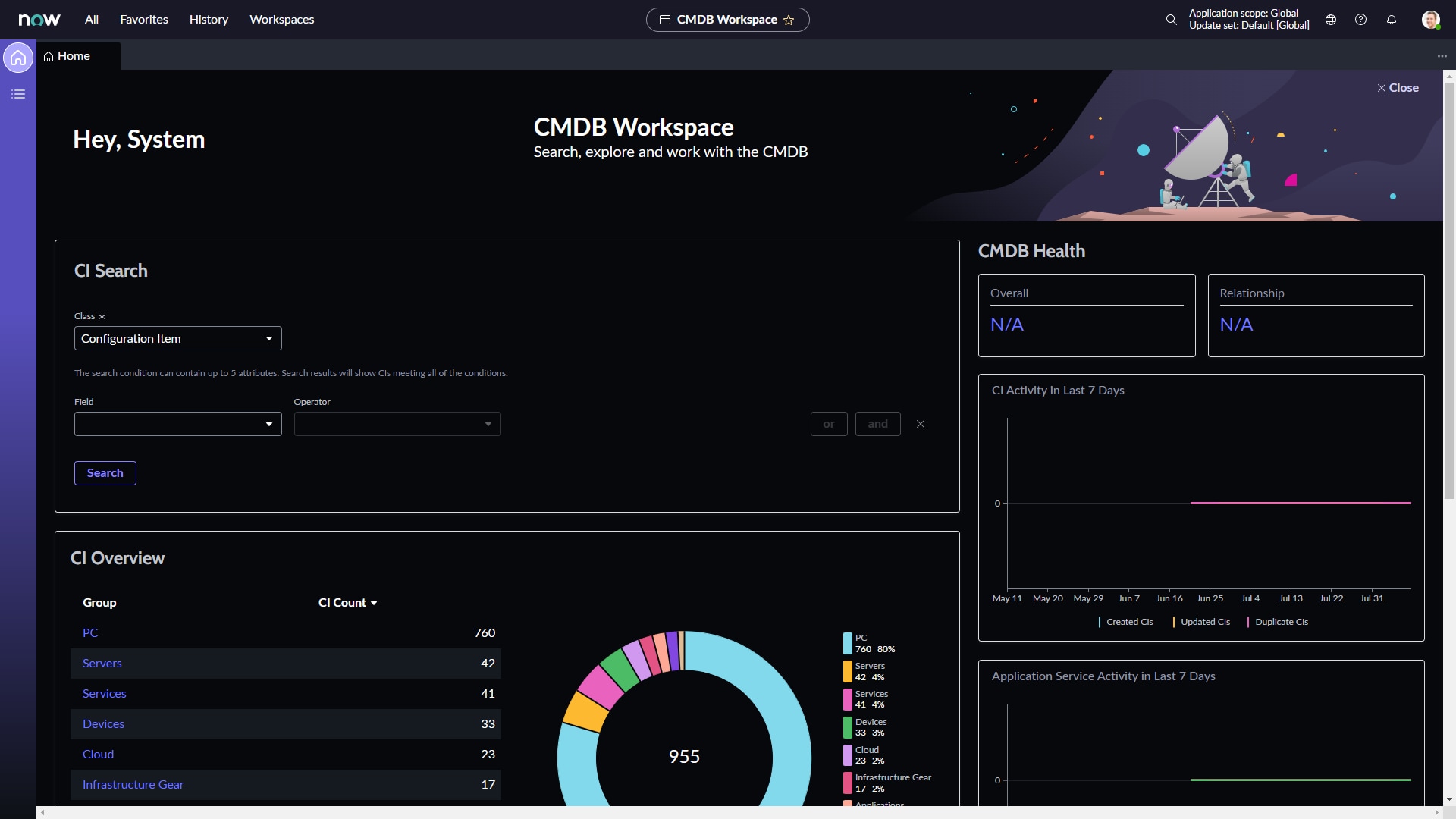
San Diego - Workspaces (Dark Theme working)
The Dark Theme on San Diego does apply to for example Workspaces. See the example below:

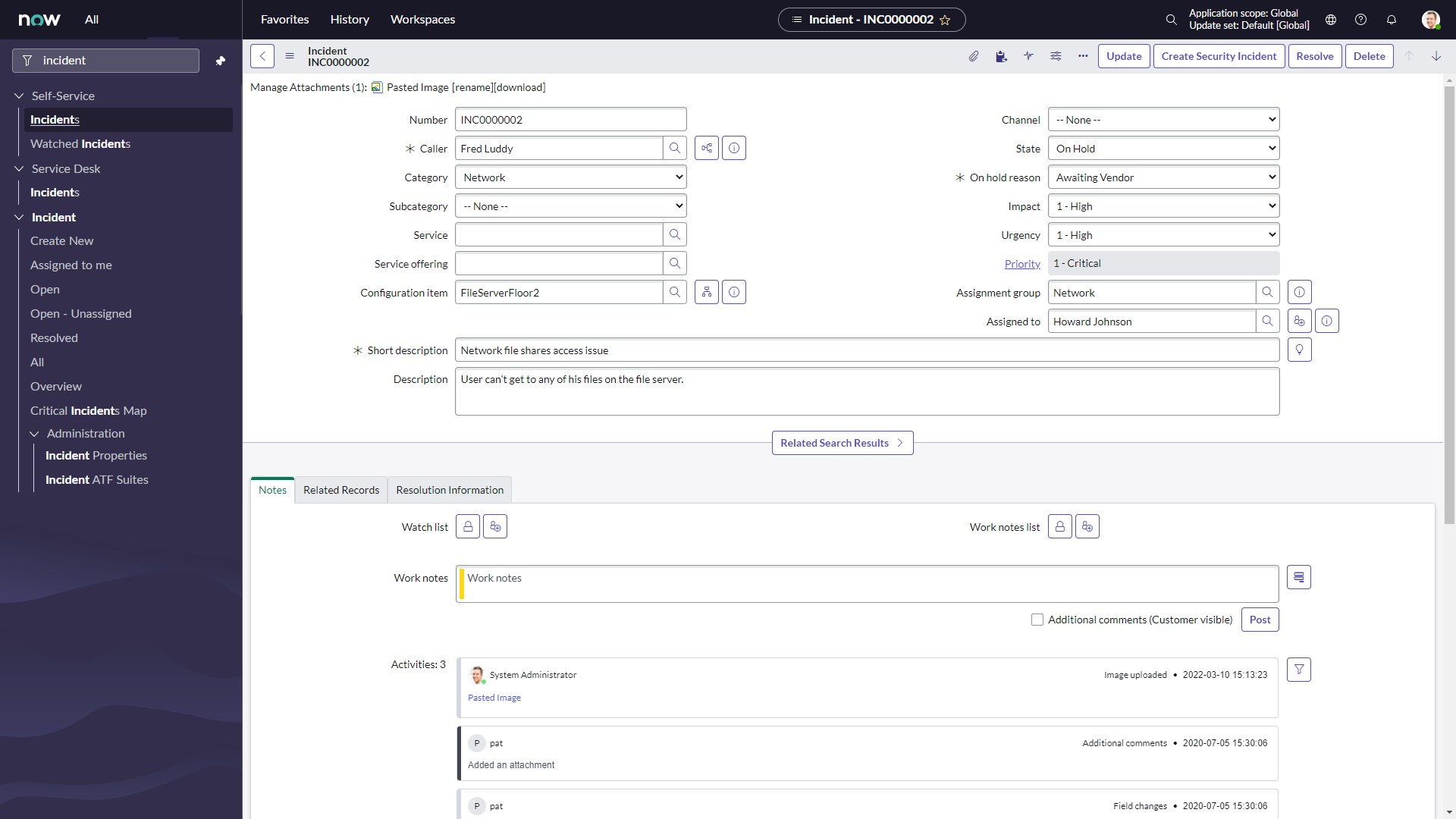
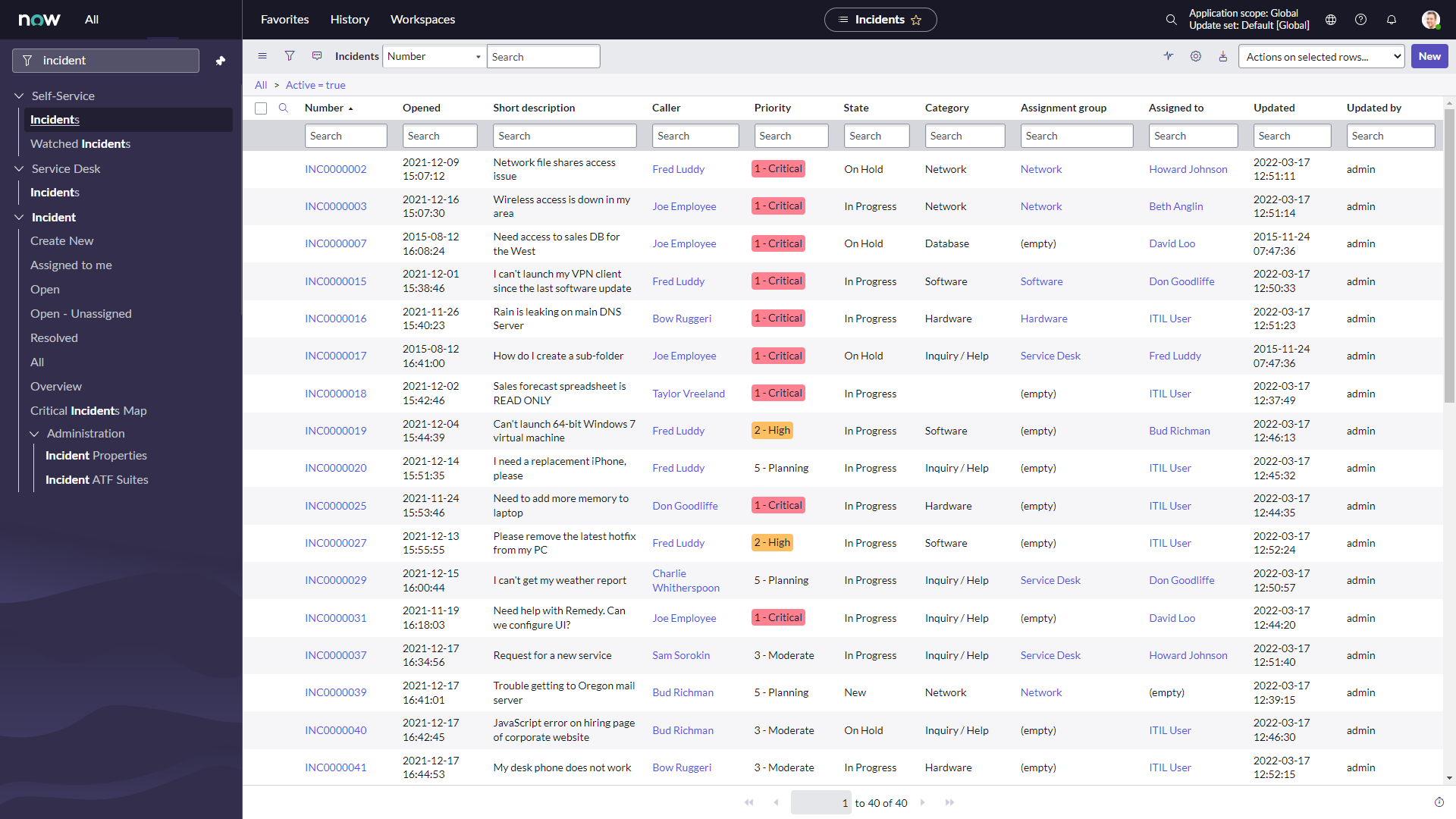
San Diego - Lists, Forms (Dark Theme not working)
The Dark Theme on San Diego did not apply to Core UI experiences. See the below examples:


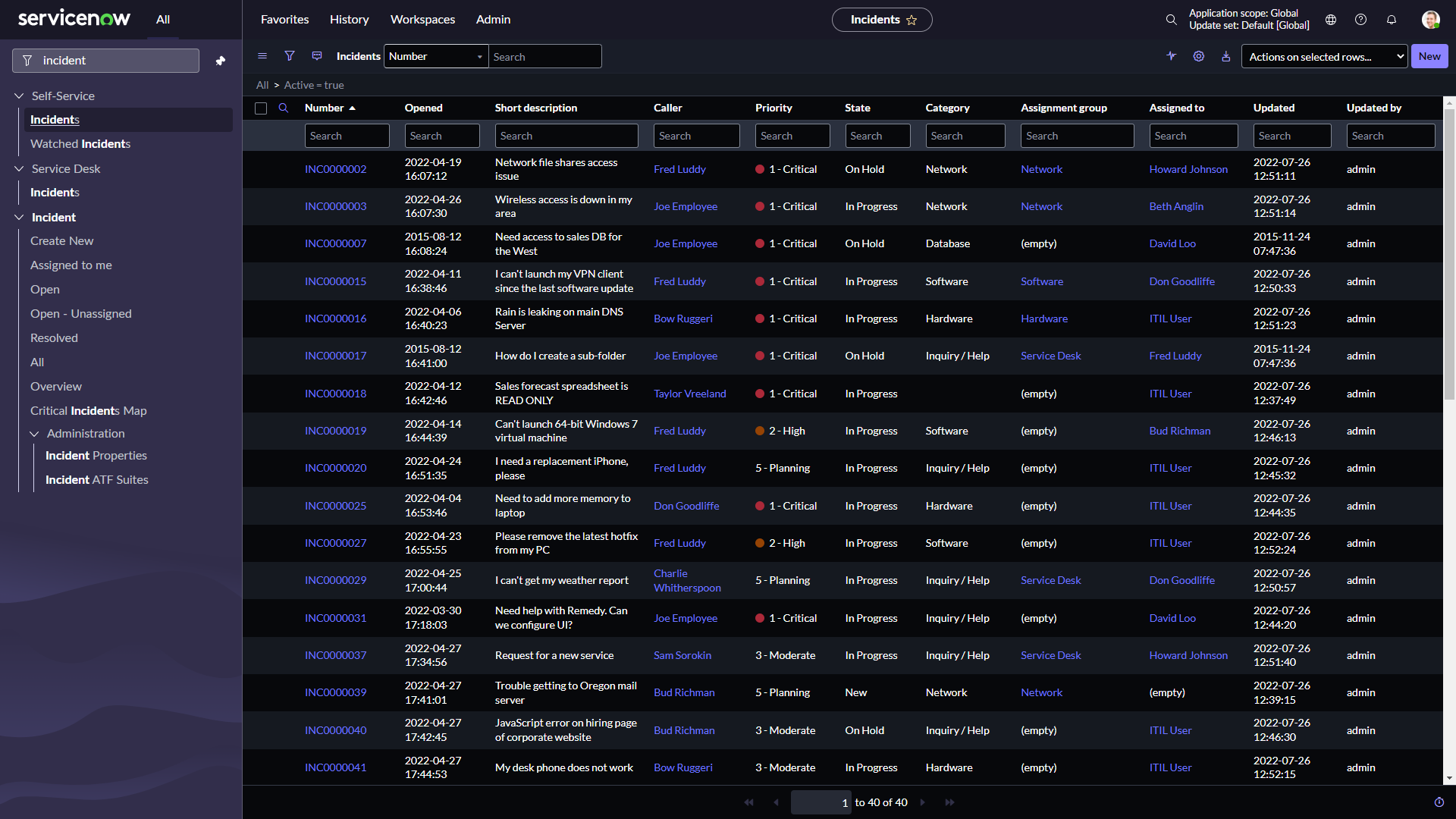
Tokyo - Lists, Forms (Dark Theme working)
With the Tokyo release, The Dark Theme does apply to Core UI experiences! The same examples as shown before, though now on a Tokyo instance:


---
Wow! Amazing to see the Dark Theme working like it is now with the Tokyo release.
And that's it. Hope you like it. If any questions or remarks, let me know!
| C |
If this content helped you, I would appreciate it if you hit bookmark or mark it as helpful.
Interested in more Articles, Blogs, Videos, Podcasts, Share projects I shared/participated in? |
Kind regards,
Mark Roethof
Independent ServiceNow Consultant
3x ServiceNow Developer MVP
3x ServiceNow Community MVP
---
- 37.849 Vistas

- Marcar como leída
- Marcar como nuevo
- Favorito
- Resaltar
- Imprimir
- Informe de contenido inapropiado
Finally! And now the last step: dashboards. I know you can set the background color, but I would expect the 'dark theme' to at least also do something with the reports/tabs/etc.

- Marcar como leída
- Marcar como nuevo
- Favorito
- Resaltar
- Imprimir
- Informe de contenido inapropiado
I was just about to make a HI-case on not seeing black background on list views in San Diego with dark theme enabled. Now I know why. Thanks for sharing!
Best regards
Thomas

- Marcar como leída
- Marcar como nuevo
- Favorito
- Resaltar
- Imprimir
- Informe de contenido inapropiado
We just upgraded to Tokyo Patch 1 and Dark Mode is not working on lists or forms. Dark mode is behaving just as it did in San Diego (as your screenshots above). Do we need to do anything to make dark mode work on Lists, Forms????
Thanks,
Mike


- Marcar como leída
- Marcar como nuevo
- Favorito
- Resaltar
- Imprimir
- Informe de contenido inapropiado
You may notice dark mode does not apply to some elements such as UI Pages, interceptors, etc. I don't have an extensive list to provide, but as an admin please verify your users are not impacted, or know what to expect before using dark mode on classic environment forms and lists.
There is a system property in Tokyo glide.ui.polaris.core_ui_exclude_dark_mode that can be set to false, if you want to show dark mode in classic environment to users when the dark theme variant is selected in Next Experience. If you want to use the dark variant in Next Experience workspaces, you can set glide.ui.polaris.core_ui_exclude_dark_mode to true, and still render classic environment in light theme.
- Marcar como leída
- Marcar como nuevo
- Favorito
- Resaltar
- Imprimir
- Informe de contenido inapropiado
Hey Ashley. We upgraded to Toyko Patch 1 and we have Next Experience along with Dark Mode enabled. When a user selects Dark Mode, all the Forms and Lists (for example Incident Form and Incident List - as in the screenshots in earlier post), still show up as white. Is there something we need to do to get those forms and lists to appear dark?
Thanks,
Mike
- Marcar como leída
- Marcar como nuevo
- Favorito
- Resaltar
- Imprimir
- Informe de contenido inapropiado
it doesn't work in my PDI either(Tokyo P1). incident list still has white background

- Marcar como leída
- Marcar como nuevo
- Favorito
- Resaltar
- Imprimir
- Informe de contenido inapropiado
Worked for me just with the property: glide.ui.polaris.core_ui_exclude_dark_mode setting it to false.

- Marcar como leída
- Marcar como nuevo
- Favorito
- Resaltar
- Imprimir
- Informe de contenido inapropiado
Unfortunately, dark mode isn't working in my lists. I wonder if it's because I our instances began like 10 years ago and have some legacy code....
- Marcar como leída
- Marcar como nuevo
- Favorito
- Resaltar
- Imprimir
- Informe de contenido inapropiado
@Rachael7 Do you have next experience enabled, and are on Tokyo and both properties set to:
glide.ui.polaris.dark_themes_enabled -true
glide.ui.polaris.core_ui_exclude_dark_mode - false
- Marcar como leída
- Marcar como nuevo
- Favorito
- Resaltar
- Imprimir
- Informe de contenido inapropiado
Yes to the first (and I can see the dark theme in all but lists). No to the second because it doesn't exist, and when I created it, it did nothing.
- Marcar como leída
- Marcar como nuevo
- Favorito
- Resaltar
- Imprimir
- Informe de contenido inapropiado
@Ashley Snyder @Rachael7 still the same for me in my PDI
glide.ui.polaris.dark_themes_enabled -true
glide.ui.polaris.core_ui_exclude_dark_mode - false (I created this)
but lists still on white background

- Marcar como leída
- Marcar como nuevo
- Favorito
- Resaltar
- Imprimir
- Informe de contenido inapropiado
It's working well on my instance, sharing the config below:

Cheers
- Marcar como leída
- Marcar como nuevo
- Favorito
- Resaltar
- Imprimir
- Informe de contenido inapropiado
List and forms are not working on my PDI which is Tokyo upgraded from San Diego.
I have tried creating the glide.ui.polaris.core_ui_exclude_dark_mode property as both a string and true/false data type and setting it to false in each case but without success.
Does anyone have any other ideas?

- Marcar como leída
- Marcar como nuevo
- Favorito
- Resaltar
- Imprimir
- Informe de contenido inapropiado
Hello Mark,
I have followed your instructions and I wanted to confirm that I was not able to see the Dark UI on my lists or record view either. I see some people are experiencing the same in the comments.
However, my coworker sees everything in dark view like lists/records.
Please let us know if there something we need to look into.

 Earl Duque
- Marcar como leída
- Marcar como nuevo
- Favorito
- Resaltar
- Imprimir
- Informe de contenido inapropiado
The properties that Ashley mentioned above worked for me, I had to perform a cache reset for it to take effect.
- In your filter navigator, type `cache.do` and then press enter
The Next Experience does a lot of caching to be more performant, the theme is part of that, so a cache reset fixes it.
- Marcar como leída
- Marcar como nuevo
- Favorito
- Resaltar
- Imprimir
- Informe de contenido inapropiado
Hi @Earl Duque , you are right. This worked for me too. Thank you.
- Marcar como leída
- Marcar como nuevo
- Favorito
- Resaltar
- Imprimir
- Informe de contenido inapropiado
I can see the dark theme, but in list view it whites-out the short description field unless you hover over it. I have a ticket into ServiceNow Support for it.
- Marcar como leída
- Marcar como nuevo
- Favorito
- Resaltar
- Imprimir
- Informe de contenido inapropiado
- Marcar como leída
- Marcar como nuevo
- Favorito
- Resaltar
- Imprimir
- Informe de contenido inapropiado
Thank you all! @Earl Duque your cache trick was the final fix. I did have to create the glide.ui.polaris.core_ui_exclude_dark_mode as a true/false in sys_properties.list but after clearing cache it worked
- Marcar como leída
- Marcar como nuevo
- Favorito
- Resaltar
- Imprimir
- Informe de contenido inapropiado
Thanks! This is great. Is there a way to enable dark mode on Studio as well?
- Marcar como leída
- Marcar como nuevo
- Favorito
- Resaltar
- Imprimir
- Informe de contenido inapropiado
Thanks all, I have re-looked at my sys_properties (my mistake I think 😊) and done a cache.do and lists now appear in dark mode. Thanks all
- Marcar como leída
- Marcar como nuevo
- Favorito
- Resaltar
- Imprimir
- Informe de contenido inapropiado
In some pages dark theme doesn't work, reports > view/page for example. Someone know how to do dark theme work in this page ?

- Marcar como leída
- Marcar como nuevo
- Favorito
- Resaltar
- Imprimir
- Informe de contenido inapropiado
If you set up both sys_properties as explained above AND you are still not seeing the dark mode on your lists do this trick:
- right click anywhere on the screen to get the menu shown below and select "inspect"
- then right click on the browser's refresh icon and select "empty cache and hard reload"
- you can close the screen on the right that was opened on step 1
- you should now get dark mode.


- Marcar como leída
- Marcar como nuevo
- Favorito
- Resaltar
- Imprimir
- Informe de contenido inapropiado
@Rachael7 I've got exactly the same "white line until hovering" issue : did you have a solutionto this problem ?
Thanks in advance !
- Marcar como leída
- Marcar como nuevo
- Favorito
- Resaltar
- Imprimir
- Informe de contenido inapropiado
Yes @Gilles Boutin, I had the short description set on a line below the rest of the columns (set years ago). I changed it so that the Short Description did not take its' own row by setting the system property glide.ui.list.detail_row to false.
- Marcar como leída
- Marcar como nuevo
- Favorito
- Resaltar
- Imprimir
- Informe de contenido inapropiado
Hi
Does anyone facing the same issue that emails in Activities become unreadable when Dark Mode is on?

| 
|
Thanks
Marc
- Marcar como leída
- Marcar como nuevo
- Favorito
- Resaltar
- Imprimir
- Informe de contenido inapropiado
I don't have dark mode working, and only see glide.ui.polaris.dark_themes_enabled which I have set to true but I don't see glide.ui.polaris.core_ui_exclude_dark_mode
Any ideas what to try next?
- Marcar como leída
- Marcar como nuevo
- Favorito
- Resaltar
- Imprimir
- Informe de contenido inapropiado
Create it if you don’t see it.
Many system properties are like this and don’t come “preloaded”.
- Marcar como leída
- Marcar como nuevo
- Favorito
- Resaltar
- Imprimir
- Informe de contenido inapropiado
After setting glide.ui.polaris.dark_themes_enabled to true and creating glide.ui.polaris.core_ui_exclude_dark_mode and setting it to false, the theme is working great.
The only issue we've found so far is the black email details on the dark background as seen in @MarcB1 's screenshot above.
Anyone find a fix for this yet? I tried creating my own dark theme (copied the JSON from the OOB dark theme) but I can't find the --now- property that would change the email text or even the background (to make it lighter) so I didn't get far.
Edit:
--now-color_background--primary can be used to change the background color. Setting it to something a bit lighter helps but it's still black text on a dark grey background and if you make the background too light, you start having trouble reading the light colored text everywhere else.
- Marcar como leída
- Marcar como nuevo
- Favorito
- Resaltar
- Imprimir
- Informe de contenido inapropiado
@Juan25
This is the answer I got today from Support:
The reported issue is a verified defect that was addressed in PRB(PRB1607006) and is targeted to fix in Tokyo Patch 5 (Awaiting Approvals) and Utah releases. Currently, this problem has no workaround.
- Marcar como leída
- Marcar como nuevo
- Favorito
- Resaltar
- Imprimir
- Informe de contenido inapropiado
@MarcB1 Thank you! I'm glad it is something that ServiceNow plans to fix. For now, I've created a new variant and found a happy medium to use for the background color to help with readability (though it still isn't great...).
- Marcar como leída
- Marcar como nuevo
- Favorito
- Resaltar
- Imprimir
- Informe de contenido inapropiado
Hello,
Did anybody applied dark theme on service portal ? Please let me know the steps for the same.
We have requirement to apply the themes on service portal based on user selection on clicking button.
- Marcar como leída
- Marcar como nuevo
- Favorito
- Resaltar
- Imprimir
- Informe de contenido inapropiado
Dark mode for Next Experience UI and Classic Environment does not extend to the Service Portal. Service Portal theming is defined separately from Next Experience and does not use the same CSS Variables that Next Experience themes use, so you would need to create your own dark mode theme for your Service Portal.
- Marcar como leída
- Marcar como nuevo
- Favorito
- Resaltar
- Imprimir
- Informe de contenido inapropiado
One issue I see in dark. If you have short description set to be your second line in your list then you can not see it unless you hover over that particular line, then the white background goes away and you can see the white text.

- Marcar como leída
- Marcar como nuevo
- Favorito
- Resaltar
- Imprimir
- Informe de contenido inapropiado
Get Dark theme core components working in Utah
Polaris, Next Experience, Dark mode.
Set this property to true if you have this defined to get rid of the picture below empty lists:
glide.ui.polarisberg => true
Somehow when you set this property to false all Core components are no longer Dark mode but look like UI16..
Tested with Utah patch 4 and patch 7.

- Marcar como leída
- Marcar como nuevo
- Favorito
- Resaltar
- Imprimir
- Informe de contenido inapropiado
Hi guys,
we have Dark Mode working, however we have issues with our Dashboards - e.g Single Score widgets with black numbers. Does anyone else recognize this?

- Marcar como leída
- Marcar como nuevo
- Favorito
- Resaltar
- Imprimir
- Informe de contenido inapropiado
Yes, we have this issue as well. At the moment I am telling our users to work around it by changing the number colour. A mid grey works well. But it would be preferable for SN to change it automatically as it does for other types of chart.
- Marcar como leída
- Marcar como nuevo
- Favorito
- Resaltar
- Imprimir
- Informe de contenido inapropiado
As a follow up to my above post, I created a HI case and received the following response:
== This issue has been identified via PRB1657330 ...
... We are happy to report that the PRB is marked as fixed and the fix will be available in the Washington DC release. ...

- Marcar como leída
- Marcar como nuevo
- Favorito
- Resaltar
- Imprimir
- Informe de contenido inapropiado
@Mark Roethof there happens to be a field named 'Dark Theme' starting Utah on sp_portal table. Seems like a plan for future release for portal themes. Do you have any idea on it? Looking for documentations but it seems a gray area still.