- Post History
- Subscribe to RSS Feed
- Mark as New
- Mark as Read
- Bookmark
- Subscribe
- Printer Friendly Page
- Report Inappropriate Content
on 11-05-2019 07:08 PM
There may be another way around this problem, but I had considerable grief trying to set up survey assessments for specific records in the contracts module. After trawling through the docs and trying to manually generate assessments and manually send, I still couldn't get the damn thing to work and kept getting the "noquestions" error, so I came up with a script that ensures surveys/assessments are sent.
Step 1: Set up your survey or assessment metric type as normal
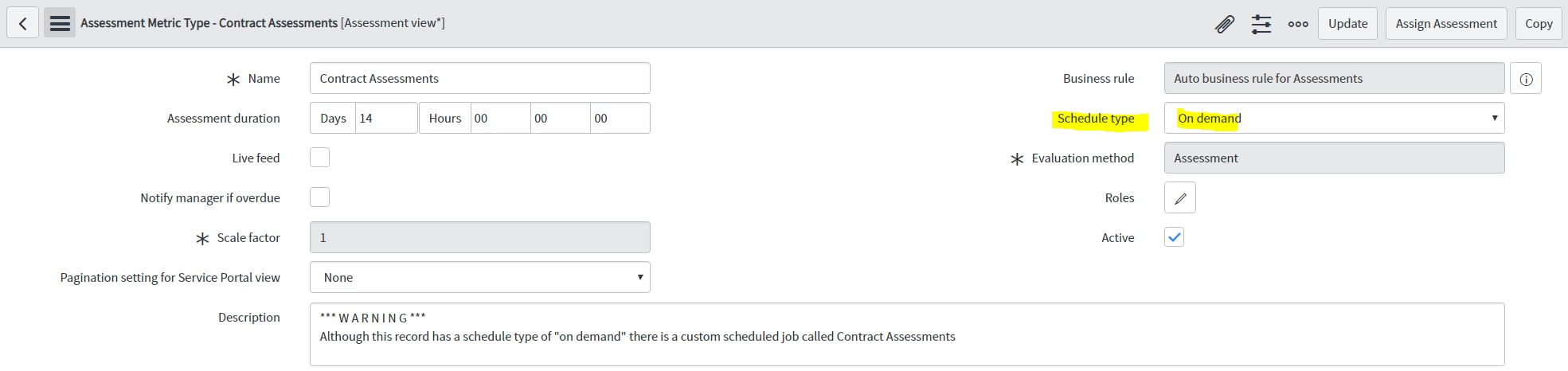
Make sure you have your questions, etc in the related list for Metric Categories but don't schedule the survey. Leave it set to on demand and we'll set up our own scheduled job.

Step 2: Run a scheduled job to cycle through your accessible records
Strictly speaking, this shouldn't be necessary, but nothing was sending overnight so I wrote this to make sure all the component parts were in play.
var whichAssessment = '2349ed57dbbc4c103ea3cd0514961909';//<<<--- update with the sys_id of your assessment metric type
var thisAssessment  = new GlideRecord('asmt_metric_type');
if(thisAssessment.get(whichAssessment)){

	////////////////////////////////////////////////////////////////////////
	//create the assessible records
	(new SNC.AssessmentCreation()).createAssessableRecords(thisAssessment);

	////////////////////////////////////////////////////////////////////////
	//check to make sure they have questions attached
	var categories = [];
	var getCategories = new GlideRecord('asmt_metric_category');
	getCategories.addEncodedQuery('metric_type.sys_id=' + whichAssessment );
	getCategories.query();
	while(getCategories.next()){
		categories.push(getCategories.sys_id.toString());
	}

	//To avoid the noquestions error, look at all the assessible records and make sure questions are attached
	var checkAssessableRecords = new GlideRecord('asmt_assessable_record');
	checkAssessableRecords.addEncodedQuery('metric_type.sys_id=' + whichAssessment);
	checkAssessableRecords.query();
	while(checkAssessableRecords.next()){

		var assessibleCategories = new GlideRecord('asmt_m2m_category_assessment');
		if(!assessibleCategories.get('assessment_record.sys_id',checkAssessableRecords.sys_id)){
			categories.forEach(function(assessCategory){
				var newAssessCategory = new GlideRecord('asmt_m2m_category_assessment');
				newAssessCategory.initalize();
				newAssessCategory.assessment_record = checkAssessableRecords.sys_id;
				newAssessCategory.category = assessCategory;
				newAssessCategory.insert();
			});
		}
	}

	////////////////////////////////////////////////////////////////////////
	//create and send the assessments
	var thisRecord = new GlideRecord(thisAssessment.table);
	thisRecord.addEncodedQuery(thisAssessment.condition);
	thisRecord.query();

	while(thisRecord.next()){
		(new SNC.AssessmentCreation()).createAssessments(whichAssessment, thisRecord.sys_id.toString(), thisRecord.contract_administrator.sys_id.toString());
	}
}
You can find the documentation for AssessmentCreation and functions such as createAssessments and createAssessibleRecords on the ServiceNow Developer API
Have fun
- 5,680 Views

- Mark as Read
- Mark as New
- Bookmark
- Permalink
- Report Inappropriate Content
I've been through this same issue before and looking at your code I see you had the same issue that I saw, the Metric Categories weren't attached to the Assessment.
I can't explain why it is built this way, but you MUST have a filter on your Metric Category for it to attach to the Assessment. This can be the same criteria as the Assessment itself. It makes no sense, but without it it will not generate.
An example here is for a Performance Review.

- Mark as Read
- Mark as New
- Bookmark
- Permalink
- Report Inappropriate Content
What version of ServiceNow are you on? After looking at this, I think it's something that's resolved in New York.
- Mark as Read
- Mark as New
- Bookmark
- Permalink
- Report Inappropriate Content
- Mark as Read
- Mark as New
- Bookmark
- Permalink
- Report Inappropriate Content
It's definitely like that in New York, and it's still mentioned in the docs pages for Orlando:
I was tearing my hair out yesterday trying to work out why it wasn't generating assessment instances after changing my metric types from being On Demand to Scheduled. Luckily managed to find that information buried in the docs pages.
SN suggest setting the condition to "Sys ID is not empty" which is much easier than copying the metric type condition down to all the categories. And it worked for me, thank goodness.
Can't understand why it should work like this. Everywhere else in ServiceNow, "no condition" matches all records. This is the only place I've seen where "no condition" matches no records. Must be such an easy thing for ServiceNow to fix.
Also, as it's clearly so critical to have a condition on each category, why doesn't the system either default it to e.g. "Sys ID is not empty", or put a conspicuous message on the Metric Category form to advise that a condition must be entered, or display a warning if you save a metric category record with an empty Condition. Very odd!
Glad to see I'm not the only person finding Assessments a bit of a challenge :-).
Regards
Michael
- Mark as Read
- Mark as New
- Bookmark
- Permalink
- Report Inappropriate Content
Thanks so much for this, Peter. Really helped me out!
I wanted to have scheduled assessments being generated, but one per user per assessable record. Whereas for scheduled assessments, I found that ServiceNow does one single assessment instance per user, covering all the assessable records for that user.
So needed to call .createAssessments(), passing in not just the metric type, but also the source record sys_id and the assignee user sys_id. However createAssessments() won't let you do that with a scheduled metric type. So had to change it to be "On demand" and write my own scheduled job to do the same sort of thing as you've presented. So it was super helpful having your code to work from. Many thanks!
- Mark as Read
- Mark as New
- Bookmark
- Permalink
- Report Inappropriate Content
Oh, that's a nice tip... thanks...
I'd got this working, but only by ensuring the Metric Conditions had the same condition as the Metric Type. Why the condition has to be in both places seems a little bizarre, but once that was in place, it worked fine.
- Mark as Read
- Mark as New
- Bookmark
- Permalink
- Report Inappropriate Content
Hi Peter,
I need ur help on custom assessment which created via workflow run script activity.
Please help me...
Regards,
Narayan
- Mark as Read
- Mark as New
- Bookmark
- Permalink
- Report Inappropriate Content
thanks a lot, that helped a lot 🙂
SN suggest setting the condition to "Sys ID is not empty" which is much easier than copying the metric type condition down to all the categories. And it worked for me, thank goodness.
- Mark as Read
- Mark as New
- Bookmark
- Permalink
- Report Inappropriate Content
@krr you are right.
If the Assessment Category filter is empty, the "Evaluate filters" BR [sys_id=4c021c56d7b00100fceaa6859e6103f7] does not create records in the "asmt_m2m_category_assessment" once a record in the "asmt_assessable_record" table is created.
The issue is also described here: https://support.servicenow.com/kb?id=kb_article_view&sysparm_article=KB0752930