getValue on Integer, true false, and other non String in Scopped applications

- Mark as New
- Bookmark
- Subscribe
- Mute
- Subscribe to RSS Feed
- Permalink
- Report Inappropriate Content
03-01-2017 05:11 PM
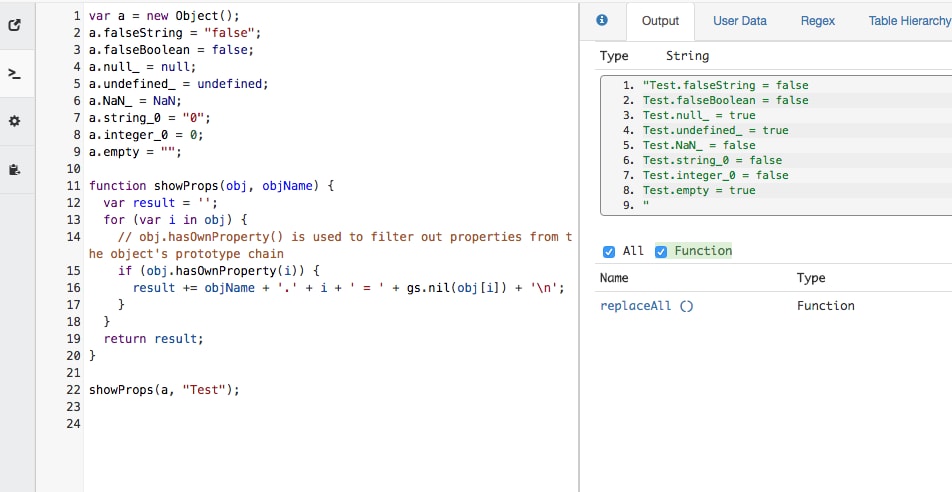
I am on a quest for consistency in my code. First off I work exclusively in scoped apps so I cannot use things like JSUtils as they are not available in a scoped application. You also cannot use .nil() in scopped applications either.
Here is my goal: I want to find a consistent way of getting values while avoiding pointer conflicts especially in loops but keep the proper variable type.
I am all about setters and getters but my problem is that GlideRecord.getValue() ALWAYS returns a string. So if I want to get the value of true/false field and then use that value in an expression for example I cannot
I want to be able to use the "falsey" and "truthy" principles of javascript. See this if you don't know what I am talking about Truthy and Falsy Values in JavaScript - A Drip of JavaScript
EMPTY Field examples
if(GlideRecord.getValue("fieldName")){//this will ALWAYS be true since get Value returns a string, even if its empty it returns a string of "null"
//do something
}
But in order for that to actually work I need to do
if(GlideRecord.fieldName){//this does work as it returns an Integer of 0 which is false .
//do something
}
TRUE FALSE Fields
var bool1 = GlideRecordObject.trueFalseField; //this will return a BOOLEAN value
var bool2 = GlideRecordObject.getValue("trueFalseField");//this will return a STRING, which means I cannot do Boolean("0") as this will evaluate to true.
var bool3 = GlideRecordObject.getDisplayValue("trueFalseField"); // returns a STRING of "true" or "false" which means I also cannot use Boolean("false")
//as any String is considered truthy and will return true
Dot walking though has the potential for pointer conflicts especially in loops I know for reference fields but I am not sure if they do for non reference fields.
So....what is the answer? As far as I can tell I only have 3 options
1. Use exact comparison with == against another string and always use getValue() which means I cannot use "truthy" and "falsey" in my logic
2. Dot walk so I can use "truthy" and "falsey" and risk pointer conflicts.
3. Create my own library that extends GlideRecord so I have all the functions and then make my own version of get value that return the proper type as far as "falsey" and "truthy" go.
Thoughts? I don't like the idea of a mixed bag of dot walking and getters and setters.
- 18,157 Views

- Mark as New
- Bookmark
- Subscribe
- Mute
- Subscribe to RSS Feed
- Permalink
- Report Inappropriate Content
03-01-2017 05:25 PM
Hi corbett,
Scoped GlideSystem has gs.nil function
http://wiki.servicenow.com/index.php?title=Scoped_GlideSystem_API_Reference#gsc.tab=0
- Mark as New
- Bookmark
- Subscribe
- Mute
- Subscribe to RSS Feed
- Permalink
- Report Inappropriate Content
03-01-2017 06:19 PM

- Mark as New
- Bookmark
- Subscribe
- Mute
- Subscribe to RSS Feed
- Permalink
- Report Inappropriate Content
03-01-2017 06:22 PM
it means can only use it to test an empty field. So that is helpful but still does not fully answer my question.
- Mark as New
- Bookmark
- Subscribe
- Mute
- Subscribe to RSS Feed
- Permalink
- Report Inappropriate Content
02-07-2020 05:31 AM
TL;DR:
if (<GlideRecord>.<TrueFalseField>) {
  // this works as you'd expect, even though you are technically using if on a GlideElement
}

var boolValue = !!<GlideRecord>.<TrueFalseField>; // cast to boolean
Long Version:
Even though this is a pretty old thread, I decided to answer it because its one of top google results for "ServiceNow GlideRecord Boolean". Because of this I wanted to give a few remarks the the statements made from OP:
"GlideRecord.getValue() ALWAYS returns a string."
This is not entirely correct. If no value is set for a certain field in a row that is represented by a GlideRecord, getValue("field") will return null (by the way: typeof null === "object").
var bool1 = GlideRecordObject.trueFalseField; //this will return a BOOLEAN value

var bool2 = GlideRecordObject.getValue("trueFalseField");//this will return a STRING, which means I cannot do Boolean("0") as this will evaluate to true.

var bool3 = GlideRecordObject.getDisplayValue("trueFalseField"); // returns a STRING of "true" or "false" which means I also cannot use Boolean("false")

//as any String is considered truthy and will return true
bool1 is NOT a Boolean! It is a GlideElement (typeof bool1 === "object" && bool1 instanceof GlideElement).
The last comment is also incorrect. A empty String evaluates to false.
My advice for working with True/False-Fields in scripts is probably best described by the following code example:
function isActive(taskSysId) {
  var gr = new GlideRecord("task");
  if (gr.get(taskSysId)) {
    return !!gr.active; // !! is idempotent
  }

  return false;
}

function getMessageIfActive(taskSysId, msg) {
  var gr = new GlideRecord("task");
  if (gr.get(taskSysId) && gr.active) {
    return msg;
  }

  return "";
}

function getTaskWithActiveValue(active) {
  var gr = new GlideRecord("task");
  gr.addQuery("active", active);
  gr.setLimit(1);
  gr.query();
  gr.next();
  return gr.getValue("sys_id") || "";
}

var inactiveTaskSysId = getTaskWithActiveValue(false);
gs.info("using task with active=false");
gs.info("if (gr.active): " + getMessageIfActive(inactiveTaskSysId, "hello world from inactive task"));
gs.info("!!gr.active: " + isActive(inactiveTaskSysId));

gs.info("");

var activeTaskSysId = getTaskWithActiveValue(true);
gs.info("using task with active=true");
gs.info("if (gr.active): " + getMessageIfActive(activeTaskSysId, "hello world from active task"));
gs.info("!!gr.active: " + isActive(activeTaskSysId));
The output for the code example is:
using task with active=false
if (gr.active):
!!gr.active: false

using task with active=true
if (gr.active): hello world from active task
!!gr.active: true