
- Mark as New
- Bookmark
- Subscribe
- Mute
- Subscribe to RSS Feed
- Permalink
- Report Inappropriate Content
01-08-2026 07:35 AM
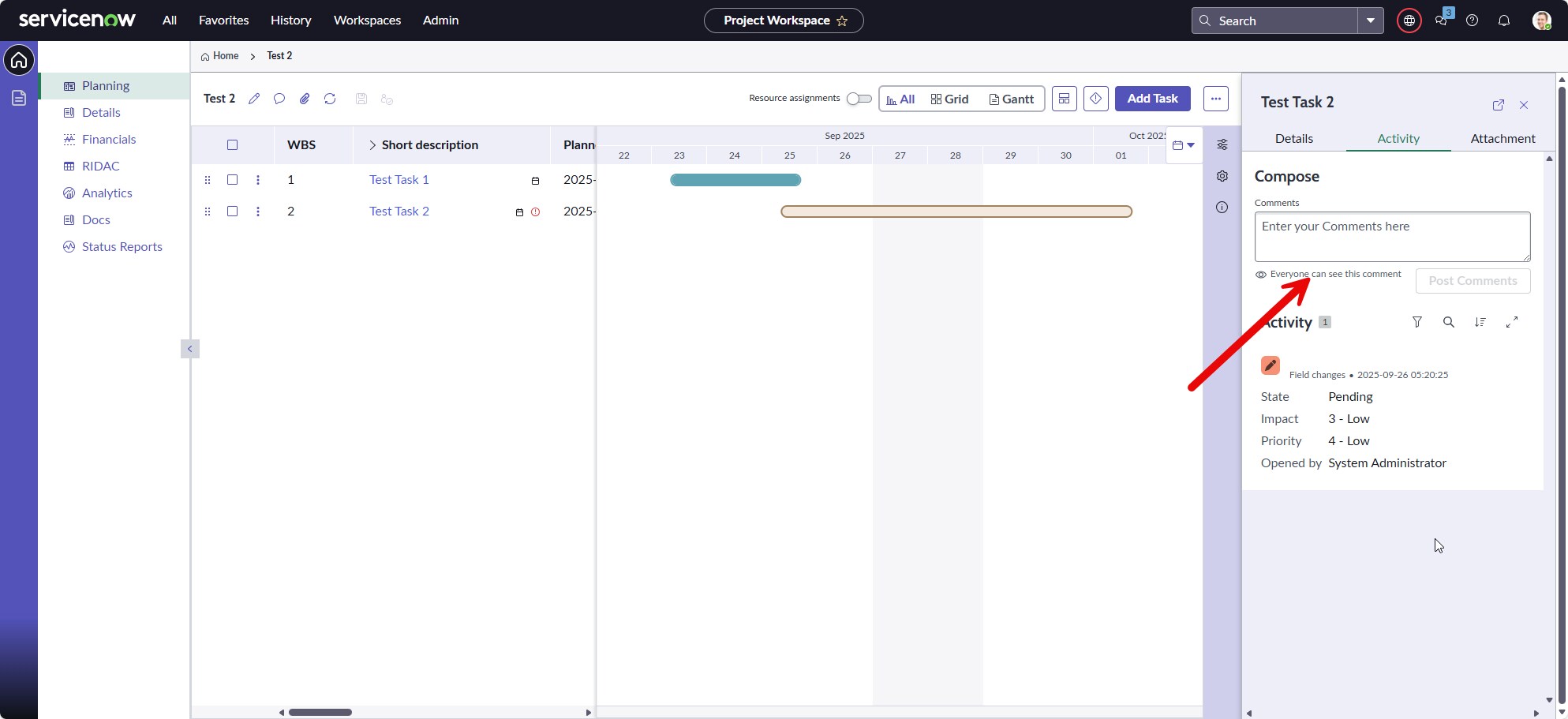
I'm looking for a way to add the Work Notes field to the new Project Workspace preview pane. Is this something that is configurable or is it something that would have to be done programmatically? Any recommendations on how to do this?
Please see the attachment for a better reference.
Thank you.
Solved! Go to Solution.
- Mark as New
- Bookmark
- Subscribe
- Mute
- Subscribe to RSS Feed
- Permalink
- Report Inappropriate Content
2 weeks ago - last edited 2 weeks ago
Hello @Raymond Coates,
1. Access the Page in UI Builder: Open the default project task page directly by navigating to the following URL (replace instance-name with your actual instance name):

2. Navigate to the Component: Select the Activity tab within the workspace layout.

3. Select the Component: Click on Activity Stream Compose 1 to open its properties.

4. Locate Data Configurations: In the configuration panel on the right, navigate to the Config tab, under Data, and locate the Fields Definition.

5. Modify Fields Definition: Click Edit and add the required property as demonstrated in the screenshot below.

6. Verify the Layout: Save your changes. The Work Notes field will now be visible and properly aligned with the Stacked View toggle in the new Project Workspace preview pane.

💡If my response helped, please mark it as helpful and correct 👍


- Mark as New
- Bookmark
- Subscribe
- Mute
- Subscribe to RSS Feed
- Permalink
- Report Inappropriate Content
01-09-2026 07:28 AM
comments already there, why you require work_notes?
💡 If my response helped, please mark it as correct ✅ and close the thread 🔒— this helps future readers find the solution faster! 🙏
- Mark as New
- Bookmark
- Subscribe
- Mute
- Subscribe to RSS Feed
- Permalink
- Report Inappropriate Content
01-09-2026 07:43 AM
My understanding is that Work notes are private versus the Comments that are visible to everyone. Much like the paradigm for Incidents and RITMs/Catalog Tasks. The team working on the project tasks would like to be able to have the Work notes be where they keep all of their day-to-day notes rather than the Comments.
The team enjoys working within the new Project Workspace and often doesn't want to open the full view of a project task. It will help them work more efficiently.
That said, perhaps there is reasoning I'm missing for only having the Comments visible in that view.
- Mark as New
- Bookmark
- Subscribe
- Mute
- Subscribe to RSS Feed
- Permalink
- Report Inappropriate Content
01-09-2026 07:33 AM
Steps
-> go to pm_project_task table record
-> check form layout
-> see which view is rendering the fields
-> try adding work notes here
💡 If my response helped, please mark it as correct ✅ and close the thread 🔒— this helps future readers find the solution faster! 🙏
- Mark as New
- Bookmark
- Subscribe
- Mute
- Subscribe to RSS Feed
- Permalink
- Report Inappropriate Content
01-09-2026 07:51 AM
The Workspace Preview view is the one that managed the layout of the Details section in that preview pane. However, the Activity tab is the one that I wish to edit and I'm not sure yet on how to get there.
