- Mark as New
- Bookmark
- Subscribe
- Mute
- Subscribe to RSS Feed
- Permalink
- Report Inappropriate Content
05-27-2020 07:35 AM - edited 01-08-2025 02:14 PM
We have a requirement to allow all users to recall their own timesheets from timesheet portal after Approved/Processed. Servicenow baseline is to only allow timecard_approver and timecard_admin role to recall timesheets. I found the script include 'TimeCardUIActionHelper' and updated the canRecall function section to replace the role 'timecard_approver' with 'timecard_user'. And that did not do the trick. I'm guessing there is something I need to do on portal side too. I'm also concerned I may be heading down a dangerous path. Don't love the idea of modifying this script inlcude. Any suggestions on how I can handle? Hopefully I'm just overlooking something.
Solved! Go to Solution.
- Labels:
-
Time Card Management


- Mark as New
- Bookmark
- Subscribe
- Mute
- Subscribe to RSS Feed
- Permalink
- Report Inappropriate Content
05-27-2020 06:42 PM
Hello Greg,
In this case, you will have to modify the SI to grant the "timecard_user" to recall a time card. You will need to modify this SI - TimeCardUIActionHelper
I add this line of code an i got it to work on the portal
(gs.hasRole('timecard_approver')||gs.hasRole('timecard_user'));// added the timecar_user

BEFORE the SI mod -

AFTER the SI mod -

It's not that big of a modification. I would leave a comment to know it was changed for future references.
I hope that helps!!
PS I also add the line of code to the 'TimeSheetUIActionHelper' SI and it worked as well. You can see the Red button in the picture for the timesheet recall.

- Mark as New
- Bookmark
- Subscribe
- Mute
- Subscribe to RSS Feed
- Permalink
- Report Inappropriate Content
05-27-2020 10:42 AM
Hello GregF,
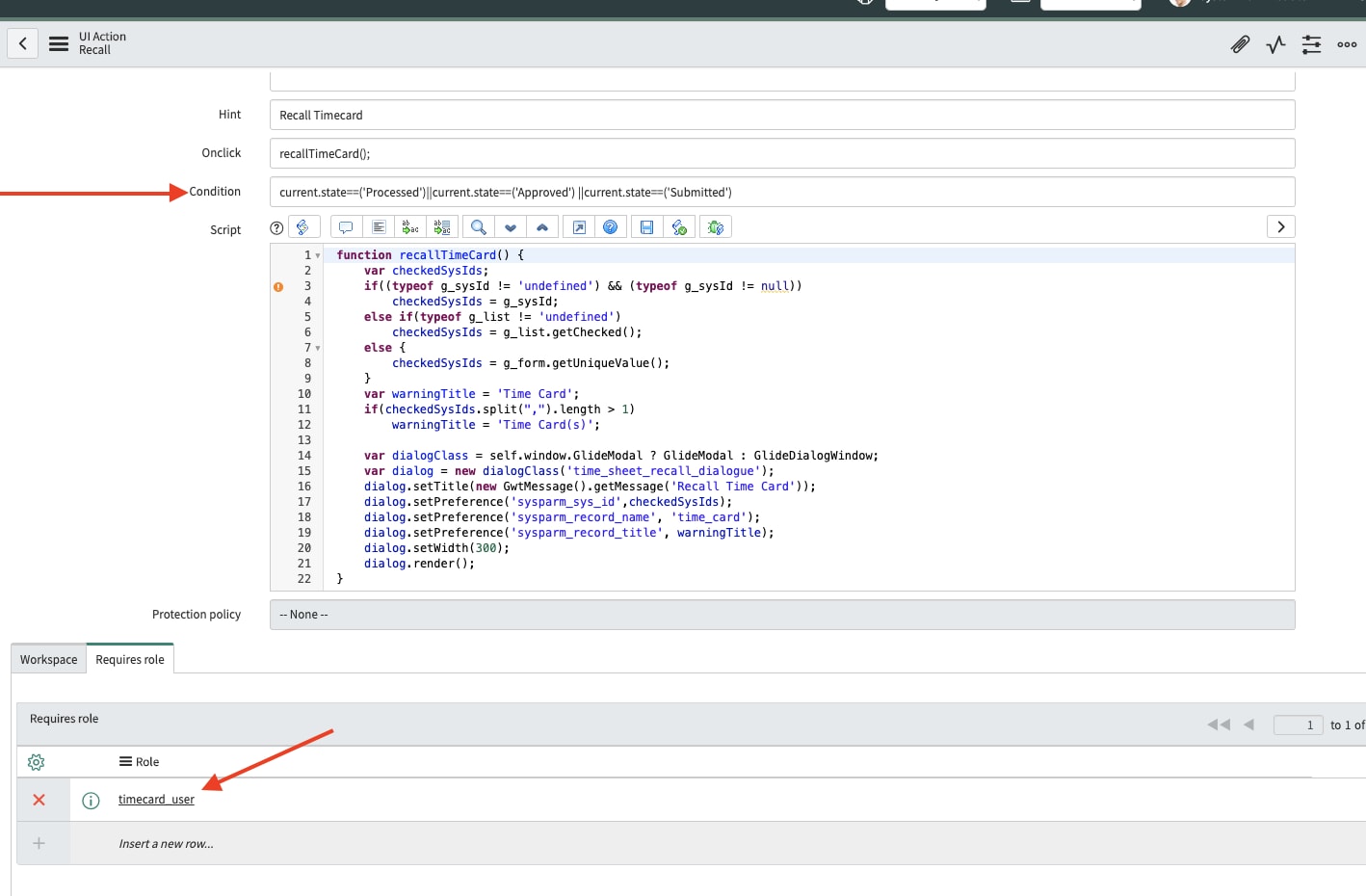
You are correct... I won't modify that Script include. Now, look at how that UI action is using that SI... it's using it as a condition in the UI action. Just remove the condition and add your own condition. Something like this -
"current.state==('Processed')||current.state==('Approved')||current.state('Submitted') *(those are the state values from the script include)
and set the role to "timecard_user" in the role condition section.
*Whatever the value of the state is put int he current state.

I removed the OOTB condition and I got the recall button to show up with the setting I mentioned above-
- Mark as New
- Bookmark
- Subscribe
- Mute
- Subscribe to RSS Feed
- Permalink
- Report Inappropriate Content
05-27-2020 04:16 PM
Thanks Miguel. This works in the application, but not in the portal. The Time Sheet Portal has a container that has a server script that calls the canRecall Function from that script include. I think my options are either modify the script in the portal, or in the script include. Neither ideal, unless you have any other ideas.

- Mark as New
- Bookmark
- Subscribe
- Mute
- Subscribe to RSS Feed
- Permalink
- Report Inappropriate Content
05-27-2020 06:42 PM
Hello Greg,
In this case, you will have to modify the SI to grant the "timecard_user" to recall a time card. You will need to modify this SI - TimeCardUIActionHelper
I add this line of code an i got it to work on the portal
(gs.hasRole('timecard_approver')||gs.hasRole('timecard_user'));// added the timecar_user
BEFORE the SI mod -
AFTER the SI mod -
It's not that big of a modification. I would leave a comment to know it was changed for future references.
I hope that helps!!
PS I also add the line of code to the 'TimeSheetUIActionHelper' SI and it worked as well. You can see the Red button in the picture for the timesheet recall.
- Mark as New
- Bookmark
- Subscribe
- Mute
- Subscribe to RSS Feed
- Permalink
- Report Inappropriate Content
05-29-2020 08:35 AM
Thanks Miguel! This is close to what I ended up doing. Instead of adding the "or" statement I just replaced timecard_approver with timecard_user, since timecard_user is already contained within timecard_approver.