- Mark as New
- Bookmark
- Subscribe
- Mute
- Subscribe to RSS Feed
- Permalink
- Report Inappropriate Content
11-29-2025 08:15 AM
Hi All,
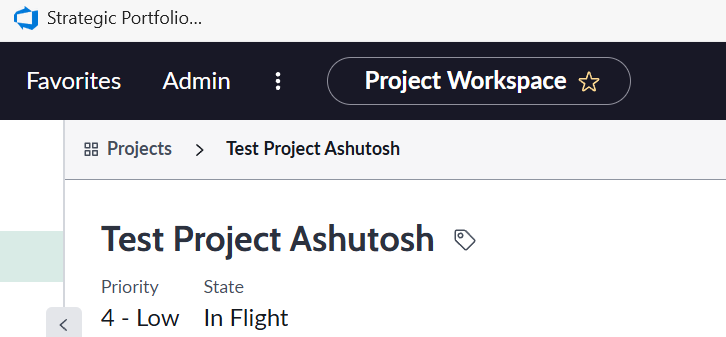
I am looking to hide the "Priority" file that is just shown below the project name at the top in Details tab of project workspace. I am not able to find that in Workspace Form Header Configuration.
I am attaching the screenshot also.
Please help me on this.
Solved! Go to Solution.

- Mark as New
- Bookmark
- Subscribe
- Mute
- Subscribe to RSS Feed
- Permalink
- Report Inappropriate Content
11-29-2025 08:33 AM
Hi @ashutoshmis ,
I tried your problem in my PDI and it works for me please check below solution
Please navigate to All< Now Experience Framework< Configuration Setting< UX Form Header Configuration

Table name for reference - sys_ux_header_config_list
Create new for your workspace - Project Workspace and save record also create new related list - UX Form header

Your primary field should be Project Name and secondary field you can configure as your requirment

I added project manager for example
Result

Please mark my answer correct and helpful if this works for you
Thanks and Regards,
Sarthak
- Mark as New
- Bookmark
- Subscribe
- Mute
- Subscribe to RSS Feed
- Permalink
- Report Inappropriate Content
11-29-2025 09:24 AM
Hi @ashutoshmis ,
Yes yes, I also check there is nothing for Project workspace, so we need to create it and create a form header.
Please mark my answer correct and helpful if this works for you
Thanks and Regards,
Sarthak
- Mark as New
- Bookmark
- Subscribe
- Mute
- Subscribe to RSS Feed
- Permalink
- Report Inappropriate Content
11-29-2025 08:33 AM
Hi @ashutoshmis ,
I tried your problem in my PDI and it works for me please check below solution
Please navigate to All< Now Experience Framework< Configuration Setting< UX Form Header Configuration
Table name for reference - sys_ux_header_config_list
Create new for your workspace - Project Workspace and save record also create new related list - UX Form header
Your primary field should be Project Name and secondary field you can configure as your requirment
I added project manager for example
Result
Please mark my answer correct and helpful if this works for you
Thanks and Regards,
Sarthak
- Mark as New
- Bookmark
- Subscribe
- Mute
- Subscribe to RSS Feed
- Permalink
- Report Inappropriate Content
11-29-2025 09:19 AM
Hi Sarthak,
I want to hide the Priority in Project workspace. I do not want to create it.
When i am going to UX Header Configuration, I am not finding a record for Project Workspace.
So, I am wondering from where the Priority field populating and How to hide it.
- Mark as New
- Bookmark
- Subscribe
- Mute
- Subscribe to RSS Feed
- Permalink
- Report Inappropriate Content
11-29-2025 09:24 AM
Hi @ashutoshmis ,
Yes yes, I also check there is nothing for Project workspace, so we need to create it and create a form header.
Please mark my answer correct and helpful if this works for you
Thanks and Regards,
Sarthak
- Mark as New
- Bookmark
- Subscribe
- Mute
- Subscribe to RSS Feed
- Permalink
- Report Inappropriate Content
11-29-2025 10:51 AM
Yes, I got your point. I tried this and it works like WOW.
Thanks a lot for your help. I am not sure , How many days it takes for me to find this.
Really Appreciate .