- Mark as New
- Bookmark
- Subscribe
- Mute
- Subscribe to RSS Feed
- Permalink
- Report Inappropriate Content
12-12-2017 10:35 AM
Hi All,
I have updated the stages name in process flow formatter for Demand but same stages are not reflecting in list view.
Any idea how to update in List view?

Thanks
Solved! Go to Solution.
- Labels:
-
Demand Management
- Mark as New
- Bookmark
- Subscribe
- Mute
- Subscribe to RSS Feed
- Permalink
- Report Inappropriate Content
12-12-2017 11:56 AM
Hi. If your demand process is still largely mirroring the Out of Box (OOB) configuration, then your process flow formatter is based on the State field, rather than the Stage field.
But the default list view for the Demands list of record includes the Stage column, and excludes the State column. So you won't initially see this column.
Individual users can personalize the list to add the State column, or an admin can configure the list layout to include this column by default for all users. OOB State will include the values like Draft, Submitted, Screening, etc. which are tied to the demand flow. Stage is the bigger picture for the overall project intake process, going from idea submission into demand and potentially project creation, so its values are things like Demand Approved, Project Pending, Project Closed Complete, etc.
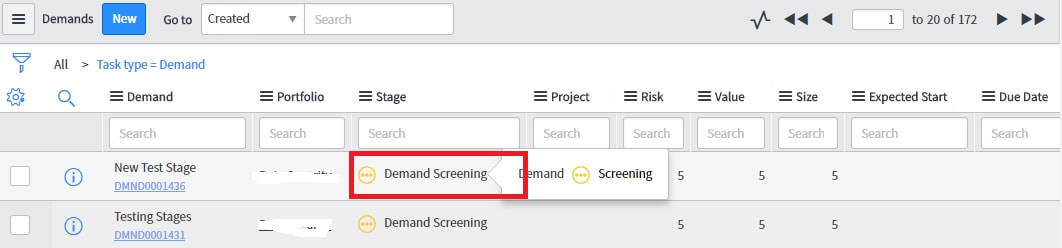
Here is what a personalized list looks like with both columns displayed side by side:

Sean
- Mark as New
- Bookmark
- Subscribe
- Mute
- Subscribe to RSS Feed
- Permalink
- Report Inappropriate Content
12-12-2017 11:01 AM
Hello,
I believe you also need to change the choice values for the demand "stage" field. In my instance demand has state not stage. I right-clicked state and selected "show choice list". Then just filter on table=dmn_demand. From there you can edit state/stage Label. I believe the flow formatter just updates the flow graphic that displays above the demand record.


- Mark as New
- Bookmark
- Subscribe
- Mute
- Subscribe to RSS Feed
- Permalink
- Report Inappropriate Content
12-12-2017 11:03 AM

- Mark as New
- Bookmark
- Subscribe
- Mute
- Subscribe to RSS Feed
- Permalink
- Report Inappropriate Content
12-12-2017 11:56 AM
Hi. If your demand process is still largely mirroring the Out of Box (OOB) configuration, then your process flow formatter is based on the State field, rather than the Stage field.
But the default list view for the Demands list of record includes the Stage column, and excludes the State column. So you won't initially see this column.
Individual users can personalize the list to add the State column, or an admin can configure the list layout to include this column by default for all users. OOB State will include the values like Draft, Submitted, Screening, etc. which are tied to the demand flow. Stage is the bigger picture for the overall project intake process, going from idea submission into demand and potentially project creation, so its values are things like Demand Approved, Project Pending, Project Closed Complete, etc.
Here is what a personalized list looks like with both columns displayed side by side:
Sean
- Mark as New
- Bookmark
- Subscribe
- Mute
- Subscribe to RSS Feed
- Permalink
- Report Inappropriate Content
12-13-2017 02:32 AM
Hi Sean,
Thanks for explaining.
I am able to update stage by updating States.
Thanks