- Mark as New
- Bookmark
- Subscribe
- Mute
- Subscribe to RSS Feed
- Permalink
- Report Inappropriate Content
07-22-2025 06:20 PM - edited 07-22-2025 06:21 PM
Hi,
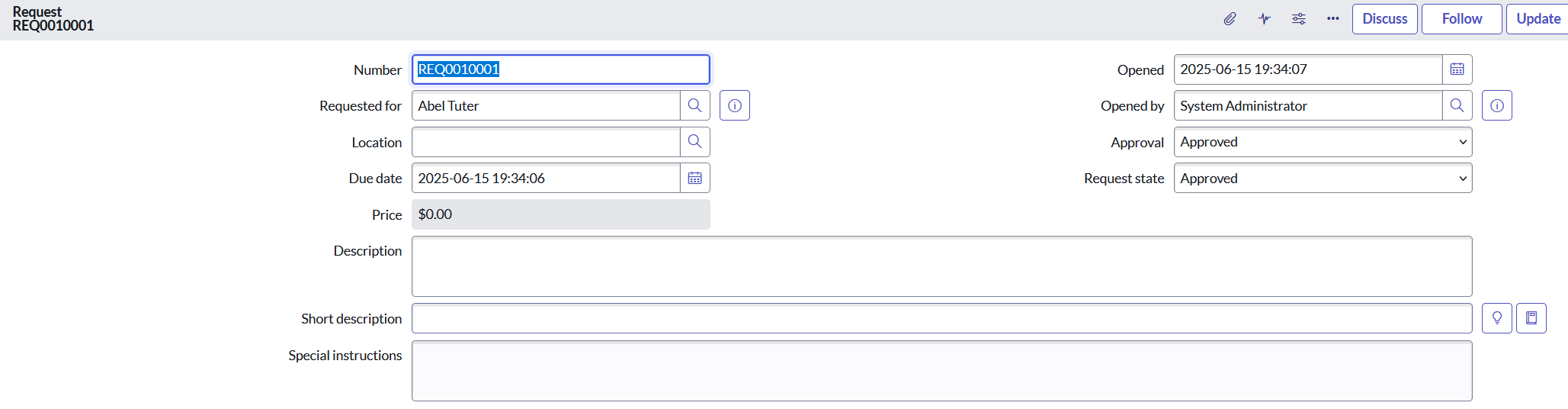
Can someone please advise how I can configure REQ form to populate location based on the "Requested for" user?
I have been able to create business rule to populate the location for the new requests but for the existing ones I can't figure out what I need to select in Form Builder under location to make it work.
I have tried dot walking in location, dependent field to the "Requested for" location but that didn't work.
Thank you for your help.
Solved! Go to Solution.


- Mark as New
- Bookmark
- Subscribe
- Mute
- Subscribe to RSS Feed
- Permalink
- Report Inappropriate Content
07-22-2025 08:16 PM
you can use a fix script to update it for older REQs
Something like this
updateLocation();

function updateLocation() {
    try {
        var req = new GlideRecord('sc_request');
        req.addEncodedQuery('locationISEMPTY');
        req.query();
        while (req.next()) {
            req.location = req.requested_for.location;
            req.setWorkflow(false);
            req.update();
        }
    } catch (ex) {
        gs.info(ex);
    }
}
If my response helped please mark it correct and close the thread so that it benefits future readers.
Ankur
✨ Certified Technical Architect || ✨ 10x ServiceNow MVP || ✨ ServiceNow Community Leader
- Mark as New
- Bookmark
- Subscribe
- Mute
- Subscribe to RSS Feed
- Permalink
- Report Inappropriate Content
07-22-2025 08:16 PM
you can use a fix script to update it for older REQs
Something like this
updateLocation();

function updateLocation() {
    try {
        var req = new GlideRecord('sc_request');
        req.addEncodedQuery('locationISEMPTY');
        req.query();
        while (req.next()) {
            req.location = req.requested_for.location;
            req.setWorkflow(false);
            req.update();
        }
    } catch (ex) {
        gs.info(ex);
    }
}
If my response helped please mark it correct and close the thread so that it benefits future readers.
Ankur
✨ Certified Technical Architect || ✨ 10x ServiceNow MVP || ✨ ServiceNow Community Leader