- Post History
- Subscribe to RSS Feed
- Mark as New
- Mark as Read
- Bookmark
- Subscribe
- Printer Friendly Page
- Report Inappropriate Content
on 05-07-2022 03:13 AM
This article contains my recent findings on ServiceNow Attachments. Though the Attachment function seems like a simple use case, it can be challenging depending on business requirements. Fortunately, ServiceNow has interesting APIs, OOB properties, and Plugins to tackle. The following topics are discussed in this Article:
1. How do Attachments Work.
2. Copy Attachments from one record to another record.
3. Copy Specific Attachments from one record to another record.
4. ServiceNow Document Viewer
5. Disabling Attachment on Table
1. How do Attachments Work?
Unlike many tables in ServiceNow Attachments table (sys_attachment) is tricky. There are two tables that do the job of storing and retrieving the attachments in ServiceNow.
1. Attachments (sys_attachment)
2. Attachment Documents (sys_attachment_doc)
When you upload a file into ServiceNow as an attachment, the Attachments (sys_attachment) table stores the metadata such as File Name, Content-Type, File Size, Sys_ID, and Table of the Record on with the attachment is made, etc. Whereas the contents of the attachment are stored in the Attachment Documents (sys_attachment_doc) table.
Creating just a record in the Attachments table using GlideRecord.initialize() method will create an attachment for the record but when you try to open it, the file throws an error message stating the file is empty. This is because the attachment record doesn’t have corresponding Attachment Document records.
The binary data of the attachment is split into 4KB chunks and are stored in the Data field of the table. The length field in the table defines the number of bytes stored in this chunk and the Position field defines the sequence of data that should be put back while retrieving the attachment for viewing or downloading and we got the Sys Attachment field which gives the sys_id of the Attachment Record. Each Attachment file in attachments tables might have one or more Attachment Document records. ServiceNow combines multiple Attachment Document records in sequence and returns them to the users for viewing.
ServiceNow provides GlideSysAttachment() API to handle attachments. It has some interesting methods which can be used to play with attachments and their contents. It creates an instance of GlideSysAttachment class.
2. Copy Attachments from one Record to another record
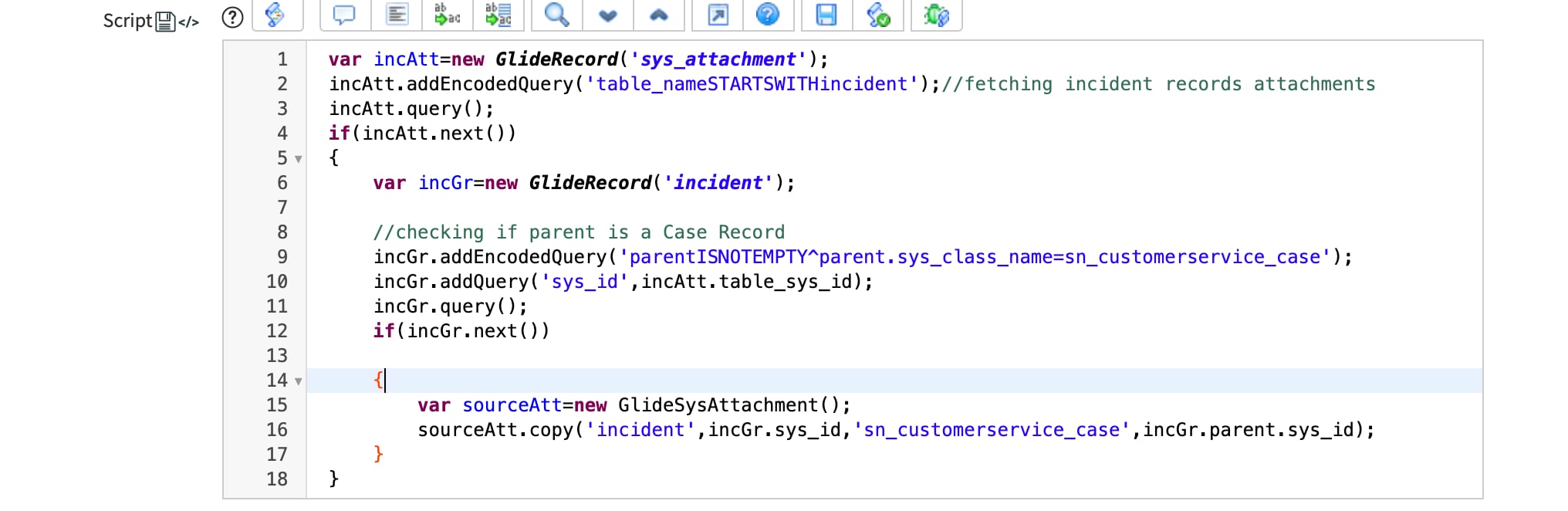
Business Scenario: This happened recently with one of our clients, we have implemented CSM on top of ITSM and created cases for all the existing incidents and associated the incidents to the case, Case Record being the Parent of Incident Record. After that, we copied the attachments from Incidents to its parent Cases using Copy method.
copy(String source table, String sourceID, String targetTable, String targetID)
Copy method copies attachments from the source record to the target record. This method returns an array of sys_id of attachments that are copied.
Proposed Solution:
Configure a fixed script to copy attachments from the Incident to the associated Case Record. Using Fix script because it’s a one-time activity.
Script:

3. Copy specific records from one record to another on upload.
Business Scenario: Continue to our previous requirement, whenever a file is attached to the case record, the same should be copied to the associated incident record. It is difficult to use the copy method since it copies all the attachments on the source record to the target record each time a file is uploaded. This results in duplicate attachments on incident records. Hence, we need to copy files that are specific to each upload.
Proposed Solution: Configured a after insert business rule on sys_attachment table and using getContentStream() and writeContentStream() methods to create an attachment on the target record.
Under GlideSysAttachment() API, we got multiple methods to retrieve and write the contents of the attachment. Some of them are:
• getContent(GlideRecord sysAttachment)
Returns attachment contents as a String
• getContentStream(String sysID of Attachment)
Returns GlideScriptableInputStream object that contains the attachment contains
• writeContentStream(GlideRecord now_GR, String fileName, String contentType, GlideScriptableInputStream inputStream)
Creates Attachment and return the sys_id of the attachment created
Parameters
now_GR-GlideObject of the record where the attachment should be copied.
filename-File Name of Attachment from sys_attachment table.
contentType-Content Type of the attachment from sys_attachment table.
GlideScriptableInputStream inputStream- Contents of the attachment
**Content is returned as a string, not as a byte array when getContent() is called.
Content is returned as a GlideScriptableInputStream object when getContentStream() is called. The GlideScriptableInputStream contains the actual bytes not converted into a String.
Script:


4. ServiceNow Document Viewer
ServiceNow comes with this interesting plugin- ServiceNow Document Viewer to view documents directly rather than download them to view them in their native applications. Though ServiceNow Document Viewer is active by default, it needs to be enabled at the table level to use it.
Make sure system property com.snc.documentviewer.enable_document_viewer is set to true or create it if it does not already exist.
Procedure:
1. Navigate to System Definition>Dictionary.
2. Search for the table where you want to enable Document Viewer.
3. Open the record with type as Collections and empty name.
4. Enter use_document_viewer=true in the attributes.

5. View UI Action will be visible on the attachments instead of Download, clicking it will open the attachment in a separate window.


5. Disable Attachments on a table
Attachments on a form can be disabled using dictionary attributes.
Procedure:
1. Navigate to System Definition>Dictionary.
2. Search for the table where you want to enable Document Viewer.
3. Open the record with type as Collections and empty name.
4. Enter no_attachment in the attributes.

Liked this article? Hit bookmark and mark it as helpful, it would mean a lot.
References:
https://docs.servicenow.com/
https://developer.servicenow.com/dev.do#!/reference/api/rome/server/no-namespace/c_GlideSysAttachmentScopedAPI