SAFe 보드 — 팀 수준
팀 구성원은 보드의 팀 수준에 액세스하여 팀 내 활동을 계획하고 모니터링할 수 있습니다 SAFe .
팀 수준에는 다음 탭이 포함됩니다.
- 백로그
- 스프린트 추적
백로그
백로그 탭을 사용하면 백로그의 스토리를 평가하여 스프린트 또는 여러 스프린트에 대한 스토리를 계획하고 우선순위를 지정할 수 있습니다.
또한 다음을 수행할 수 있습니다.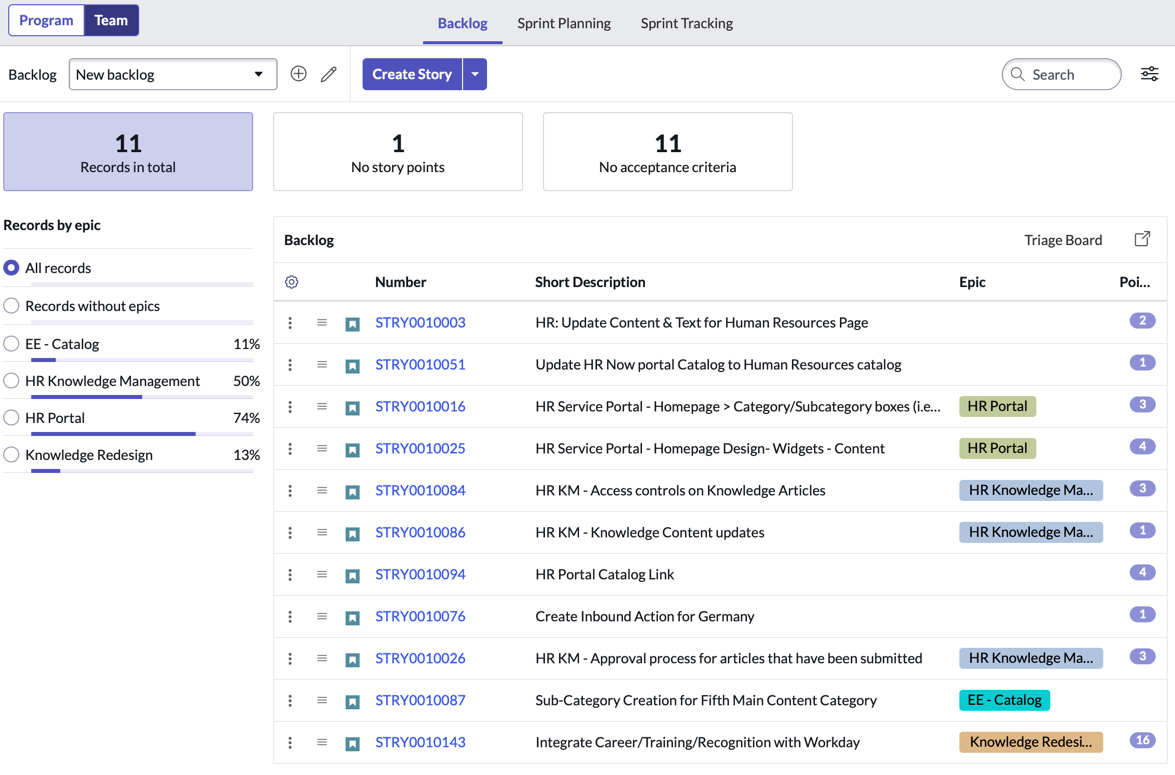
- 스토리를 생성합니다.
- 끌기 기능을 사용하여 백로그의 스토리 순서를 변경합니다. 백로그 맨 위에 있는 스토리는 순위 값이 낮을수록 우선순위가 높다고 간주합니다. 백로그 맨 아래에 있는 스토리는 순위 값이 높을수록 우선순위가 낮다고 간주합니다.
- 기능을 기준으로 스토리를 필터링합니다.
- 상세 정보가 키워드와 일치하는 스토리만 보려면 검색 상자에 키워드를 입력합니다.
- 스프린트를 생성, 구성, 모니터링, 시작, 완료합니다.
- 현재 및 향후 스프린트를 시간순으로 봅니다.
- 스프린트의 주요 측면(현재 스프린트의 계획된 시작 및 종료 날짜, 스토리 포인트 수(합계, 완료, 보류 중))을 봅니다.
- 백로그의 스토리를 평가하고 스프린트로 끌어 놓습니다.
- 미완료된 스토리를 완료된 스프린트에서 백로그나 향후 스프린트로 이동합니다.
주:
SAFe 보드에서 팀의 백로그를 보려면 팀이 다음 조건을 충족해야 합니다.
- SAFe 팀 그룹 유형에서 팀 구성원에게 역할safe_scrum_user 할당됨
- Agile 릴리스 트레인에 추가됨
스프린트 추적
스프린트 추적 탭에서 제공하는 뷰는 다음과 같습니다.
- 스토리 보드
- 스토리 보드는 목록 및 양식 내비게이션을 대화형 그래픽 환경으로 전환하는 시각적 작업 보드를 기반으로 합니다. 시각적 작업 보드 인터페이스는 기록 관리 및 공동 작업에 적합한 그래픽 중심의 환경을 제공합니다. 보드에서 수행할 수 있는 작업에 대해 자세히 알아보려면 시각적 작업 보드를 참조하십시오. 또한 다음을 수행할 수 있습니다.
- 레인 전체에서 현재 스프린트의 모든 스토리를 추적합니다.
- 스토리를 한 레인에서 다른 레인으로 이동하여 스토리의 상태를 업데이트할 수 있습니다.
- 검색 기준에 따라 스토리를 필터링합니다.
- 작업 보드
- 작업 보드를 사용하면 여러 레인에서 현재 스프린트에 속한 스토리의 모든 SCRUM 작업을 추적할 수 있습니다.
- SCRUM 작업을 한 레인에서 다른 레인으로 이동하여 SCRUM 작업의 상태를 업데이트할 수 있습니다.
- 검색 기준에 따라 SCRUM 작업을 필터링합니다.
- 목록
- 각 스프린트의 스토리에 연결된 SCRUM 작업과 테스트가 목록에 표시됩니다. 다음을 수행할 수 있습니다.
- 기록의 컨텍스트를 벗어나지 않고 스크럼 작업과 테스트를 추가합니다.
- 상세 정보로 드릴다운할 필요 없이 스크럼 작업의 상태, 짧은 설명 및 담당자를 봅니다.
- 짧은 설명을 보고 테스트 결과를 실행합니다.
- 현재 스프린트가 종결되기 전에 보류 중인 SCRUM 작업과 테스트를 평가합니다.