SAFe Board — Team level

  • 릴리스 버전: Australia
  • 업데이트 날짜 2026년 03월 12일
  • 소요 시간: 4분
  • As a team member, you can plan and monitor activities within your team by accessing the Team level on the SAFe Board.

    The Team level includes the following tabs:
    • Backlog
    • Sprint Tracking

    Backlog

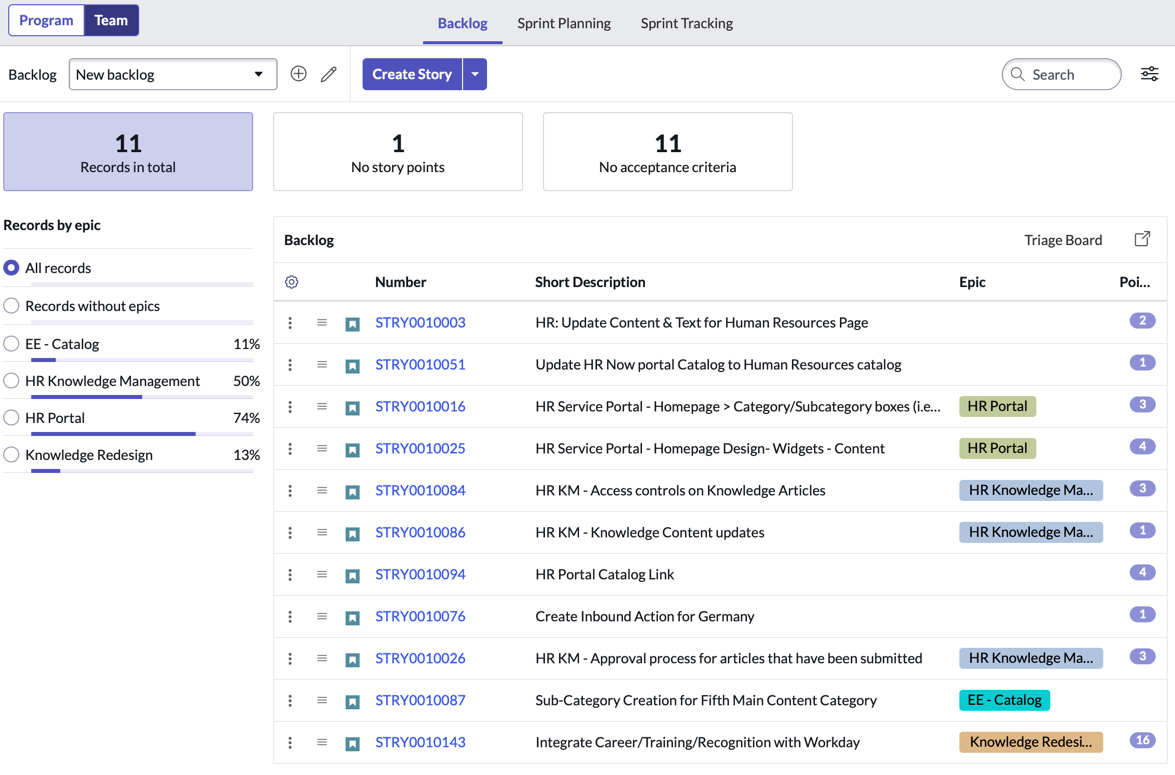
    The Backlog tab enables you to plan and prioritize stories for a sprint or multiple sprints by assessing stories in the backlog.

    In addition, you can:
    • Create stories.
    • Reorder stories in the backlog using the drag feature. The story at the top of the backlog assumes higher priority with a lesser rank value. The story at the bottom of the backlog assumes lower priority with a higher rank value.
    • Filter stories by a feature.
    • Type a keyword in the search box to view only stories whose details match with the keyword.
    • Create, organize, monitor, start, and complete sprints.
    • View current and future sprints in chronological order.
    • View these key aspects of a sprint: planned start and end dates, number of story points (total, complete, and pending) for the current sprint.
    • Assess stories in the backlog and drag them to sprints.
    • Move unfinished stories from the completed sprint to the backlog or a future sprint.
    주:
    To see the backlog of your team on SAFe Board, ensure that your team is:
    • Of the group type SAFe Team, with the role safe_scrum_user assigned to the team members
    • Added to Agile Release Trains
    Backlog tab

    Sprint Tracking

    The Sprint Tracking tab provides the following views:
    Story board
    Story board is built on visual task boards, which transform the navigation of lists and forms into an interactive graphical experience. The visual task board interface provides a graphic-rich environment suited for managing and collaborating records. To know more about the actions that can be performed in the board, see Visual Task Boards. In addition, you can:
    • Track all the stories of the current sprint across lanes.
    • Move stories from one lane to another, which in turn updates the state of the stories.
    • Filter stories based on search criteria.

    Sprint Tracking SAFe Board

    Task board
    Task board enables you to track all the scrum tasks of stories of the current sprint across lanes.
    • Move scrum tasks from one lane to another, which in turn updates the state of the scrum tasks.
    • Filter scrum tasks based on search criteria.

    Sprint Tracking Task Board

    List
    List displays scrum tasks and tests associated to stories in each sprint. You can:
    • Add scrum task and tests without leaving the context of the record.
    • View the state, short description, and assignee of the scrum task without drilling down into details.
    • View the short description and run result of a test.
    • Assess scrum tasks and tests that are pending before the closure of current sprint.

    Sprint Tracking List