Query Regarding Missing Fields in Database View

- Mark as New
- Bookmark
- Subscribe
- Mute
- Subscribe to RSS Feed
- Permalink
- Report Inappropriate Content
05-14-2026 11:38 PM
Hi Team,
I hope everyone doing well.
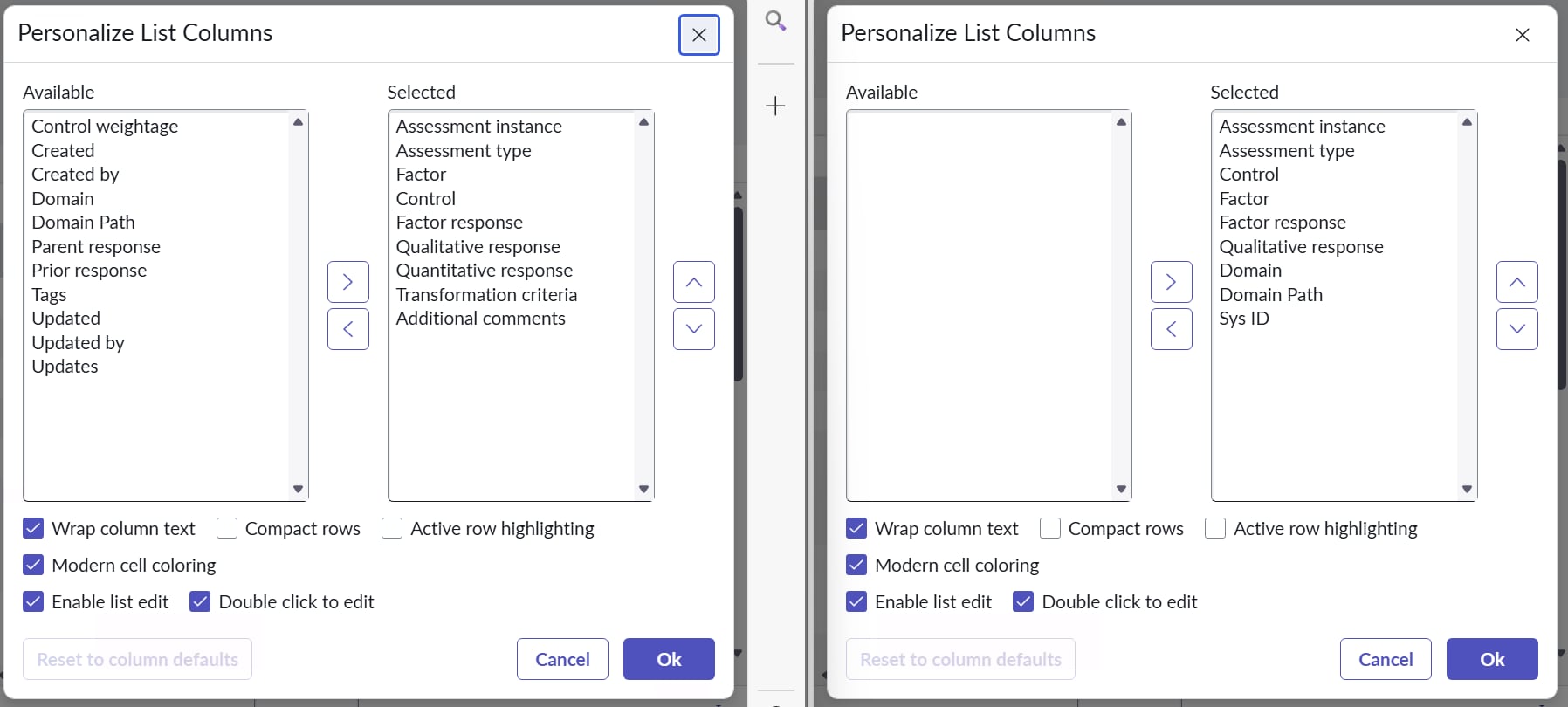
I have a query regarding a database view I recently created a database view with one table for a project requirement. The view is based on a single table. My expectation was that all fields from the main table would be reflected in the database view; however, I noticed that a few fields are missing in the view.
I am unable to determine the reason for this discrepancy. Has anyone encountered a similar issue before or can help identify the possible cause?
Please refer to the attached file for more details. The left image shows the main table, and the right image shows the database view, which is based on that table.
Note: I have not applied any WHERE clause, and the view fields related list is also empty.
Thank you in advance for your response.
Best regards,
Sai Krishna Rajana.


- Mark as New
- Bookmark
- Subscribe
- Mute
- Subscribe to RSS Feed
- Permalink
- Report Inappropriate Content
05-14-2026 11:46 PM
database view is used to join 2 or more tables
you used only 1 table?
share screenshots of db view config
Ankur
✨ Certified Technical Architect || ✨ 10x ServiceNow MVP || ✨ ServiceNow Community Leader
- Mark as New
- Bookmark
- Subscribe
- Mute
- Subscribe to RSS Feed
- Permalink
- Report Inappropriate Content
05-15-2026 12:07 AM
Hello
First of all you can not technically create a database view using one table. What I think here is that you want to apply filter if I'm not wrong if yes then you can use Standard List Filters or Report Sources instead of a database view or If you need complex SQL-like filtering on a single table that standard filters can't handle, you might consider using Function Fields or Scripted REST APIs rather than a database view

- Mark as New
- Bookmark
- Subscribe
- Mute
- Subscribe to RSS Feed
- Permalink
- Report Inappropriate Content
05-15-2026 12:51 AM
NEVER create a DB view for one table. That absolutely doesn't make sense. Database views are to connect two tables. What is your use case?
Please mark any helpful or correct solutions as such. That helps others find their solutions.
Mark
- Mark as New
- Bookmark
- Subscribe
- Mute
- Subscribe to RSS Feed
- Permalink
- Report Inappropriate Content
05-15-2026 01:13 AM
Thanks for your response. My case - the views are used as a data interface for a data lake integration. I need only one table in Database view.
The data from SNOW is being sent to external system.
so, instead of giving direct access from the ServiceNow table to external system, I create a DB view on top of it and external system reads from the DB view.
So, When I created the database view, I observed that not all fields from the main table were included. Do you know why this might happen?