drjohnchun
Tera Guru

Last time, we ran a simple read-only demo test named "Verify That Form Defaults Are As Expected" that had only three test steps. This time, we'll continue running more demo tests and see how the Automated Test Framework (ATF) works.

FORM SUBMISSION

After logging in with the atf_test_designer role (not impersonating since the test runs impersonating another user) using Internet Explorer 11, I chose to run the simplest write test among the demo tests called "Basic UI Test". This test has only four steps, opening a new 'Catalog Task' form, set some fields, and submit. Below is the screenshot of the test:

find_real_file.png

TEST EXECUTION

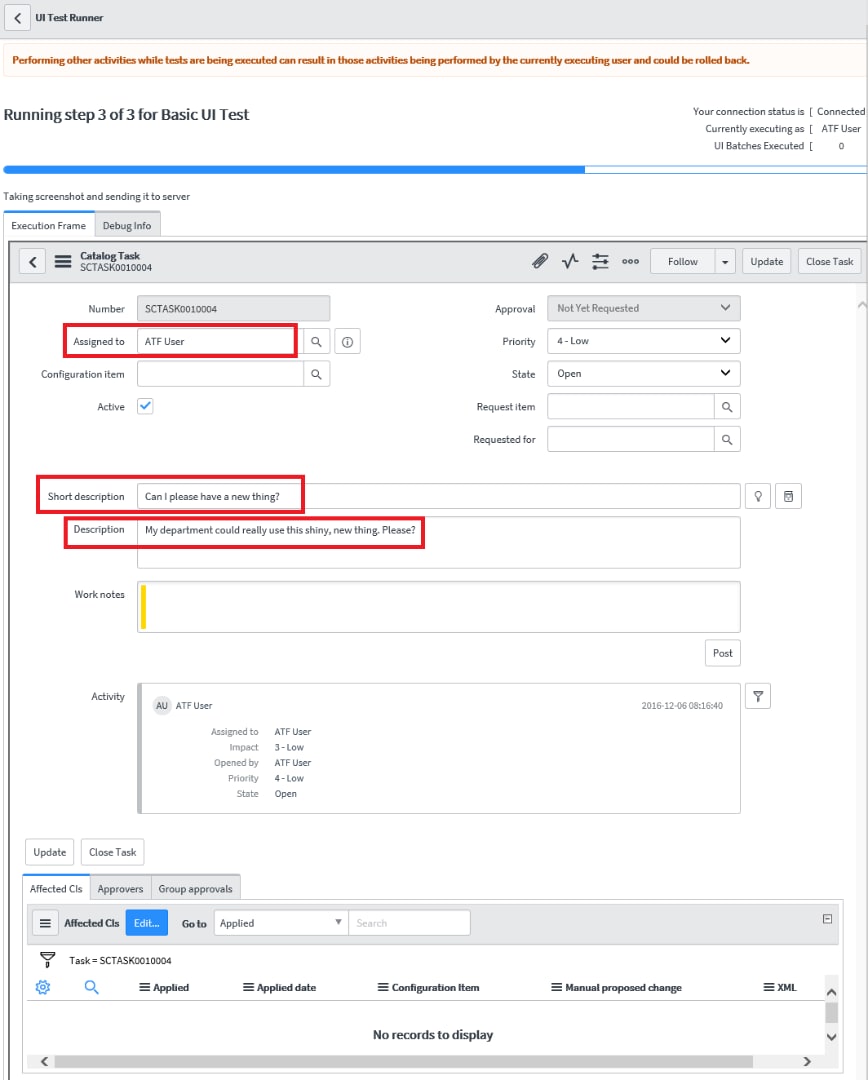
I clicked Run Test and switched over to the Client Test Runner window (labeled as UI Test Runner in the window header) to watch the test in action as shown below. The three field values set are highlighted in red rectangles:

find_real_file.png

When the test was completed, the status dialog box was updated indicating successful completion as below:

find_real_file.png

TEST RESULTS

When clicked on Go to Result, the results were shown as below:

find_real_file.png

In the Step Results tab, all four steps showed Success with summary output for each step. In the Test Log tab, it showed more detailed output with 92 entries.

SCREENSHOTS

The results included three screenshots attached:

  1. When the form first opened
    find_real_file.png
  2. After the field values were set
    find_real_file.png
  3. After the form was submitted
    find_real_file.png

This time, I'm not only seeing the form header obscuring the top portion of the form and some missing elements (buttons and icons) from the header, but also the third screenshot taken after the submission is malformed, with the misaligned field labels; you can compare this with an earlier screenshot from the Client Test Runner window above. As I noted in Part 1, I believe this is a side effect of screenshots not being taken directly from the screen. Screenshots provide objective evidence for test results, thus the fidelity is an important prerequisite for regulated testing. I hope the ServiceNow team can address this issue.

MISSING TEST RECORD, BY DESIGN

Next, I impersonated "ATF User" and looked for the Service Catalog Task [sc_task] record SCTASK0010004 that had just been created and assigned to "ATF User". I navigated to Service Desk > My Work, but couldn't find it. I removed the filter to see all tasks for everyone, but still couldn't find it. I tried the same by navigating to Service Catalog > Open Records > Tasks, but no luck, even after removing the filter conditions. Then I logged in with the admin role and looked inside Sys Audits [sys_audit] and Audit Deleted Records [sys_audit_delete] but no trace. I then ran this Background Script:

var gr = GlideRecord('sc_task');

gr.query();

while (gr.next()) gs.info(gr.number);

var gr = GlideRecord('task');

if (gr.get('number', 'SCTASK0010004')) gs.info(gr.number);

but still no luck. The only trace of it was that the Number Counter for SCTASK was showing the next number as 10,005.

ATF provides data cleanup via Automated Test Framework > Administration > Table Cleanup. But it only applied to the Test Results [sys_atf_test_result] table and it was set to run after 2,592,000 seconds (30 days) since sys_created_on, so this would have nothing to do with the missing Service Catalog Task [sc_task] record.

I also inspected the test steps, especially the final step of "Submit a Form" and its Step Configuration under Administration to see if anything would delete the test record, but didn't see anything obvious. Looking through other settings under Administration didn't yield a clue either.

The ATF wiki Automated Test Framework does mention

The test framework automatically tracks and deletes any data created by running tests, automatically taking care of rolling back changes after testing.

So I believe this feature must've deleted the record without a trace and I confirmed it. I do think it's a nice feature, but I can foresee cases where you want to inspect your test results, especially if tests fail, and also possibly take additional screenshots. It would be nice to give the user an option to delete test data later. I also like creating a large number of tickets for load testing, for which an automated tool is ideal (web services would be faster at creating a large number of records but they're not the same as UI tests). I didn't check it, but my thinking is this auto deletion feature would also take care of cascading deletes.

Further review revealed some log entries for rollback in Rollback Logs [sys_rollback_log] as shown below:

find_real_file.png

Next time, I'd like to take a look under the hood to see how ATF works.

UPDATES

2016-12-07 added rollback log and screenshot

Please feel free to connect, follow, post feedback / questions / comments, share, like, bookmark, endorse.

John Chun, PhD PMP see John's LinkedIn profile

visit snowaid

ServiceNow Advocate

Winner of November 2016 Members' Choice Award

Comments
ServiceNow Employee
ServiceNow Employee

Nice work on the posts about this 😃


//Göran


Tera Guru

Thanks Göran! Any feedback would be great.


Kilo Guru

John,


Thanks for your blog, a great intro to ATF - which looks like it will be very useful - if a little slow!


I have graduated to attempting my own test and have hit something peculiar, I wonder if you might check it out?


Try creating an Incident as "ATF User" and in a later step retrieve it and see if you can add WORK NOTES or ADDITIONAL COMMENTS?


My test is failing in either case saying "Field is not editable"


Now, this should not be the case, if you use normal screen actions as ATF User you CAN add WN or Comment - but I wonder if it has something to do with the odd "tick box" for "switching" between WN and Comments - this does not appear to be a "field" nor does it have any visible UI POLICY or CLIENT SCRIPTS so I am unclear as to how it works - and perhaps ATF IS TOO?


Tera Guru

Mike - when you create a new Incident record, the form looks like the screenshot below, with two distinct fields for "Additional comments" and "Work notes" - when you inspect the DOM elements, you can also clearly see that the fields are for "incident.comments" and "incident.work_notes" behind the scenes.


find_real_file.png


Setting those values in a test step in ATF works as expected, as shown in this screenshot.


find_real_file.png


When you submit and retrieve it to make further edits to an existing record, as you noted, the field now looks different than a new ticket, as shown in the screenshot below from ATF:


find_real_file.png


and the same screenshot taken from outside of ATF, so you can see all the missing icons (as I mentioned in my blog, the ATF screenshots don't look right):


find_real_file.png


This is now a dynamic field controlled by script that switches between "Additional comments" and "Work notes" based on the checkbox value. When you try to set a value, you get the following error message in the test step:


FAILURE: Unable to set field 'comments' to value 'add additional comments to existing ticket'. Field 'comments' is not editable. See screenshot


When you look at the screenshot, it's the same as what I pasted above - there's no visual indication that the field is not editable (such as grayed out background). However, since the actual "incident.comments" field is NOT visible, ATF might be giving the error, but please keep reading.


It takes another twist if you run a slightly modified test. This time, instead of retrieving a just created record, open up an existing Incident record. Then try to set the field values for "Additional comments". This time, it doesn't give an error but says "Successfully set field 'comments' to value 'add additional comments to existing ticket'". But it fails at the final submit step saying


FAILURE: Cannot submit 'incident' form. No submit actions available. Only the 'Save' and 'Submit' actions are currently supported.


It doesn't really make sense when you read it. When you open the screenshot, though, you'll notice the entire form is readonly, with all fields grayed out and NO "Additional comments" field - so not sure how it "successfully set the value" before. Mind you ATF User has the ITIL role and read/write access to the Incident table. You'll also notice the existing Incident ticket that was used as "readonly" is now deleted, nowhere to be found again - something to be aware of. I'm not sure of all the reasons as to why and continuing my investigation.


I'll be writing about these in my upcoming blogs in this series, so please stay tuned! BTW, regarding your comment about "slow", I'm also tracking the execution performance as well, which I'll write about later too.


Mega Guru

Is it possible to close the client test runner automatically when it's completed all of its steps? I'm finding that I have to close it manually upon completion.


Tera Guru

As far as I know, you can't auto close the Client Test Runner window after a test run is completed.


Tera Contributor

Hi,


Is there anyway to retain data that is getting created while testing?


Thanks


Tera Guru

As far as I know, there's no option to retain test data as of istanbul-09-23-2016__patch0-10-05-2016_11-18-2016_1553.


Kilo Contributor

Is there anyway to run tests simultaneously on different browsers or by different users in the same instance


Tera Guru

There's a warning message at the top of Browser Test Runner that says "Performing other activities while tests are being executed can result in those activities being performed by the currently executing user and could be rolled back." Because test data are deleted after a test is finished, the test data from other tests being run simultaneously might get deleted by a test that finishes first, although I haven't confirmed it yet.


Kilo Contributor

Yes, but if tests are being run by 2 different users/browsers(hypothetically), they would be considered 2 different test executions, hence the test data would be different for both of them, right?


Tera Guru

The official document Automated Test Framework Test Run Queue module says


Note: To prevent conflicts, the system allows only one test to run at a given time. This is true even if you have multiple client test runner windows open. If you submit tests to run when another test is already running, the system holds the new tests in a queue to run later. If a test remains in the queue for more than ten minutes, the system cancels the test.


It's still not clear if this applies to multiple test runs in the same session or even to multiple sessions. As a quick check, you might start multiple test runs from multiple browser/user sessions and see if they all end up in the same queue or separate queues.


Kilo Contributor

I had tried that, they do end up in the same queue. I am looking for some configuration or even some changes in OOTB functionality to overcome this limitation, but no luck so far


PS : I have also asked this question here, you can also reply in that thread


Tera Guru

I believe this confirms ATF tests can be run only in series, not in parallel, as I'm not aware of any settings that can change this. I replied in your other post as well. Thanks.


Kilo Contributor

Thanks


Kilo Explorer

Hi


I need to handle the Modal Pop Up using ATF.  


find_real_file.png


I am trying to add step Click Modal Button, but it support only clicking of Ok and Cancel button.


Can some one help me with how to handle this pop to enter the field values and how this can be achieved using custom scripts.


Thanks


Kilo Contributor

Hi John. Thanks for your great work! It's helpful.


About the screenshot layout, I tested today and it looks fine. Just wondering if this resolved in your instance too. Or I just get it wrong.


Attachment to test result:


https://dev22551.service-now.com/sys_attachment.do?sysparm_referring_url=tear_off&view=true&sys_id=88583cd9db3132001e7073ffbf961937


Tera Guru

Hi Cheryl - I just reran the following test and sad to report the screenshots are still malformed as in my original blog post. I couldn't see your screenshot since I don't have access to your dev site. If you can paste the screenshot here, that would help. Also, if you can post your test environment, that would be great. Thanks.


TEST RUN


Date: 2017-03-28 20:53:11 US EDT


Test: Basic UI Test


SN Version: istanbul-09-23-2016__patch1-12-07-2016


Desktop OS: Windows 8.1


Browser: Internet Explorer 11.0.9600, Chrome 56.0.2924.87


Kilo Contributor

Hi there. I ran the test today and below's the result:


And the instance I used: ServiceNow


find_real_file.png


Tera Guru

Hi Cheryl - I noticed you ran the test using FireFox, so I also reran the same test using FireFox 50.0 on Windows 8.1. And as in your case, my screenshot looks much better. I noticed very subtle imperfections, such as the missing chevrons for the Priority and State dropdowns (also in your screenshot). I'm still not sure why the screenshots look different between different browsers and wouldn't feel comfortable using them as objective evidence.


Kilo Contributor

Hi John,


Can you please confirm if it is possible to verify the activity log and the email notifications through ATF. If yes, then how can we do it ?


Your response is awaited.


Thanks,


Apoorv


Tera Guru

Hi Apporv - yes, you can. Navigate to Automated Test Framework > Administration > Step Configurations and open "Custom Scripted StepConfig". Then inspect


Mega Expert

Hi John Chun


ServiceNow Employee
ServiceNow Employee

Hi John ,


Confirming for this behavior " FAILURE: Unable to set field 'comments' to value 'add additional comments to existing ticket'. Field 'comments' is not editable." , there is PRB created at ServiceNow .


Mega Expert


Hi Manish Singh


I able to set the field values(Additional comments and Work_notes)


Please   go through the below screen shot


ATF!.png


Thanks & Regards


Vamsi Krishna


Please mark like / helpful /correct answer


Kilo Expert

Hi Manish, do you happen to know the PRB number?


Community Alums

Is it possible to check if the attachment is added to a form or not.