

drjohnchun
Tera Guru
Options
- Subscribe to RSS Feed
- Mark as New
- Mark as Read
- Bookmark
- Subscribe
- Printer Friendly Page
- Report Inappropriate Content
12-06-2016
12:52 PM
Last time, we ran a simple read-only demo test named "Verify That Form Defaults Are As Expected" that had only three test steps. This time, we'll continue running more demo tests and see how the Automated Test Framework (ATF) works.

FORM SUBMISSION
After logging in with the atf_test_designer role (not impersonating since the test runs impersonating another user) using Internet Explorer 11, I chose to run the simplest write test among the demo tests called "Basic UI Test". This test has only four steps, opening a new 'Catalog Task' form, set some fields, and submit. Below is the screenshot of the test:
TEST EXECUTION
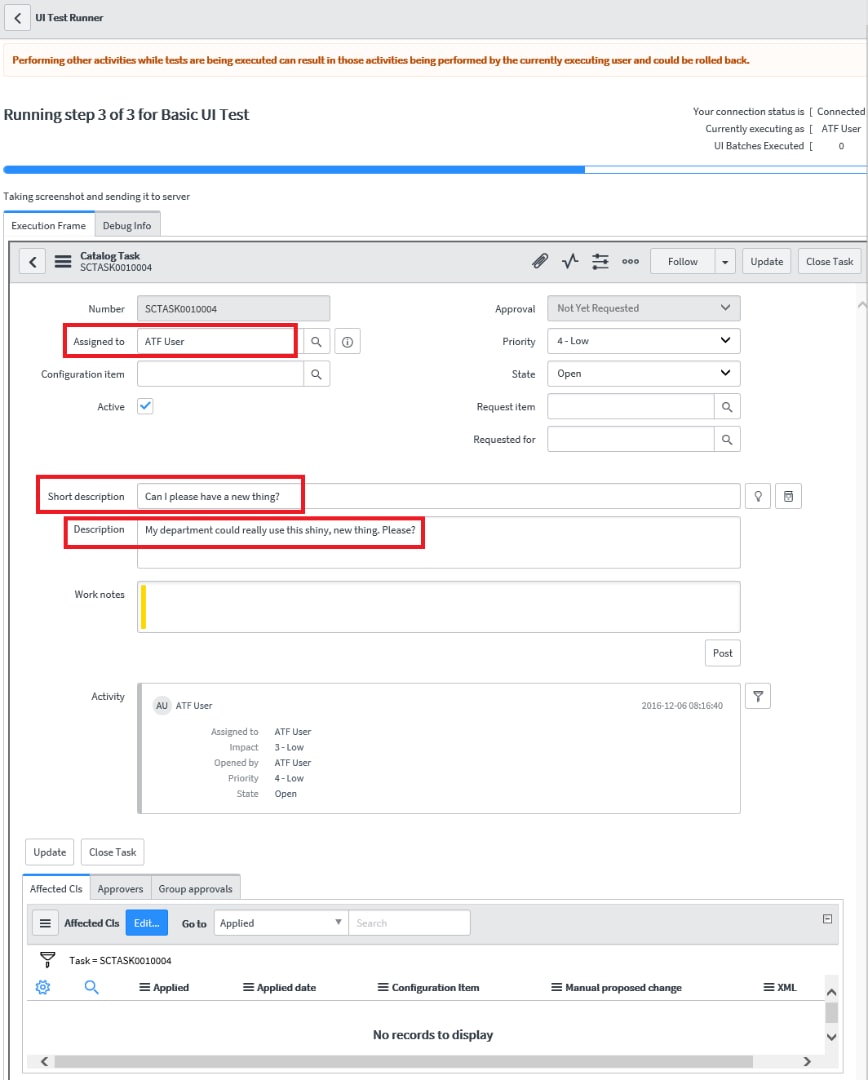
I clicked Run Test and switched over to the Client Test Runner window (labeled as UI Test Runner in the window header) to watch the test in action as shown below. The three field values set are highlighted in red rectangles:
When the test was completed, the status dialog box was updated indicating successful completion as below:
TEST RESULTS
When clicked on Go to Result, the results were shown as below:
In the Step Results tab, all four steps showed Success with summary output for each step. In the Test Log tab, it showed more detailed output with 92 entries.
SCREENSHOTS
The results included three screenshots attached:
- When the form first opened
- After the field values were set
- After the form was submitted
This time, I'm not only seeing the form header obscuring the top portion of the form and some missing elements (buttons and icons) from the header, but also the third screenshot taken after the submission is malformed, with the misaligned field labels; you can compare this with an earlier screenshot from the Client Test Runner window above. As I noted in Part 1, I believe this is a side effect of screenshots not being taken directly from the screen. Screenshots provide objective evidence for test results, thus the fidelity is an important prerequisite for regulated testing. I hope the ServiceNow team can address this issue.
MISSING TEST RECORD, BY DESIGN
Next, I impersonated "ATF User" and looked for the Service Catalog Task [sc_task] record SCTASK0010004 that had just been created and assigned to "ATF User". I navigated to Service Desk > My Work, but couldn't find it. I removed the filter to see all tasks for everyone, but still couldn't find it. I tried the same by navigating to Service Catalog > Open Records > Tasks, but no luck, even after removing the filter conditions. Then I logged in with the admin role and looked inside Sys Audits [sys_audit] and Audit Deleted Records [sys_audit_delete] but no trace. I then ran this Background Script:
var gr = GlideRecord('sc_task');
gr.query();
while (gr.next()) gs.info(gr.number);
var gr = GlideRecord('task');
if (gr.get('number', 'SCTASK0010004')) gs.info(gr.number);
but still no luck. The only trace of it was that the Number Counter for SCTASK was showing the next number as 10,005.
ATF provides data cleanup via Automated Test Framework > Administration > Table Cleanup. But it only applied to the Test Results [sys_atf_test_result] table and it was set to run after 2,592,000 seconds (30 days) since sys_created_on, so this would have nothing to do with the missing Service Catalog Task [sc_task] record.
I also inspected the test steps, especially the final step of "Submit a Form" and its Step Configuration under Administration to see if anything would delete the test record, but didn't see anything obvious. Looking through other settings under Administration didn't yield a clue either.
The ATF wiki Automated Test Framework does mention
The test framework automatically tracks and deletes any data created by running tests, automatically taking care of rolling back changes after testing.
So I believe this feature must've deleted the record without a trace and I confirmed it. I do think it's a nice feature, but I can foresee cases where you want to inspect your test results, especially if tests fail, and also possibly take additional screenshots. It would be nice to give the user an option to delete test data later. I also like creating a large number of tickets for load testing, for which an automated tool is ideal (web services would be faster at creating a large number of records but they're not the same as UI tests). I didn't check it, but my thinking is this auto deletion feature would also take care of cascading deletes.
Further review revealed some log entries for rollback in Rollback Logs [sys_rollback_log] as shown below:
Next time, I'd like to take a look under the hood to see how ATF works.
UPDATES
2016-12-07 added rollback log and screenshot
Please feel free to connect, follow, post feedback / questions / comments, share, like, bookmark, endorse.
John Chun, PhD PMP 
|  |
Labels:
28 Comments
- « Previous
-
- 1
- 2
- 3
- Next »
You must be a registered user to add a comment. If you've already registered, sign in. Otherwise, register and sign in.