- Post History
- Subscribe to RSS Feed
- Mark as New
- Mark as Read
- Bookmark
- Subscribe
- Printer Friendly Page
- Report Inappropriate Content
on 05-20-2022 04:05 AM
De-duplicate tasks are created when system identifies the duplicate Cis in the discovery process.
In some cases these tasks are not created as expected even though duplicate CI exists.
In a few scenarios clients expecting to create de-duplicate task from the UI action on list view of ''cmdb_ci'' table and this UI action is available to specific group of people.
In Servicenow we have OOTB Script include ‘’CMDBDeduplicateTaskUtil”, to create duplicate task, however In this case we have to specify the sys_ids of specific Cis and execute every time.
So Instead of taking the sys_ids of the CIs every time and execute, we can create button/list choice UI action on the list view and select the specific CIs from CMDB_CI table, this will be easier to the CMDB team whoever wants to create.
This UI action utilizing the OOTB Script include with few modifications as we have to return with newly created de-duplicate task or error if it finds any.
UI Action name : Create De-duplicate Task, Type: List Choice
Step:1

Step:2

Step:3
when we click on OK. We'll get the confirmation.

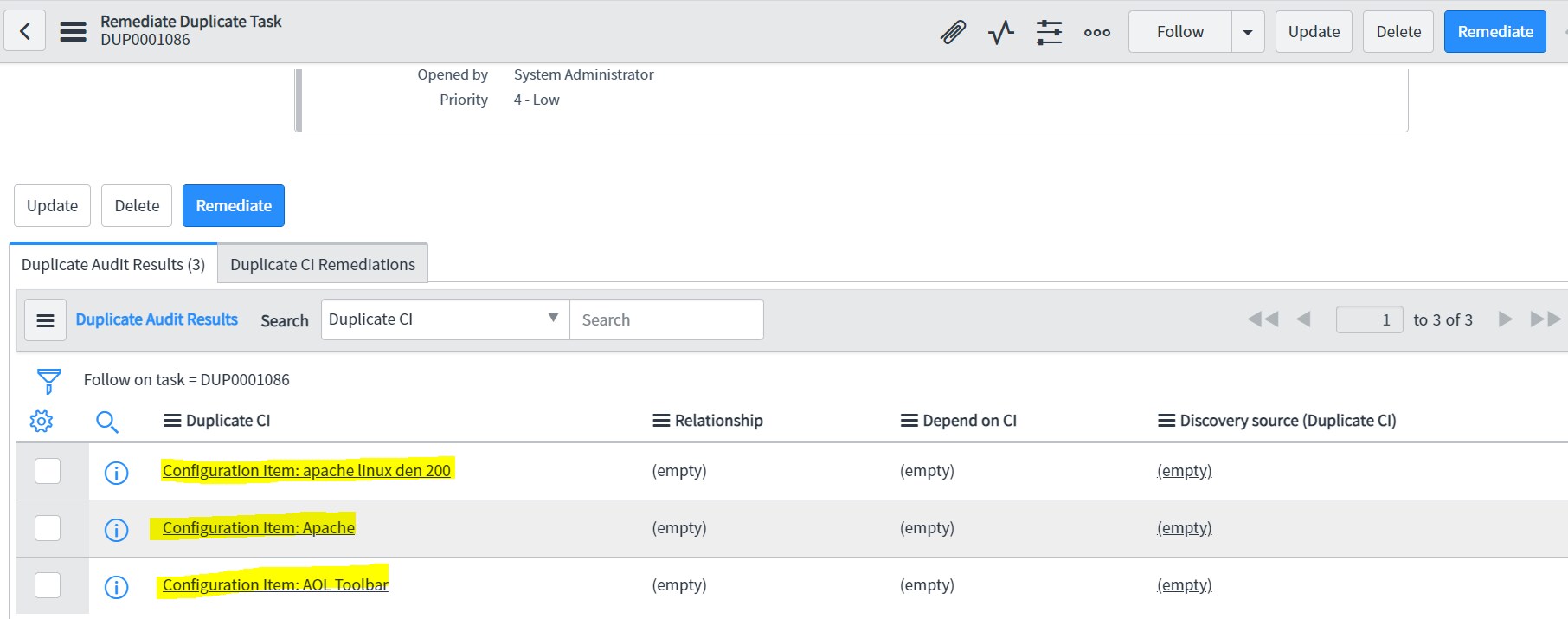
It will navigate to newly created De-duplicate task, shown below.
Step: 4

If the selected CI is already part of open De-duplicate task then it will give error and displays those CIs
Step:5

Step: 6

Client script:
function getConfigItems() {
var sysIDs = g_list.getChecked().toString();
var sysIdList = sysIDs.split(',');
var con1 = confirm('Total number of Selected CIs ' + sysIdList.length + '. Click OK to create De-duplicate task');
if (con1) {
var ga = new GlideAjax('CMDBtaskCreate');
ga.addParam('sysparm_name', 'createDuplicateTask');
ga.addParam('sysparm_sysids', sysIDs);
ga.getXML(CallBack);
function CallBack(response) {
var answer = response.responseXML.documentElement.getAttribute("answer");
if (answer == null) {
alert('Failed to create Remediate Duplicate Task. Selected CIs are already part of an open Remediate Duplicate Task');}
else {var url1 = 'reconcile_duplicate_task.do?sys_id=' + answer;
var con = confirm('The De-duplicate task is created. Click OK to redirect to De-duplicate task record');if (con) {
location.href = url1;
}}}}
Thanks,
Mark it helpful if it is.....!!!!!
- 16,898 Views

- Mark as Read
- Mark as New
- Bookmark
- Permalink
- Report Inappropriate Content
Thank you for sharing this; I may try this out actually. In our environment, sometimes IRE fails to catch a duplicate, even when the CI's meet the criteria - I've always wondered if ServiceNow plans to address this or if there is a solid reason why.
Your manual work around looks like a good help for a larger platform problem.
- Mark as Read
- Mark as New
- Bookmark
- Permalink
- Report Inappropriate Content
Thanks

- Mark as Read
- Mark as New
- Bookmark
- Permalink
- Report Inappropriate Content
Its not working as mentioned in above screen shots. Not giving any message and not creating duplicates. Could you please help with exact code.
- Mark as Read
- Mark as New
- Bookmark
- Permalink
- Report Inappropriate Content
looking for this as well

- Mark as Read
- Mark as New
- Bookmark
- Permalink
- Report Inappropriate Content
I have not thoroughly tested this but I was able to get this working with the code below. A few things to note:
- This could be helpful for de-duplicating logical records like Services, Business Applications, etc... since those typically do not use IRE and could have manual duplication.
- Your IRE Rules should be setup to automatically identify duplicates, if you are finding duplicates that are not creating rules make sure to investigate why
- CMDBDuplicateTaskUtils - Global The docs site has examples for running a script across your cmdb based on a value to automatically create duplicates which may also be helpful
UI Action:
Name = Create De-duplicate Task
Client = True
List Choice = True
Onclick = showConfirmationDialog() or whatever you choose as your function name
Script:
function showConfirmationDialog() {
var entries = g_list.getChecked();
var sysIDs = entries.split(',');
var con1 = confirm('Total number of Selected CIs ' + sysIDs.length + '. Click OK to create De-duplicate task');
if (con1) {
alert(sysIDs);
var ga = new GlideAjax('createDuplicateCITask');
ga.addParam('sysparm_name', 'createDeDupTask');
ga.addParam('sysparm_entry_ids', entries);
ga.getXML(getDupTasks);
}
function getDupTasks(response) {
var answer = response.responseXML.documentElement.getAttribute("answer");
if (answer == null) {
alert('Failed to create Remediate Duplicate Task. Selected CIs are already part of an open Remediate Duplicate Task');
} else {
var url1 = 'reconcile_duplicate_task.do?sys_id=' + answer;
var con = confirm('The De-duplicate task is created. Click OK to redirect to De-duplicate task record');
if (con) {
location.href = url1;
}
}
}
}
Script include:
Name = createDuplicateCITask
Client Callable = true
Script:
var createDuplicateCITask = Class.create();
createDuplicateCITask.prototype = Object.extendsObject(AbstractAjaxProcessor, {
createDeDupTask: function() {
var entries = this.getParameter('sysparm_entry_ids');
var dupTaskUtil = new CMDBDuplicateTaskUtils();
var deDupTaskID = dupTaskUtil.createDuplicateTask(entries);
return deDupTaskID;
},
type: 'createDuplicateCITask'
});
- Mark as Read
- Mark as New
- Bookmark
- Permalink
- Report Inappropriate Content
This worked perfectly as expected. Thank You!
- Mark as Read
- Mark as New
- Bookmark
- Permalink
- Report Inappropriate Content
Hi NateDickson (Servicenow version Zurich)
Thank you that work fine, however find a different way, so I have share it too
If you are calling the OOB script include "CMDBDuplicateTaskUtils" to create the duplicate task direct from client side it will not working as OOB script include is not client callable/ Glideajax enabled,
so make it work, follow the below instruction
as if we are calling script include from UI action as client side
UI Action
Name = Create De-duplicate Task
Client = True/checked
Show update = True/checked
List Choice = True/checked
Onclick = duplicateselectci() or whatever you choose as your function name
Ui Action Script
if (sysIdList.length > 1) { // to check record more then one
var con1 = confirm('Total number of Selected CIs ' + sysIdList.length + '. Click OK to create De-duplicate task');
function callBack(response) {
so to make functionality work and call the script include from client
Create a New Script Include
Name : manually OR whatever you choose but make sure name should be update in GlideAjax or now i have choose manually
Glide AJAX enabled - Checked
//Create Remediate Duplicate Task for given list of duplicate sysIds
//Check if sysId already exist in open de-duplicate task
where to write the script in script include after checked GlideAjax enabled, refer to the attached screenshot of the Script Include."

- Mark as Read
- Mark as New
- Bookmark
- Permalink
- Report Inappropriate Content
Yes, I'm already aware of the OOTB script include is 'CMDBDuplicateTaskUtils'' not client callable.
I just took that as a reference script and we should always customize based on our requirements.