amitsharma

ServiceNow Employee
Options
- Subscribe to RSS Feed
- Mark as New
- Mark as Read
- Bookmark
- Subscribe
- Printer Friendly Page
- Report Inappropriate Content
10-19-2021
02:49 PM
Removed Software functionality in legacy SCCM integration (SCCM 2016 integration or older)
Removed Software functionality depended on following tables:
• ADD_ REMOVE _PROGRAMS_DATA_DD
• ADD_REMOVE_ PROGRAMS _64_DATA_DD
• INSTALLED_SOFTWARE_DATA_DD
Above tables were updated by database triggers inside SCCM, in Microsoft Endpoint Manager Configuration Manager/System Center Configuration Manager (SCCM) builds 1902 and newer, Microsoft disabled these triggers, breaking Removed Software functionality.
It is advisable for legacy SCCM integration customer to upgrade to Service Graph Connector for SCCM integration to utilize the support for Removed Software functionality. In Service Graph Connector for SCCM, Removed Software has been reimagined and reimplemented
Removed Software functionality in Service Graph Connector for SCCM integration
• Current implementation Removed Software does comparison software instance/install on ServiceNow instance with SCCM and removes those from the CMDB that are no longer in SCCM. For comparison it uses following attribute for matching software instance/install
o Publisher
o Software name
o Software version
o Resource Id
• There is no dependency on database triggers or other SCCM-side extensions
• No longer dependent on SCCM Group ID
• Will cleanup SCCM 2016 installed software records too**
• Works with both cmdb_software_instance and cmdb_sam_sw_install
** Important note: Removed Software only assesses computers still in SCCM. If a computer is removed from SCCM, we expect that IT lifecycle management will act on the Computer CI. Changing the Computer Status to Retired will remove all SAM Software Installs for the CI in the CMDB, via Business Rule “Remove Installs for Retired/Stolen CI “. This is outside the scope of SG-SCCM. Also operating system related record created by legacy SCCM integration are not cleaned.
Troubleshooting Removed Software functionality in Service Graph Connector for SCCM integration
After running ‘SG-SCCM Removed Software’ scheduled data import software instance/install on ServiceNow instance will be expected to be synchronized with SCCM.
To check what software instance/install is deleted open import set table name sn_sccm_integrate_sccm_2019_removed_software [SG-SCCM Removed Softwares]
associated with ‘‘SG-SCCM Removed Software’ data source. This import set table has one row associated with each Computer CI.
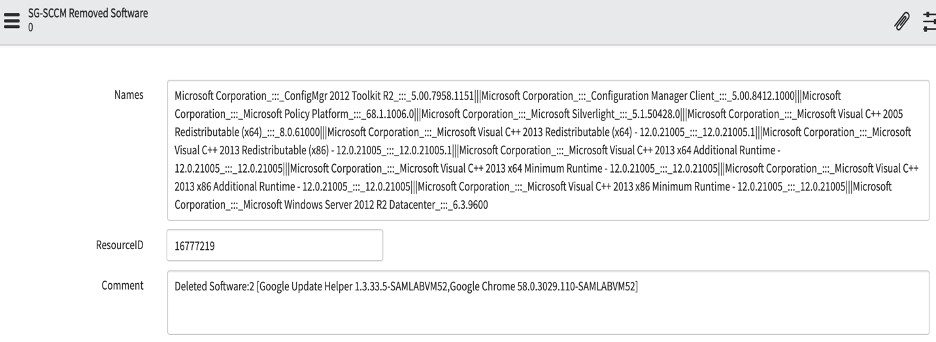
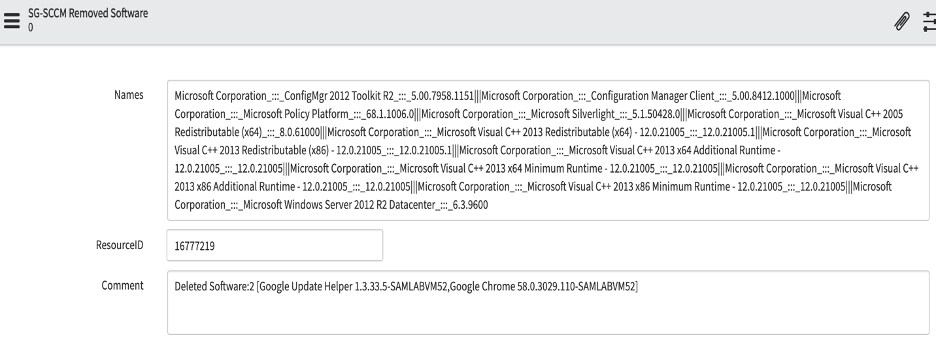
An example records shown in following figure.
• Names: This field shows currently installed software (as partial Source Native Keys for Software Install – concatenation of Publisher, Software Name and Software Version)
• ResourceID: This field shows Computer’s Resource ID
• Comments: This field shows count and name of software instance/install is deleted.
- 10,167 Views
3 Comments
You must be a registered user to add a comment. If you've already registered, sign in. Otherwise, register and sign in.