Database Ci install status keep changing in a loop from intsalled to retired

- Mark as New
- Bookmark
- Subscribe
- Mute
- Subscribe to RSS Feed
- Permalink
- Report Inappropriate Content
11-10-2025 06:53 AM
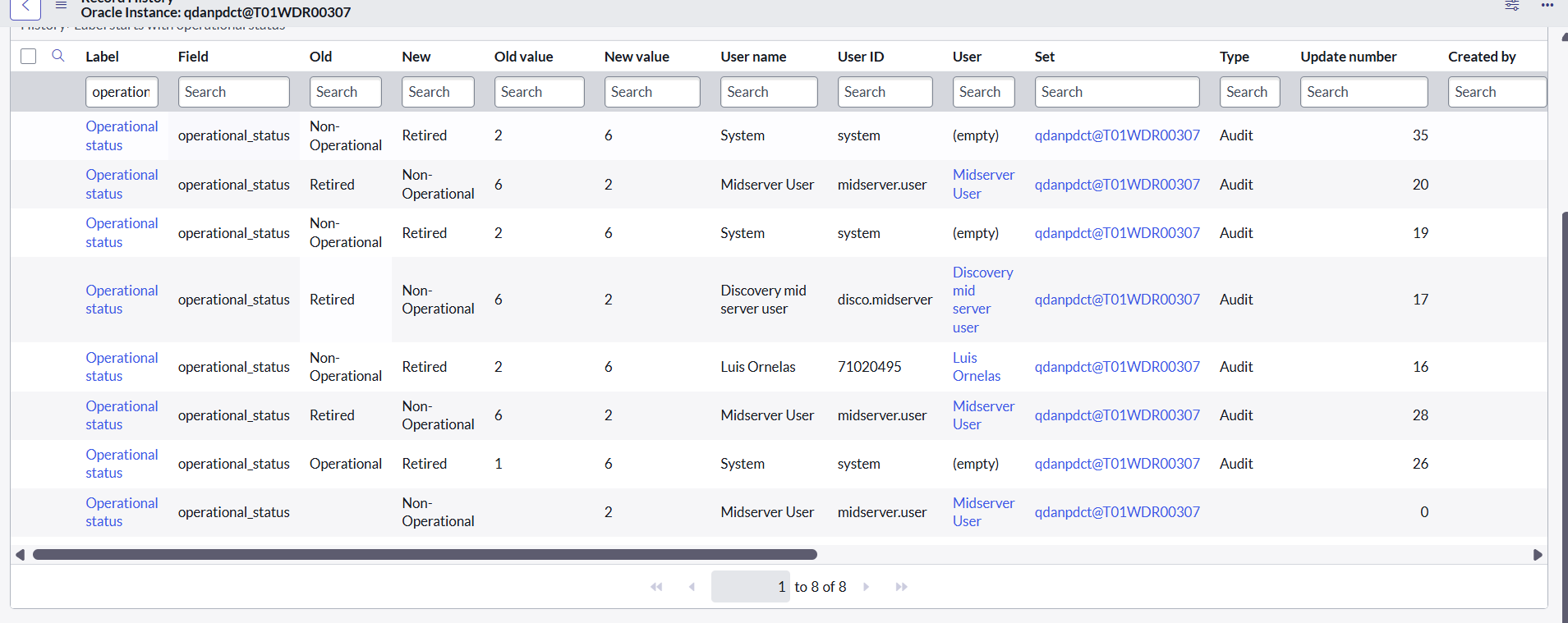
There are lots of issues occurring related to manually change install status of database records CI while checking audit history it shows Discovery (Discovery mid server user) is updating install status as Installed while User name with system marking it as retired and the same process keep changing install status in a loop
How to fix it.
- Mark as New
- Bookmark
- Subscribe
- Mute
- Subscribe to RSS Feed
- Permalink
- Report Inappropriate Content
11-14-2025 08:22 AM
@ayush_g the only possibility is, the status is changed by some server side script (Script Include triggered with scheduled job/Business Rule/Script action). One of the way to check is, check the time stamp the CI status changes to 'Retired' and check in System logs for the same time stamp, what jobs were running.
Or you can do a code search in Studio for 'retired' string (make sure to select the 'All application' check box).
These might give you a trace of it.

- Mark as New
- Bookmark
- Subscribe
- Mute
- Subscribe to RSS Feed
- Permalink
- Report Inappropriate Content
11-14-2025 02:47 AM
A Database CI getting retired means it is no longer being detected by subsequent discovery runs. If it gets discovered again, it will move back to the Installed state. When a CI retires, you may need to check the discovery logs to confirm whether the database discovery is actually happening for that server.
- Mark as New
- Bookmark
- Subscribe
- Mute
- Subscribe to RSS Feed
- Permalink
- Report Inappropriate Content
11-18-2025 01:45 AM
Thanks @VivekSattanatha for response but in our case what is happening even on manually retired by CMDB team discovery runs and keep changing install status from retire to In stock daily how can we resolve this that discovery don't Update install status