SNPI - Import CMDB Data

- Mark as New
- Bookmark
- Subscribe
- Mute
- Subscribe to RSS Feed
- Permalink
- Report Inappropriate Content
11-29-2025 11:40 AM
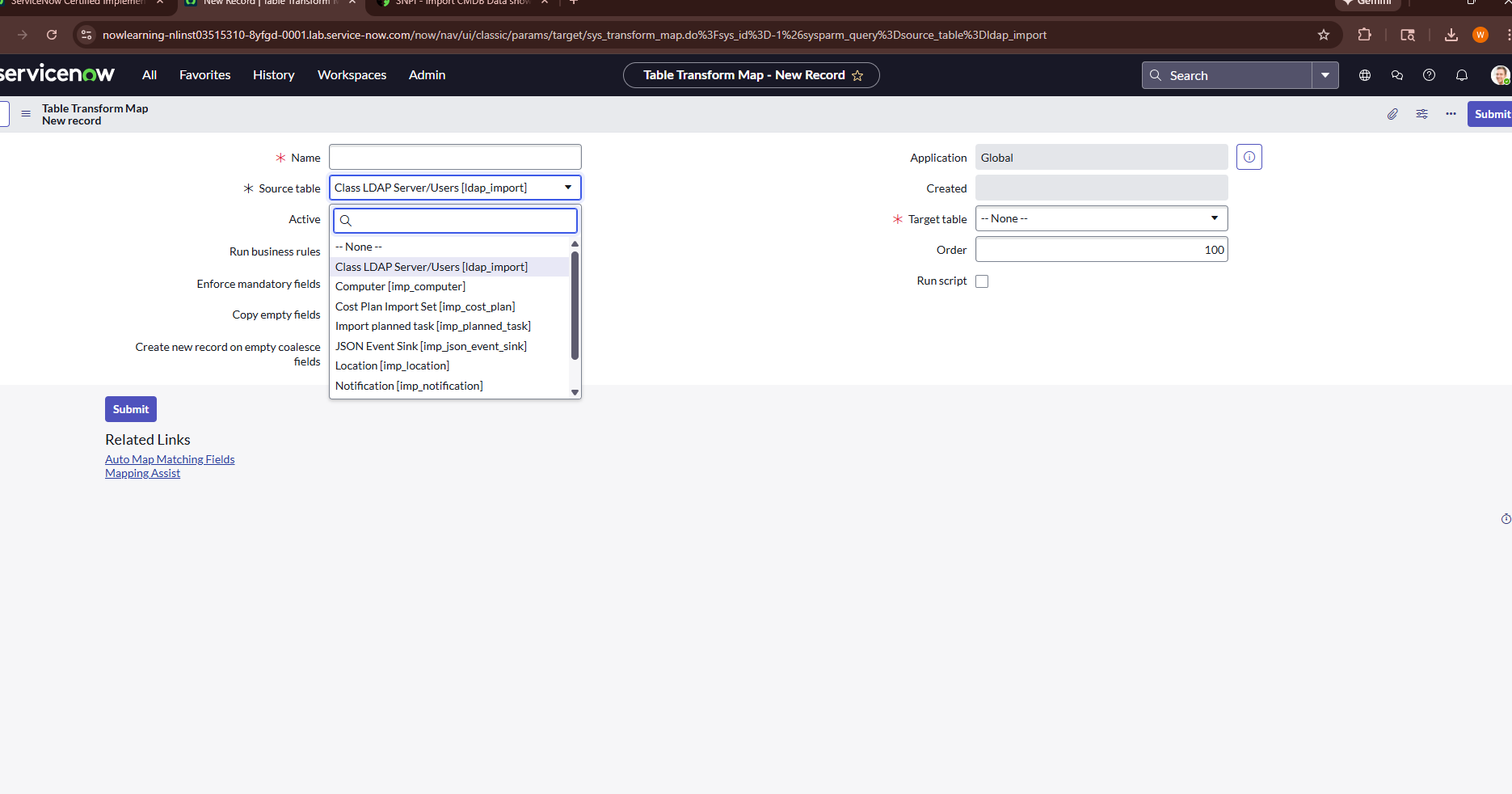
I'm trying to complete the SN Platform Implementation. In lab SNPI - Import CMDB Data it wants the source table to be CMDB Import [u_cmdb_import]. When I follow every step exactly as I'm supposed to in the lab it does not give me that option as a source table. Please see the attachment for the only options I'm given. TIA for the help.

- Mark as New
- Bookmark
- Subscribe
- Mute
- Subscribe to RSS Feed
- Permalink
- Report Inappropriate Content
11-29-2025 12:06 PM
Hi @WJI,
check some of the previous steps, it seems that the table might have been required to be first created...
✂-----Cutting-out-the---✦AI-noise✦---All-replies-written-and-vouched-for-by-GlideFather---
- Mark as New
- Bookmark
- Subscribe
- Mute
- Subscribe to RSS Feed
- Permalink
- Report Inappropriate Content
11-30-2025 07:17 AM
- Mark as New
- Bookmark
- Subscribe
- Mute
- Subscribe to RSS Feed
- Permalink
- Report Inappropriate Content
11-30-2025 12:11 PM
@WJI that's unusual... and if you navigate here can you see it there created?
https://yourInstanceName.service-now.com/sys_transform_map_list.do
Is it there?
If so, then check the scope or any other things... eventually delete the table and try to recreate it again.
PS: when replying, make sure to use the "@" mention, it will be more probable that I will notice your reply (I almost missed it)
✂-----Cutting-out-the---✦AI-noise✦---All-replies-written-and-vouched-for-by-GlideFather---


- Mark as New
- Bookmark
- Subscribe
- Mute
- Subscribe to RSS Feed
- Permalink
- Report Inappropriate Content
11-29-2025 01:36 PM
Hi @WJI
Your source table must be u_cmbd_import.
Please go to import Set tables and check is that table exits or not.
Regards
Dr Atul G. - Learn N Grow Together ServiceNow Techno - Functional Trainer
LinkedIn: https://www.linkedin.com/in/dratulgrover
YouTube: https://www.youtube.com/@LearnNGrowTogetherwithAtulG
******************************************************************************************