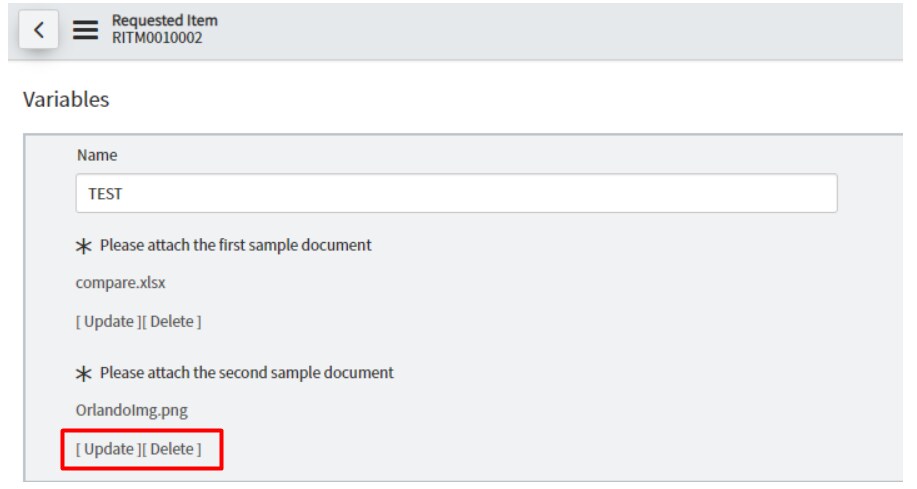
Attachment - [Update] [Delete] action

- Mark as New
- Bookmark
- Subscribe
- Mute
- Subscribe to RSS Feed
- Permalink
- Report Inappropriate Content
04-25-2025 05:23 AM


- Mark as New
- Bookmark
- Subscribe
- Mute
- Subscribe to RSS Feed
- Permalink
- Report Inappropriate Content
04-25-2025 09:15 AM
Hi,
They're not UI actions but baked into the way to the variable type displays. Do you have a question about their functionality
- Mark as New
- Bookmark
- Subscribe
- Mute
- Subscribe to RSS Feed
- Permalink
- Report Inappropriate Content
05-08-2025 02:45 AM
Thank you for your response, Kieran Anson. Actually, I just need to know where they are being configured.
- Mark as New
- Bookmark
- Subscribe
- Mute
- Subscribe to RSS Feed
- Permalink
- Report Inappropriate Content
05-08-2025 07:46 AM
What do you mean by configured? What are you trying to achieve?
- Mark as New
- Bookmark
- Subscribe
- Mute
- Subscribe to RSS Feed
- Permalink
- Report Inappropriate Content
06-11-2026 02:55 AM
We are observing the following behavior when using a File Attachment field (u_icon) in ServiceNow:
- A File Attachment field is configured on the kb_knowledge table.
- A v2.01 record references a sys_attachment record.
- However, the sys_attachment record is actually associated with v2.0 (base_version), rather than the current v2.01 record.
As a result:
- The attachment can be downloaded successfully.
- However, the [Update] and [Delete] links are not displayed.
We would like to confirm the following points:
- What is the exact condition used to determine whether the [Update] and [Delete] links are displayed for File Attachment fields?
- Is it required that sys_attachment.table_sys_id == current record sys_id for these actions to appear?
- Is this logic implemented in a UI Macro, Client Script, or the platform internal renderer?
- Is there any official documentation describing this behavior?
We would greatly appreciate any clarification you can provide, as it will help us accurately explain this behavior to our customer and complete our RCA analysis. Thank you for any response.