- Mark as New
- Bookmark
- Subscribe
- Mute
- Subscribe to RSS Feed
- Permalink
- Report Inappropriate Content
12-02-2025 12:52 AM
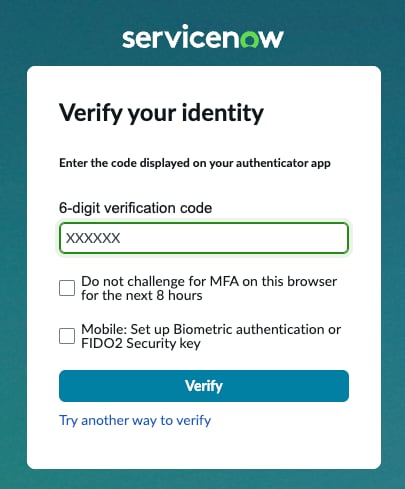
I'm faced with the following issue: after requesting a brand new PDI and installing SAM Pro and Discovery on it via the manage instance section, I'm prompted with a MFA code request while logging into the instance. I haven't set up MFA yet for this instance though and a credentials reset for the admin user via the manage PDI section hasn't resolved the issue.
Some additional info:
- I didn't have the authenticator app enabled for my main SN account (verification through email).
- Setting up the authenticator app for my main SN account doesn't work either (trying everything at this point)
Any thoughts on how to tackle this?
I'm afraid the MFA code it's requesting is from a previous PDI, which I no longer have, and I don't see a way to reset the MFA config.
Solved! Go to Solution.


- Mark as New
- Bookmark
- Subscribe
- Mute
- Subscribe to RSS Feed
- Permalink
- Report Inappropriate Content
12-02-2025 04:39 AM
Hello @RobinM1
I had faced this issue for my account during buildagent campaign two times and since there is no support for PDI, so I had released the instance waited for 1 hour and then requested a new PDI. I was also puzzled that how without setting MFA for new PDI it can asked code during first access.
In my opinion it will better if you release existing instance and do get a new instance after some time gap.
If my response has helped you, hit the helpful button, and if your concern is solved, do mark my response as correct.
Thanks & Regards
Viraj Hudlikar.
- Mark as New
- Bookmark
- Subscribe
- Mute
- Subscribe to RSS Feed
- Permalink
- Report Inappropriate Content
12-02-2025 06:58 AM
Released the instance, waited 2 hours and requested a fresh one. I'm no longer getting the MFA prompt so seems to have done the trick! Thanks again!