Garbled characters on workspace screen

- Mark as New
- Bookmark
- Subscribe
- Mute
- Subscribe to RSS Feed
- Permalink
- Report Inappropriate Content
06-24-2025 11:50 PM
環境情報
SN: 横浜 (パッチ:1a-03-25-2025)
助けてくれてありがとう。
現在、ベンダー環境のワークスペース画面で文字化けが発生しています。
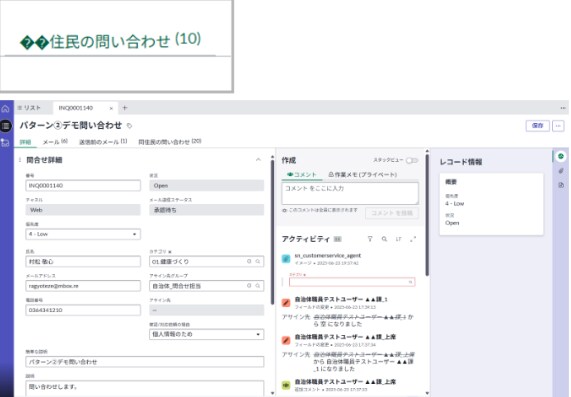
添付されているのは、構成可能なワークスペース画面と文字化けしたテキストの画像です。
この画面は、構成可能なワークスペースの OOTB レコード バリアントの複製です。
正しくは「同住民の問い合わせ」ですが、下図のように「同」が文字化けして表示されません。
残っている証拠はタブの文字化けだけですが、フォーム画面の「問詳細」というフィールド名も文字化けしていることが確認されています。
当社は問題の原因を調査中です。
関連情報や同等の事象がありましたらご提供いただければ幸いです。
ご協力をよろしくお願いいたします。
DeepL.com(無料版)で翻訳
- Labels:
-
Customer Service Management
- Mark as New
- Bookmark
- Subscribe
- Mute
- Subscribe to RSS Feed
- Permalink
- Report Inappropriate Content
09-04-2025 08:35 PM
こちらも同じ現象に悩んでいます。
【現象】
- Service Operation Workspace(OOTB)のリストでフィルターに日本語を入力
- Enterキーを押すと文字化けが発生
もし同じ症状を解決された方がいらっしゃいましたら、
対応方法をご教示いただけると大変助かります。
Garbled characters on workspace screen
Issue:
- In the Service Operation Workspace (OOTB) list, when I enter Japanese text into the filter and press Enter, the characters turn into garbled text.
If anyone has successfully resolved this problem, I would greatly appreciate any guidance or workarounds. Thank you!
- Mark as New
- Bookmark
- Subscribe
- Mute
- Subscribe to RSS Feed
- Permalink
- Report Inappropriate Content
09-04-2025 08:42 PM
①

②

再現ステップスクショです。
一方で、フィルターを開いて、詳細条件の中に文字が正しく表示されています。↓