- Subscribe to RSS Feed
- Mark as New
- Mark as Read
- Bookmark
- Subscribe
- Printer Friendly Page
- Report Inappropriate Content
On a project I am currently working on, the business users receive approvals at certain points in the workflow. They are very busy, and sometimes the process of deciding if they can approve or reject a step takes a while. They wanted to make sure that the approvals didn't get forgotten, and asked me to create a regular report that would list all the items they needed to approve.
I first tried doing this with a report that showed all of the projects open approvals, but they quickly vetoed that--they only wanted to see their own approvals, and not get bogged down trying to figure out if anything in the report applied to them.
Instead, we now send out an individualized notification to any business users who may have approvals that are still pending.
What You Need
To replicate this process, you will need three pieces: an event, a scheduled job that will generate the event, and a notification that will be sent out when the event is generated.
Note: I created the screen shots and the Update Set using the current ServiceNow Sandbox, running Eureka. However, I developed the tool originally using our instance, which is running Dublin. Also, I used the Change module when duplicating this rather than my custom application.
Create Your Event
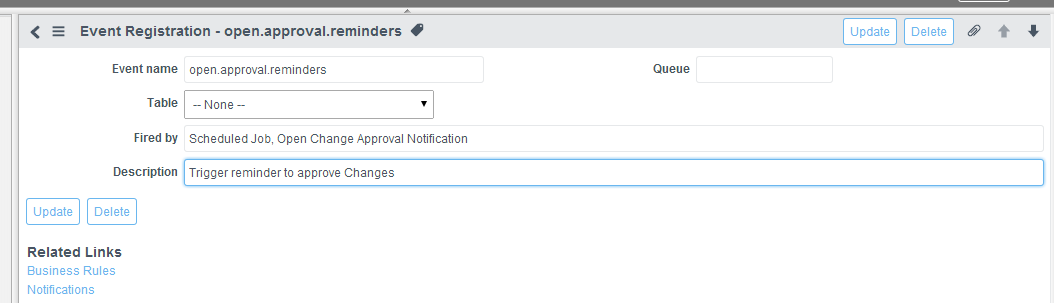
- Go to System Policy | Events | Registry.
- Click New to create a new Event.
- Enter your event information.


Create Your Scheduled Job
- Go to System Definition | Scheduled Jobs.
- Click New to launch the Automation Creator.
- Click Automatically run a script of your choosing.
- Enter a name and when you want the script to run. For this example, we'll go with daily at 8:00 a.m.
- Enter the following script:


var arrUtil = new ArrayUtil(); //set up array to find all pending approvals for users
var answer = [];
var app = new GlideRecord('sysapproval_approver'); //set up variable to retrieve approvals that are pending
app.addQuery('state','requested'); //only retrieve approvals if they are pending (in requested state)
app.addQuery('sysapproval.sys_class_name', 'change_request'); //only retrieve approvals for change records
app.orderBy('approver');
app.query(); //retrieve all approvals that meet our query
while(app.next()){ // step through the approvals one by one
if (arrUtil.indexOf(answer, app.approver.sys_id)==-1) { //if the approver is not currently in our list, add them (next line adds them)
answer.push(app.approver.sys_id);
}
}
for (var i = 0; i < answer.length; i++) { //have array that lists each user who has open change approvals We'll step through each
gs.eventQueue('open.approval.reminders', app, answer[i]); //and fire off the event for each user, passing their sys_id as parm1
}
- Click Submit.
Create Your Notification
- Go to System Policy|Notifications.
- Click New to create a new notification.
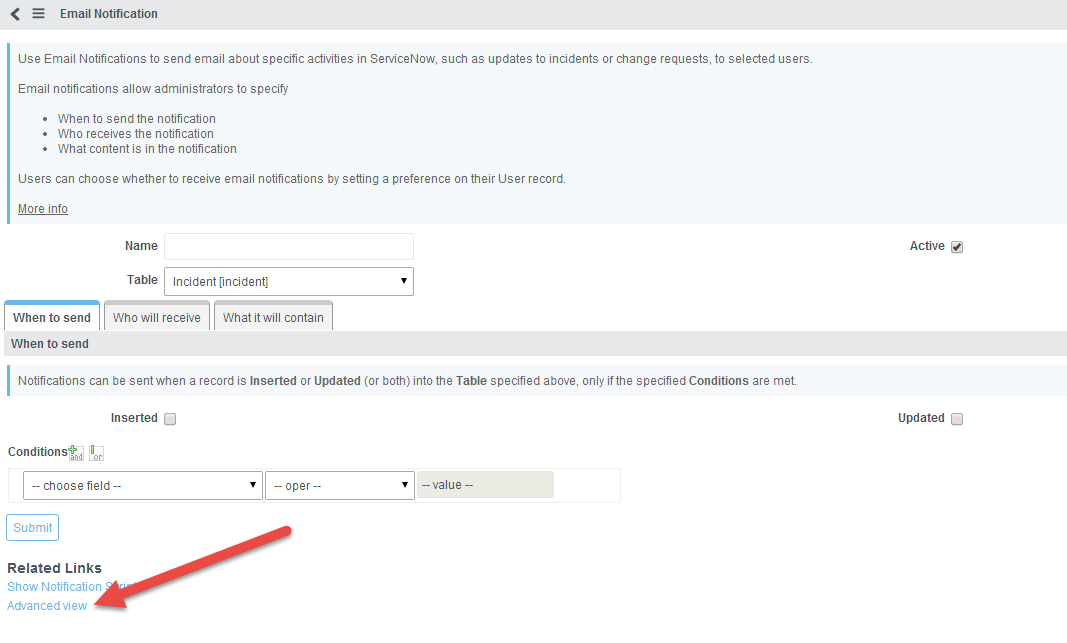
- In Eureka, I needed to click the Advanced view Related Link to see all the options I needed.
- Enter your information for the notification.
- Enter when to send the notification.
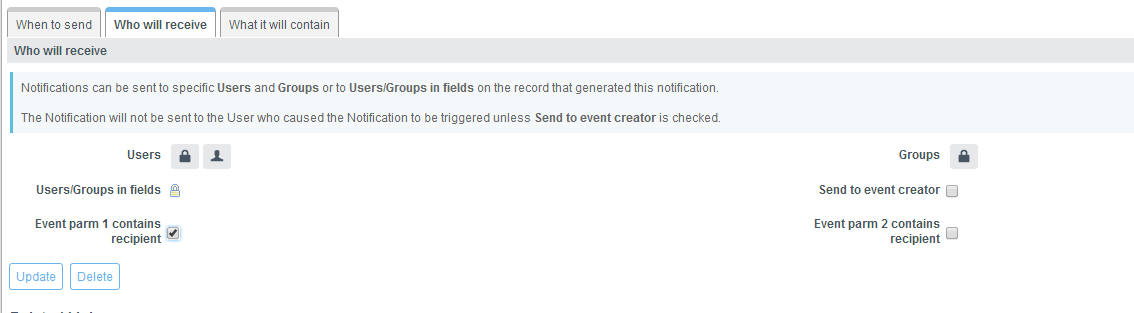
- Parm1 contains the person who should receive the email, so on the Who will receive tab, check that option.
- Finally, you will use a mail script to retrieve the current user, then browse through all the changes for that person and list the relevant information for them. If you are using Dublin (or earlier) the mail script goes on the Message HTML field, enclosed by <mail_script>…</mail_script>
If you are on Eureka, you will create a mail script, then put the link in the form ${mail_script:scriptname} in the Message HTML field. - e="margin: 0in; margin-left: .375in; font-family: Calibri; font-size: 11.0pt;">Here is the script:


//First, we need to locate our current user's approvals (the parm1 variable contains the current approver)
var app = new GlideRecord('sysapproval_approver'); //create a query to retrieve open approvals
app.addQuery('state','requested'); //only retrieve approvals that are pending
app.addQuery('approver',event.parm1); //only find approvals for the current approver
app.addQuery('sysapproval.sys_class_name','change_request'); //only find approvals for change reqeusts
app.query();
while(app.next()){
//now that we have an approval for that user, we are going to look up the change tickets they need to approve and print out the data
var chg = new GlideRecord('change_request'); //find the first related Change approval and print info
chg.get(app.sysapproval);
template.print('<p>You have an open change approval for ' + chg.number + '</br>');
template.print('Change Short Description ' + chg.short_description + '.</p>');
}
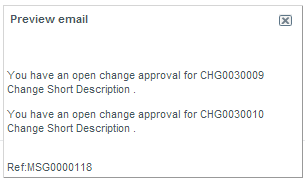
Here are the previews of the resulting emails:


You must be a registered user to add a comment. If you've already registered, sign in. Otherwise, register and sign in.