- Subscribe to RSS Feed
- Mark as New
- Mark as Read
- Bookmark
- Subscribe
- Printer Friendly Page
- Report Inappropriate Content
We are currently implementing a corporate initiative to manage how we set up and approve new Resellers (that is, companies that purchase our product from us, and resell it to the public.) As all Service Management software managers know, users figure out quickly which emails are coming from your tool and many of them immediately send those messages to a folder (or even the trash.) The team asked me to figure out a way to make the "From" field that went out to the business for approvals and reviews to have a different address so they wouldn't get lost (or accidentally trashed...)
It turns out it's pretty simple. Just modify the email notification to set the email From field by including the following mail_script:
<mail_script>
email.setFrom("VendorComplianceOMA");
</mail_script>
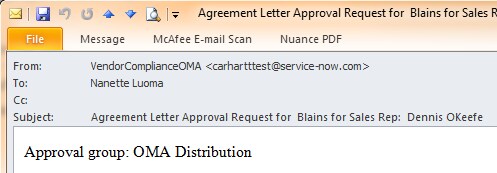
The incoming email will appear as follows:

Note, this only changes the display name, not the underlying address. Many of our users just scan down the "from" field and respond based on the name that shows up. However, some users do have rules that redirect or trash messages based on who they are from. Since we use Outlook, it's relatively easy to create rules in Outlook that work on the display name rather than the email address (using either the "from people or distribution list" condition or the "with specific words in the message header" condition). We wrote a short tutorial for our users who work with Retail Onboarding and showed them how to modify their rules so they don't lose track of these more important messages.
You must be a registered user to add a comment. If you've already registered, sign in. Otherwise, register and sign in.