- Post History
- Subscribe to RSS Feed
- Mark as New
- Mark as Read
- Bookmark
- Subscribe
- Printer Friendly Page
- Report Inappropriate Content
on 05-23-2019 10:11 AM
I have been banging my head against the wall for the past few days trying to figure this out. I couldn't find anything on the internet or community specific to my case, so I'm posting this article in hopes it will help someone in the future.
My custom application has a GlideAjax call from a client script to the script include. Everything worked great, until I enabled Application administration. Once that happened, only users with the application's admin role would execute the script include from the GlideAjax call. End-users could execute it server-side, but it failed from the GlideAjax call every time. No settings within the caller restrictions or anything on the script include helped.
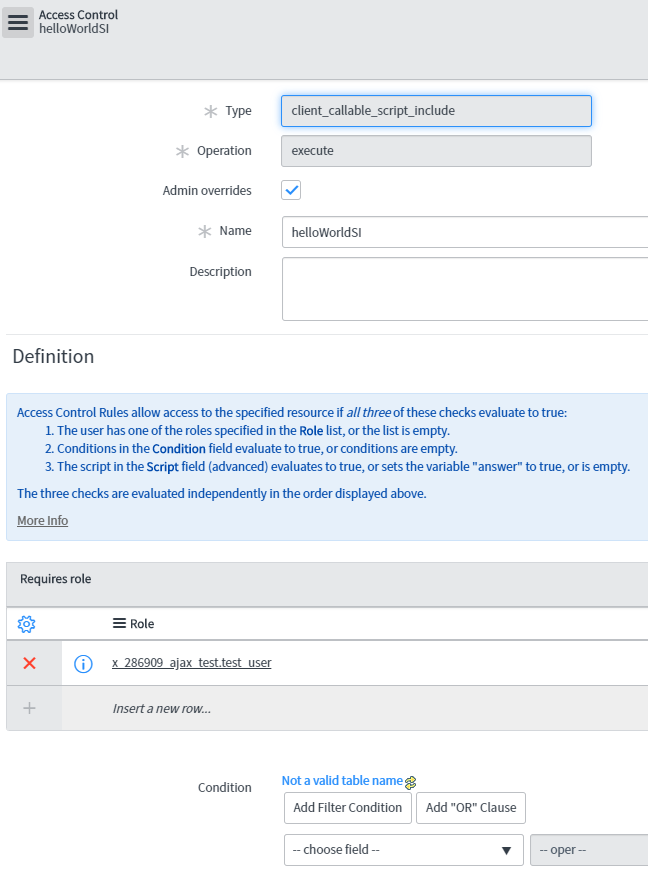
In short, you need to create an ACL to that script include. In studio, create a new ACL and set the type to client_callable_script_include. Set the Name to the name of your script include (ignoring the x_ap_name prefix). Add whatever restrictions or roles necessary to open this up. Attached is an example of how my script include named helloWorldSI is set up in an ACL.

- 2,820 Views
- Mark as Read
- Mark as New
- Bookmark
- Permalink
- Report Inappropriate Content
Hello Brain,
Same here, tried to figure out for few days and finally your article helped out. Thank You

- Mark as Read
- Mark as New
- Bookmark
- Permalink
- Report Inappropriate Content
Thank you Brian.