- Post History
- Subscribe to RSS Feed
- Mark as New
- Mark as Read
- Bookmark
- Subscribe
- Printer Friendly Page
- Report Inappropriate Content
on 08-21-2021 07:26 AM
Hi Folks,
This is my second article for ServiceNow community and is based on Workflow containing Orchestration Activities. The solution described below in this article is an outcome of a client facing issues on errors in their Workflows that contained orchestration activities that utilizes MID server.
Problem Statement:
My client is heavily dependent on the Orchestration activities for triggering Database queries, commands, PowerShell code, etc. via the MID Server to their Applications, Active Directory, Databases, etc. hosted on their Infra.
This made them the best candidate to suffer with failed or errored out workflow whenever the MID server was Down due to Upgrade or MID server restart. Moreover, the error handling on the Workflow were designed to generate an Incident whenever the Workflow errors out, resulting into countless incidents piling up. The platform administration team was not having a good experience with the stuck, errored out workflows and the Incidents.
They wanted to pause the workflow whenever the MID Server was down and then again resuming back the workflow when the MID Server comes up.
The pausing and resuming of workflow were my only hints and the below solution strikes me.
Solution:
As you all know, whenever a MID Server goes Up or Down, it triggers an event on the platform. The events are [mid_server.up] and [mid_server.down] respectively, thus this can be used as the triggers to pause and resume the Workflow along with "Wait for Workflow Event Activity". Below is a simple Workflow screenshot demonstrating the same.

In the "IF" activity, I am checking whether my required MID server is Down. I am doing this using the below script in the script box of IF Activity.
answer = ifScript();

function ifScript() {

	var quer = "status=Down^name=ProdMIDServer";
	var midGr = new GlideRecord("ecc_agent");
	midGr.addEncodedQuery(quer);
	if(midGr.next()) {
		return 'yes';
	} else {
		return 'no';
	}

}
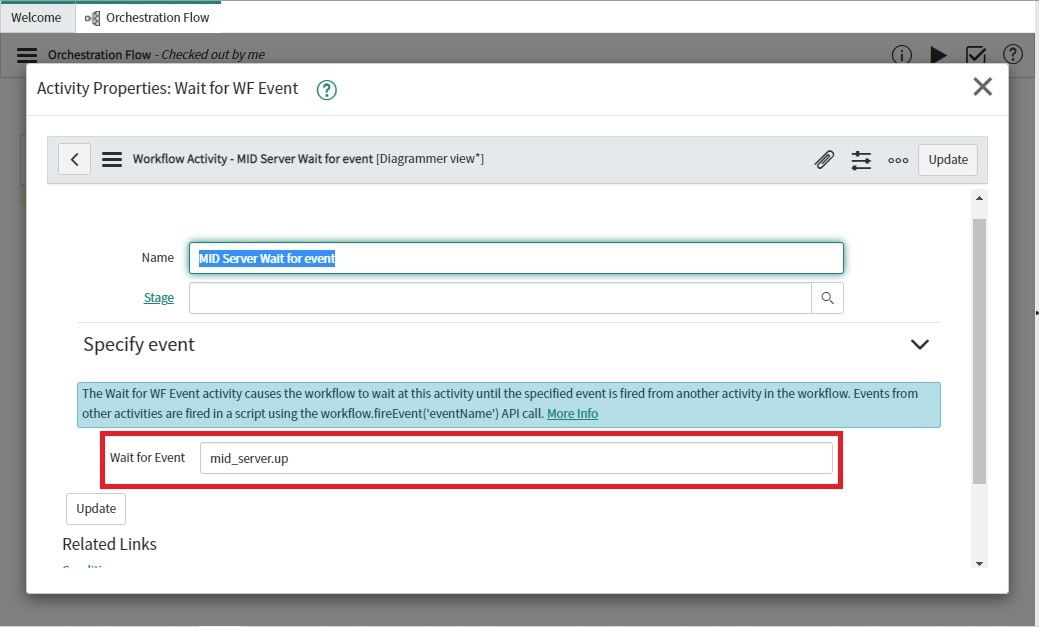
If "YES" it sends the flow control to "Wait for Workflow Event Activity", where it waits for "mid_server.up" event to fire.
But there is a catch to it, just mentioning the mid_server.up event in the Wait for Workflow Event activity will not resume it when the MID server comes up back and triggers mid_server.up event on the platform.
The reason is that, the regular Registered events and events specified in the Wait for Workflow Event activity are very different and they also listens to different triggers. Where regular registered events listens to the triggers fired by gs.eventQueue() or gs.eventQueueScheduled() APIs, Events specified in Wait for Workflow Event activity listens to triggers fired by new Workflow().broadcastEvent(wf.sys_id, '<event_name_sepcified_in_activity>'); or by new Workflow().broadcastEventToCurrentsContexts(current , 'mid_server.up', '<event_params>'); APIs. [Where current is the Glide Record object on which Workflow is running].
As, regular Registered events and events specified in the Wait for Workflow Event activity listens to triggers fired by different APIs, so it is totally safe to have an event that has same name in regular Registered Events and events specified in the Wait for Workflow Event activity. They will never conflict with each other because of their different triggers types and subsequently their different execution paths.

Also, there is one important difference which I would like to highlight when regular registered events and events specified in wait for workflow event activity is executed, i.e. When regular registered events executes you can track their execution status using the Event[sysevent] table, whereas when a Wait for Workflow Event Activity is in executing state in a workflow, you can see the record in Workflow Executing Activity[wf_executing] table by applying the below filter
registered_events | is | <event_name>.
NOTE: Don't get confused by the filter above, as registered_events is not referring to the regular registered events, but to the name of events specified in the Wait for Event field of Wait for Workflow Event activity. It is just ServiceNow's way of naming fields.
More on workflow event can be read here. Also, you can check out the screenshot below for the same.

Using the above knowledge for Wait for Workflow Event activity, we need a Script Action on the regular registered event <mid_server.up> to inform all of our paused workflow who are waiting on wait for workflow activity event that has also the same name as the regular registered event, which is in this example is <mid_server.up>.
NOTE: You can also have a different name for the event mentioned in the wait for workflow event activity. It is totally up to you.
var WFExecutingGR = new GlideRecord("wf_executing");
WFExecutingGR.addEncodedQuery("registered_events=mid_server.up^state=waiting^contextISNOTEMPTY");
WFExecutingGR.query();
while(WFExecutingGR.next()) {

    var recordGR = WFExecutingGR.context.id.getRefRecord();
    if(recordGR.isValidRecord()) {
       new global.Workflow().broadcastEventToCurrentsContexts(recordGR, 'mid_server.up', null);
    }

}
In the script specified in the script action, I am querying on the Workflow Executing Activity[wf_executing] table to fetch all the records that are having Wait for Workflow event activity in waiting state for mid_server.up workflow event using the encoded query "registered_events=mid_server.up^state=waiting^contextISNOTEMPTY". Once fetched, iterating over each one of them to fetch the glide record object of the workflow context record using the getRefRecord() and then, using this context record object inform each of the workflow to resume back it's execution using this code.
new global.Workflow().broadcastEventToCurrentsContexts(recordGR, 'mid_server.up', null); where "mid_server.up" in this case is the event specified in the Wait for Event field of the Wait for Workflow Event activity.
Now, after some time when the MID server comes up, it triggers the "mid_server.up" regular registered event on the platform and that in turns trigger the script action, which broadcast to all those workflow context record that are having "Wait for Workflow Event" activity in waiting state, making the workflow to resume back execution.
This Wait for Workflow Event Activity is again connected back to the IF activity to check if our required MID server is UP or is it some other MID server.

If it is our required MID server, the execution of the Orchestration activity triggers, else it goes to wait again.
NOTE: There is also an alternate way to have additional MID servers configured on the platform along with MID server clusters configured to do Failovers, so if one goes down, the other can handle the demand.

But if you have only one MID server, the above solution comes handy for your Workflows containing orchestration activities or REST Triggers via MID Server.
This is a small solution with just 2 activities to pause and resume the Workflow. The above solution can also be utilized in other scenarios where you don't know the amount of time to Pause the Workflow and thus make use of the above concept of Wait for Workflow Event.
Enjoy....
- 3,910 Views
- Mark as Read
- Mark as New
- Bookmark
- Permalink
- Report Inappropriate Content
- Mark as Read
- Mark as New
- Bookmark
- Permalink
- Report Inappropriate Content
True, the solutions to bigger complex problem is the path of Simplicity