Daniele Songini
Tera Guru
Options
- Post History
- Subscribe to RSS Feed
- Mark as New
- Mark as Read
- Bookmark
- Subscribe
- Printer Friendly Page
- Report Inappropriate Content
on 08-13-2020 06:20 AM
Hello everybody,
I want to share a quick way to search for a string in the instance code,
using a slightly modified version of UI Page "CodeSearchExampleUse".
Create a new UI Page
HTML
<?xml version="1.0" encoding="utf-8" ?>
<j:jelly trim="false" xmlns:j="jelly:core" xmlns:g="glide" xmlns:j2="null" xmlns:g2="null">

	<g:requires name="styles/heisenberg/heisenberg_all.css" includes="true" />
	<g:requires name="scripts/lib/jquery_includes.js" />
	<g:requires name="scripts/heisenberg/heisenberg_all.js" />

	<g:sn_codesearch_CodeSearchExample />
</j:jelly>
Client script
// Default search in all applications
document.getElementById("sn_codesearch_search_all_scopes").checked = true;

function sn_codesearch_getResults() {
	$j("#sn_codesearch_results").html('');

	var userToken = "$[gs.getSessionToken()]";

	var endpoint = '/api/sn_codesearch/code_search/search',
	limit = $[gs.getProperty('sn_codesearch.search.results.max', 500)],
	req = {
		data : {
			limit : limit,
			current_app : "sn_codesearch",
			table : $j("#sn_codesearch_table").val(),
			term : $j("#sn_codesearch_term").val(),
			search_all_scopes : $j("#sn_codesearch_search_all_scopes").is(":checked")
		},

		dataType : 'json',
		headers : {"X-UserToken" : userToken}
	};

	if(!req.data.term) {
		alert("No search term provided.");
		return false;
	}

	var jqxhr = $j.ajax(endpoint, req)
		.done(function(data, textStatus, jqXHR) {
			var result = data.result;
			//are we dealing with just one table's results
			if (req.data.table)
				writeOutputForTable(result);
			else
				for (var i=0; i<result.length; i++)
					writeOutputForTable(result[i]);
		})
		.fail(function(jqXHR, textStatus, errorThrown) {
			console.log("Error - unable to complete search. Message is " + errorThrown);
		});

	return false;
}

function sn_codesearch_clearSelections() {
	$j("#sn_codesearch_table").val('');
	$j("#sn_codesearch_term").val('');
	if ($j("#sn_codesearch_search_all_scopes").is(":checked"))
		$j('label[for="sn_codesearch_search_all_scopes"]').click();

	return false;
}

function writeOutputForTable(data) {
	if(!data)
		return;

	if(!data.hits)
		return;

	var header = $j("<div><h1>" + data.tableLabel + "</h1></div>");
	var result_body = "<div><p> Found <strong>" + data.hits.length + "</strong> records matching query.</p></div>";
	result_body += "<div>";

	$j.each(data.hits, function(idx, hit) {
		// Link to the record
		var result_desc = "<p>Record <a href='/" + hit.className + ".do?sys_id=" + hit.sysId + "' target='_blank' >" + hit.name + "</a> has <strong>" + hit.matches.length + "</strong> matching fields.</p>";
		var text = "<ul>";

		$j.each(hit.matches, function(indx, match) {
			text += "<li><p>" + match.fieldLabel + "</p>";
			text += "<pre>";
			$j.each(match.lineMatches, function(ix, fieldMatch) {
				text += "Line: " + fieldMatch.line + " " + fieldMatch.escaped + "\n";
			});
			text += "</pre></li>";
		});
		text += "</ul>";

		result_body += result_desc + text;
	});

	result_body += "</div>";
	$j(result_body).appendTo(header);
	$j(header).appendTo($j("#sn_codesearch_results"));

}
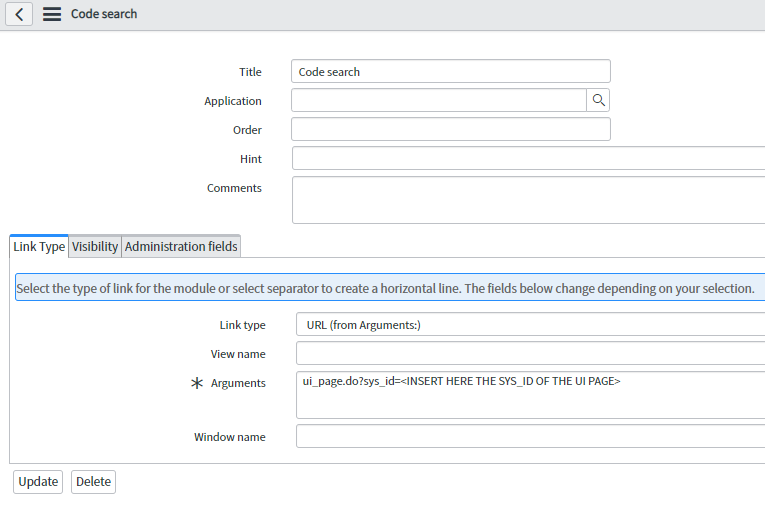
At this point just create a Module that will open the UI Page

The final result is

Compared to the original page, it has the "Search All Applications" checked by default, and the link to the record in which the string was found.
I hope it's useful!
Corrections and comments are welcome 🙂
Daniele
- 3,453 Views
Comments

eviljack
Tera Contributor
- Mark as Read
- Mark as New
- Bookmark
- Permalink
- Report Inappropriate Content
02-09-2025
11:14 PM
Very nice! If you want to filter out tables with no result add this to the function writeOutputForTable:
if(data.hits.length === 0)
	return;