- Post History
- Subscribe to RSS Feed
- Mark as New
- Mark as Read
- Bookmark
- Subscribe
- Printer Friendly Page
- Report Inappropriate Content
12-12-2019 01:22 AM - edited 08-29-2025 12:05 PM
Articles, Blogs, Videos, Podcasts, Share projects - Experiences from the field
Hi there,
While working with the Multi-Row Variable Set on Catalog Items, a while ago I stumbled on making the Multi-Row Variable Set conditional visible. Conditional visible like having a Multi-Row Variable Set appear upon checking a Checkbox variable. While working on this I came across several Community topics which used Catalog Client Scripts to achieve this. I thought, can't this be done easier? Maybe already through a Catalog UI Policy? Similar to making a Multi-Row Variable Set mandatory?
Default behavior
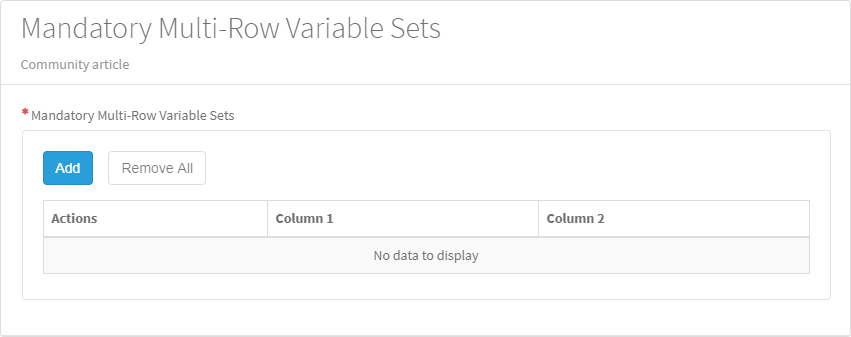
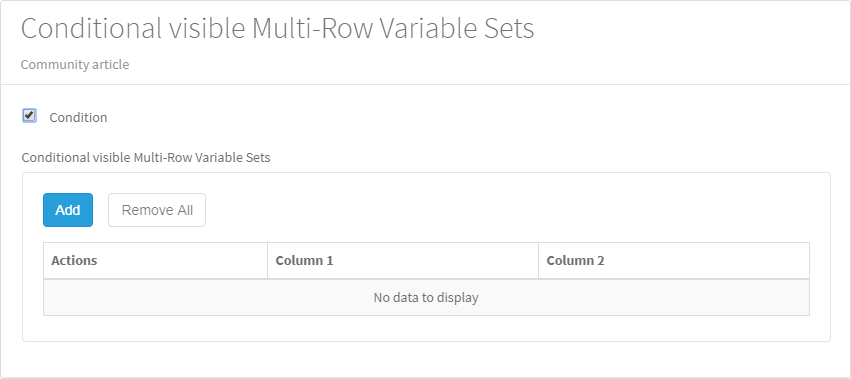
When setting up a Multi-Row Variable Set, and adding this to a Catalog Item or Record Producer, the default behavior looks something like:

Conditional visible
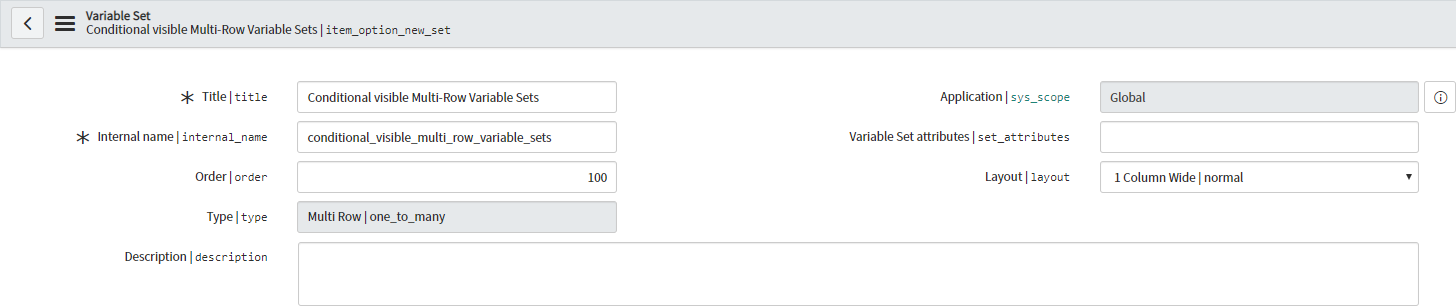
On the Multi-Row Variable Set record itself, notice there's no visible flag for example.

Though available options which are helpful are:
1) Catalog Client Scripts
2) Catalog UI Policies
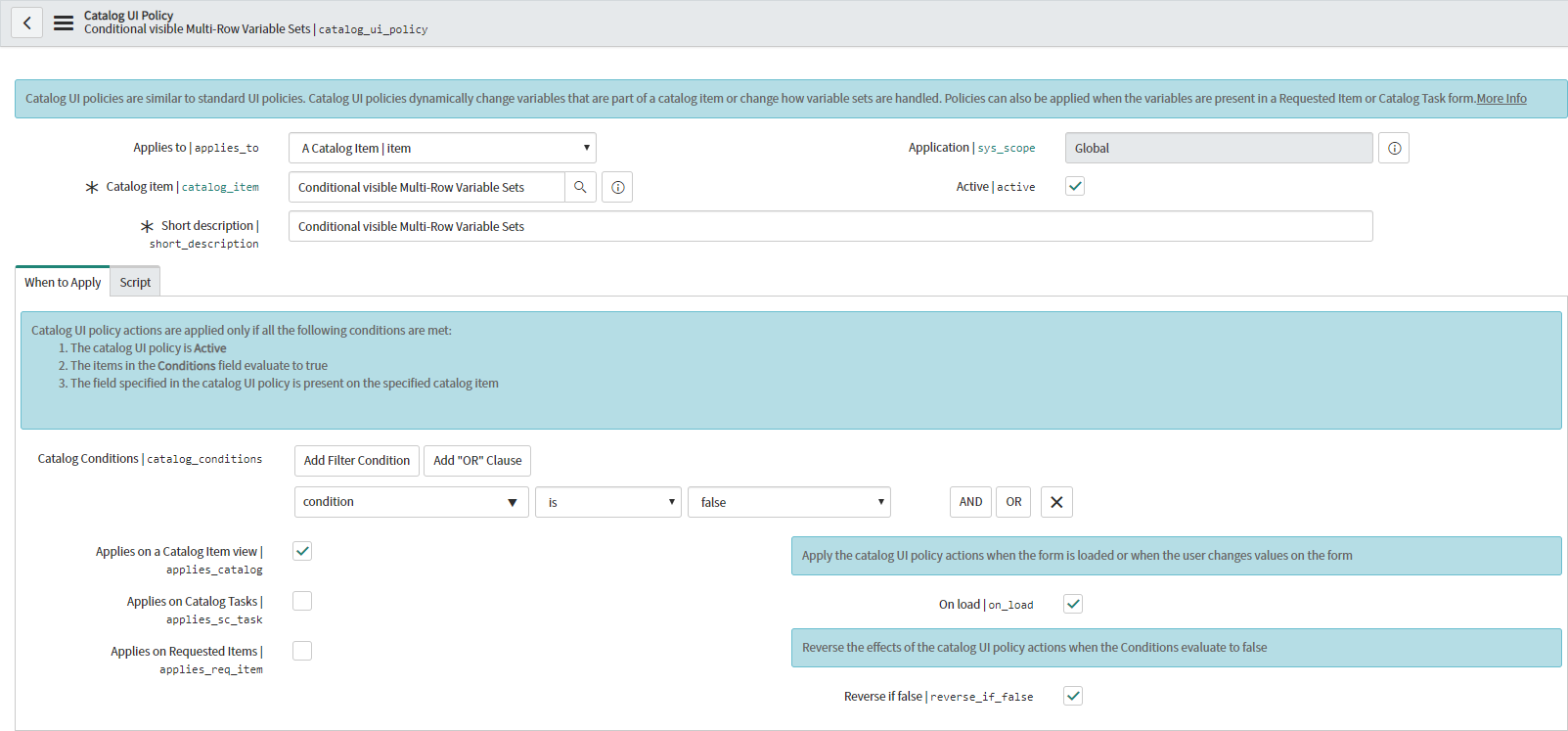
Catalog UI Policy
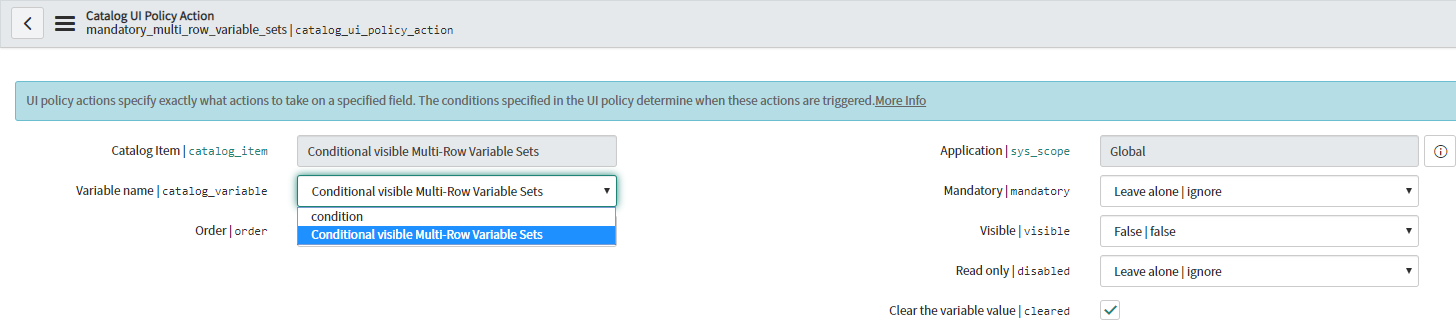
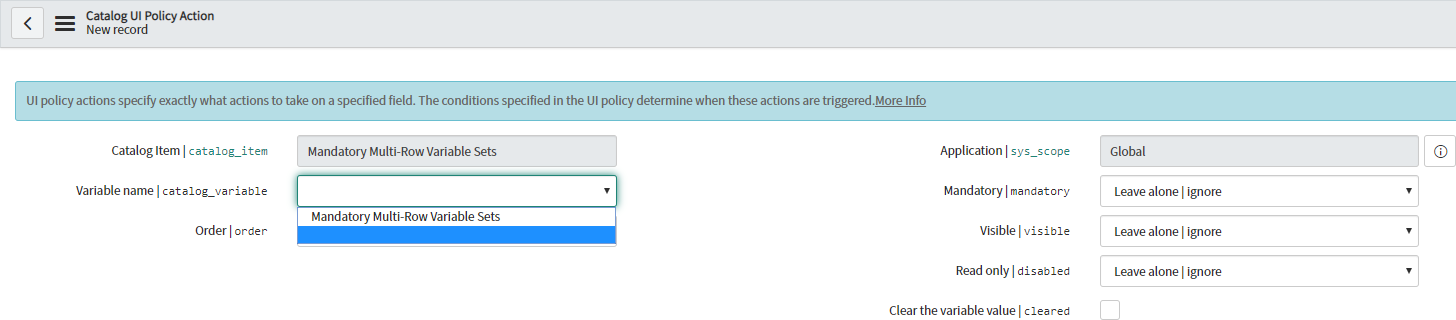
When adding a Catalog UI Policy and the Catalog UI Policy Actions on the Catalog Item level (not on the Multi-Row Variable Set level!), notice the available Variables on the Catalog UI Policy Action:

The Variable name field will list all Variables and all Multi-Row Variable Sets! Knowing this, is the actual gem of this whole story 😀. Simply select the Multi-Row Variable Set within the Variable name field, set the Visible field to false, and check the Clear the field value field.
On the Catalog UI Policy, set up your condition. Because we've chosen to apply Clear the field value and Visible false, your condition on the Catalog UI Policy should evaluate to false. Read about this in one of my previous articles: Clear the field value / Clear the variable value.

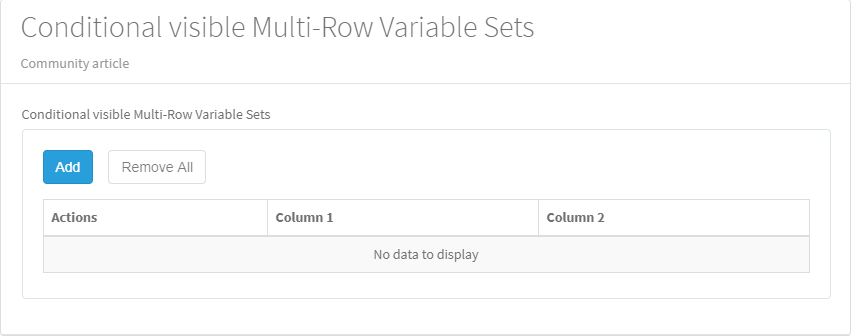
Result


---
And that's it actually. Hope you like it. If any questions or remarks, let me know!
| C |
If this content helped you, I would appreciate it if you hit bookmark or mark it as helpful.
Interested in more Articles, Blogs, Videos, Podcasts, Share projects I shared/participated in? |
Kind regards,
Mark Roethof
ServiceNow Technical Consultant @ Paphos Group
---
- 15,609 Views

- Mark as Read
- Mark as New
- Bookmark
- Permalink
- Report Inappropriate Content
Something completely off the subject of this post, How did you get your browser to show the field names next to the labels? I need this sorcery
- Mark as Read
- Mark as New
- Bookmark
- Permalink
- Report Inappropriate Content
Hi,
Its SN Utils extension feature
You can install this extension from chrome store
- Mark as Read
- Mark as New
- Bookmark
- Permalink
- Report Inappropriate Content
Hi @Mark Roethof
I have a multi row variable set in which it contains 4 variables, I need to hide 2 of the variables which contains sensitive information. I have created catalog UI policy and Catalog UI script to hide the variables on the RITM and catalog task but they are not getting hidden. Can you help on this?
Thank you.

- Mark as Read
- Mark as New
- Bookmark
- Permalink
- Report Inappropriate Content
Hi @Sampathr382
What you're seeing is expected MRVS behaviour: catalog UI policies and client scripts (setDisplay/setVisible) work on the variables inside the add/edit row dialog, but they don't hide the columns of the MRVS grid, so on the RITM and catalog task the columns still show.
Options:
1. If you're on Australia or later
- Open each of the two variables inside the MRVS and tick "Hide on grid".
- If you don't see the field, add it through Configure > Form Layout on the variable form (it can be missing if the form layout was customised before the upgrade - check Upgrade History for a skipped record).
- Test on Portal, the RITM and the catalog task.
2. If you need to protect the data, not just hide it
- Hiding a column is only cosmetic. The whole MRVS is stored as one JSON value, so anyone who can read the variable (list, API, reports) can still see those fields.
- Better options: keep the sensitive values out of the MRVS (separate variables with read roles / restricted ACLs), or store them on a restricted table and only keep a reference in the row.
3. Avoid the CSS/DOM scripts you'll find in older threads - they only work in the Portal, break on upgrades, and don't protect anything.
On releases before Australia there's no supported way to hide individual MRVS columns on RITM/SCTASK.
If this helps, please mark it helpful or accept it as the solution.
- Mark as Read
- Mark as New
- Bookmark
- Permalink
- Report Inappropriate Content
Thank you @Kailash Bhange for the inputs.
Can we populate the mrvs data in ctasks?
- Mark as Read
- Mark as New
- Bookmark
- Permalink
- Report Inappropriate Content
Hi @Sampathr382,
Yes, you can - it just isn't automatic, because variables inside an MRVS can't be marked Global, so the MRVS won't show on the catalog task on its own. You need to add it to the task when the task is created.
1. Flow Designer / Workflow Studio (recommended)
- In your flow, open the Create Catalog Task action.
- In Catalog Variables, move the MRVS from Available to Selected (the Template Catalog Item must be the same item).
- Save, activate, and raise a new request - existing tasks won't pick it up retroactively.
2. Legacy workflow
- Open the Catalog Task activity and add the MRVS under the Variables section, same idea.
3. If you need the row values themselves on the task (e.g. in the description, or one task per row)
- Use Get Catalog Variables (select the MRVS), then a For Each over the MRVS rows.
- Inside the loop you can build the description text, or create one catalog task per row.
A couple of things to keep in mind, given your earlier question:
- "Hide on grid" (Australia+) also applies wherever the MRVS is shown, so check the task view after you add it.
- Read roles aren't supported for variables inside an MRVS, so if those two fields are sensitive, adding the MRVS to the task exposes them to fulfillers. If the fulfillers shouldn't see them, keep them out of the task or move them out of the MRVS.
- Avoid the older scripts that make the MRVS Global or inject an HTML table with jQuery - they're unsupported and tend to break on upgrade.
Which release are you on, and are you using a flow or a legacy workflow for this item? I can be more specific from there.
If this helps, please mark it helpful or accept it as the solution.
- Mark as Read
- Mark as New
- Bookmark
- Permalink
- Report Inappropriate Content
@Kailash Bhange I have used 'Hide on grid' option to hide the few mrvs column on the catalog item view and RITM view but I want to show the columns in CTASK variables. Is it possible?
- Mark as Read
- Mark as New
- Bookmark
- Permalink
- Report Inappropriate Content
Hi @Sampathr382,
Short answer: not with "Hide on grid" alone. It's a single setting on the variable itself, so it applies wherever that MRVS grid is rendered - you can't tick it for the item/RITM and untick it for the catalog task. Catalog UI policies won't help at column level either, because for an MRVS a UI policy action can only target the whole set, not the variables inside it.
If fulfillers really need to see those columns on the CTASK, there are two practical options:
Option 1 - a "task copy" MRVS (keeps the grid look on the task)
1. Create a second MRVS (e.g. task_details) with the same variables, but leave "Hide on grid" unticked.
2. Add it to the catalog item.
3. Create a catalog UI policy (no condition / always true) with a UI policy action on the whole task_details set: Visible = false. Set Applies on a Catalog Item view = true, Applies on Requested Items = true, Applies on Catalog Tasks = false.
4. Create a second catalog UI policy for the same set with Visible = true and only Applies on Catalog Tasks = true.
5. Copy the rows from the original MRVS into the copy server-side. Variables can only be written in a before business rule, e.g. on sc_req_item, before insert, condition Item is <your item>:
(function executeRule(current, previous) {
// original MRVS -> task copy MRVS (both have the same variable names)
current.variables.task_details = current.variables.original_mrvs.toString();
})(current, previous);
Replace task_details / original_mrvs with your internal names. If the variable names differ, loop with getRowCount()/getRow() and addRow()/setCellValue() instead.
6. Make sure task_details is added to the catalog task (Create Catalog Task > Catalog Variables in your flow, as in my earlier reply).
Option 2 - simpler, no second MRVS
In the flow, use Get Catalog Variables on the original MRVS, loop with For Each, and write the hidden columns into the task's description or work notes when you create the CTASK.
One caveat, since you mentioned these are sensitive fields: both options just move where the data is shown. The values still sit in the RITM variables (the MRVS is stored as JSON), so anyone who can read the RITM variables can get to them. If this is about protecting data rather than tidying the view, look at restricting who can read the RITM/variables rather than hiding columns.
If this solves it, please mark it helpful or accept it as the solution.