- Post History
- Subscribe to RSS Feed
- Mark as New
- Mark as Read
- Bookmark
- Subscribe
- Printer Friendly Page
- Report Inappropriate Content
on 07-19-2019 07:16 AM
In this article, I will explain how to copy attachments from 1 incident record to another. You can use the same logic for any other table as well.
To do this, we will use the following
- A UI action (Form button) to display on the source record
- A popup view to select target incidents
- A UI Button (list choice) to trigger copy action
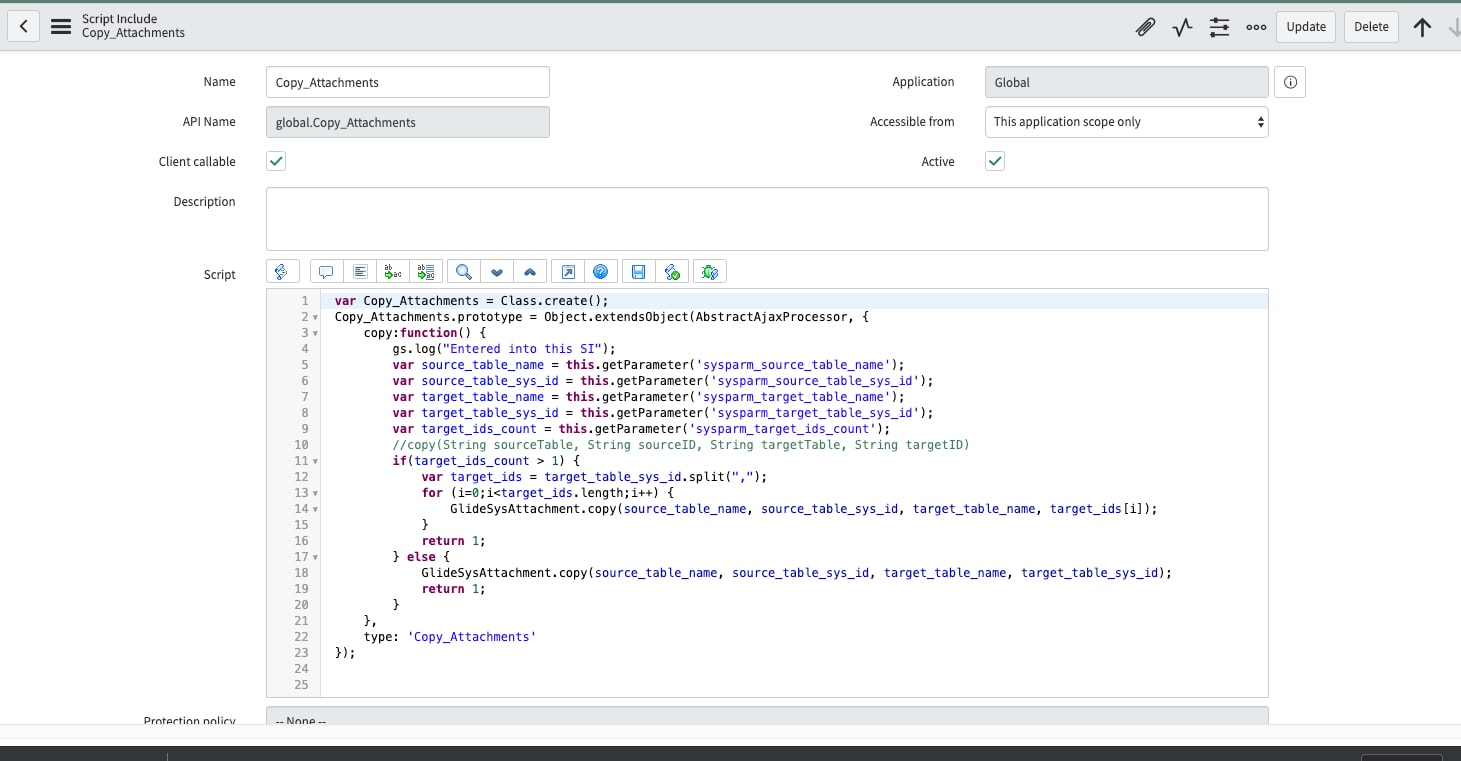
- A script include to actually copy
UI Action (Form button)


Popup View

UI Action Copy (list choice)

In the script, add the below code
function copyAttachments() {
  var gdw = GlideDialogWindow.get();
  var source_table_name = gdw.getPreference('source_table_name');
  var source_table_sys_id = gdw.getPreference('source_table_sys_id');
  var target_table_name = g_list.getTableName();
  var selected_elem = g_list.getChecked();
  var selected_ids = selected_elem.split(",");
  if(selected_ids.length>1) {
    for(i=0;i<selected_ids.length;i++) {
      if(selected_ids[0]==source_table_sys_id) {
        alert("You seem to have selected the source record also here. kindly check ");
	return false;
      }
    }
  } else {
    if(selected_elem==source_table_sys_id) {
      alert("The selected record is same as source record. kindly check ");
      return false;
    }
  }

  console.log("Copy attachments"+source_table_name+"---"+source_table_sys_id+"---"+g_list.getChecked()+"--"+g_list.getTableName());
  //call script include to copy attachment.
  var ga = new GlideAjax('Copy_Attachments');
  ga.addParam('sysparm_name','copy');
  ga.addParam('sysparm_source_table_name',source_table_name);
  ga.addParam('sysparm_source_table_sys_id',source_table_sys_id);
  ga.addParam('sysparm_target_table_name',target_table_name);
  ga.addParam('sysparm_target_table_sys_id',selected_elem);
  ga.addParam('ssysparm_target_ids_count',selected_ids.length);
  ga.getXML(callback);
  function callback(response)
  {
    var answer = response.responseXML.documentElement.getAttribute("answer");
    if(answer) {
      gdw.destroy();
      g_form.addInfoMessage("Attachments copied successfully");
    }
    else {
      gdw.destroy();
      g_form.addErrorMessage("Error: Attachments not copied ");
    }
  }
}
Script Include (Copy Attachments)

Let me know if you have any questions in the comments.
Mark the article as helpful and bookmark if you found it useful.
- 5,502 Views

- Mark as Read
- Mark as New
- Bookmark
- Permalink
- Report Inappropriate Content
Thanks for the info! I've been trying to do this for a while. I had to resort to creating a new relationship between tables and listing all attachments as a related list.
- Mark as Read
- Mark as New
- Bookmark
- Permalink
- Report Inappropriate Content
Glad it will help you.
I will also be creating another article where you can specifically copy the single attachments from 1 record to another.
- Mark as Read
- Mark as New
- Bookmark
- Permalink
- Report Inappropriate Content
Hi,
I have added a new article, which will allow you to copy specific attachment (not all) from 1 record to another. Kindly check it.

- Mark as Read
- Mark as New
- Bookmark
- Permalink
- Report Inappropriate Content
Thank you could you (or anybody) please post the "copy_incidents_attach_view" ui page?
- Mark as Read
- Mark as New
- Bookmark
- Permalink
- Report Inappropriate Content
Hello Simon,
It is not a UI page, but a view created on incident table with selected columns. (configure list layout, and in that you can select New under views and create a new view and keep only the columns that you want).
In my above article, if you check, you will find popup view, which is actually the copy_incidents_attach_view that is rendered there.
And it is rendered as popup using GlideDialogWindow using UI action (check 1st screenshot in the above article).
Mark the comment as helpful if it helps.
- Mark as Read
- Mark as New
- Bookmark
- Permalink
- Report Inappropriate Content
made my day, thank you very much 😄
- Mark as Read
- Mark as New
- Bookmark
- Permalink
- Report Inappropriate Content
Glad it helped 🙂

- Mark as Read
- Mark as New
- Bookmark
- Permalink
- Report Inappropriate Content
Hi Mr. Asif,
I've a question. Is it possible to copy the original email logs and its contents from an Incident to a Request using the UI actions script?
Is this possible using getJournalEntry(-1)