- Post History
- Subscribe to RSS Feed
- Mark as New
- Mark as Read
- Bookmark
- Subscribe
- Printer Friendly Page
- Report Inappropriate Content
04-11-2022 11:18 PM - edited 08-03-2024 07:10 AM
Articles, Blogs, Videos, Podcasts, Share projects - Experiences from the field
Hi there,
Noticed after the San Diego upgrade, that two different modals are presented after first login? Modals which are presented to every user.
Sure it's only one click for every user (on the next login the modal will not be presented anymore), though personally I find modals like these really annoying and last week this was also asked twice on the Now Community.
Let's dig into this! Just a short article on how to prevent these modals.
Next Experience enabled (User Preference, "glide.ui.polaris.use" == true)
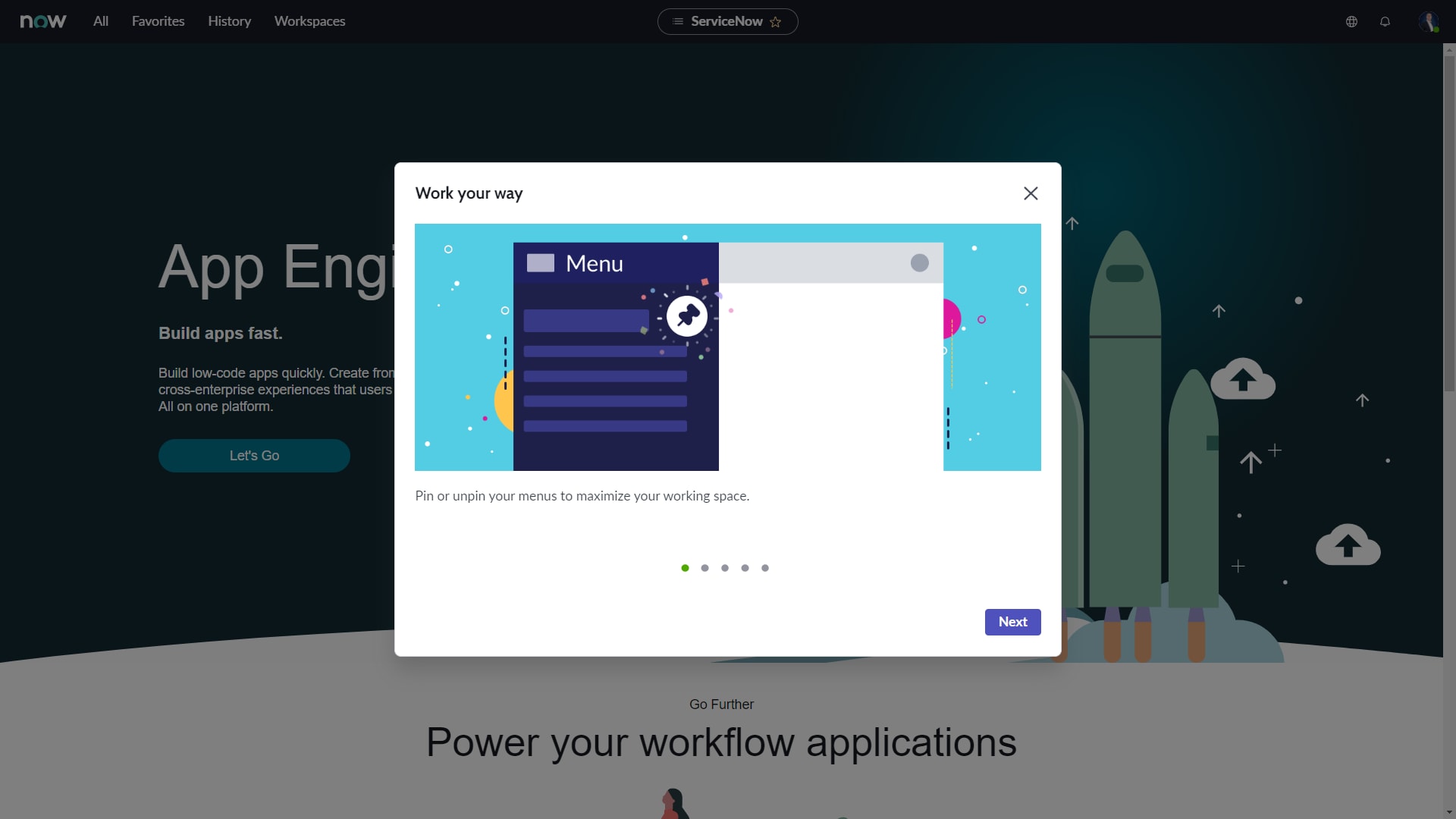
The modal which is presented to every user upon initial login after the San Diego release, for users which have the Next Experience turned on:

After a user closes the modal, a User Preference "overview_help.visited.SanDiego" is created. To prevent having this modal shown to all your users, you could create a similar User Preference. Only difference with the field "System" checked, and the field "User" empty. That's it!

Next Experience disabled (User Preference, "glide.ui.polaris.use" == false)
The modal which is presented to every user upon initial login after the San Diego release, for users which have the Next Experience turned off:

After a user closes the modal, a User Preference "overview_help.visited.navui" is created. To prevent having this modal shown to all your users, you could create a similar User Preference. Only difference with the field "System" checked, and the field "User" empty. That's it!

---
And that's it. Hope you like it. If any questions or remarks, let me know!
| C |
If this content helped you, I would appreciate it if you hit bookmark or mark it as helpful.
Interested in more Articles, Blogs, Videos, Podcasts, Share projects I shared/participated in? |
Kind regards,
Mark Roethof
ServiceNow Technical Platform Architect @ Eraneous
3x ServiceNow Developer MVP
3x ServiceNow Community MVP
---
- 6,123 Views

- Mark as Read
- Mark as New
- Bookmark
- Permalink
- Report Inappropriate Content
I think the user preference names may be reversed.
In our org's upgraded instance (SD Patch 2), where polaris was disabled by default, we have a modal that is dependant on 'overview_help.visited.SanDiego'.
In my personal dev instance (SD Patch 1), with polaris enabled, there is a modal that seems linked to 'overview_help.visited.navui'.

- Mark as Read
- Mark as New
- Bookmark
- Permalink
- Report Inappropriate Content
Brilliant... I too find these types of things extremely annoying. Thanks for the posting fix before we upgrade production!
- Mark as Read
- Mark as New
- Bookmark
- Permalink
- Report Inappropriate Content
There is new property for Tokyo "overview_help.visited.NextExperience".
- Mark as Read
- Mark as New
- Bookmark
- Permalink
- Report Inappropriate Content
Hi Mr. @Mark Roethof
We recently upgraded our DEV instance from TOKYO to UTAH.
However, in our DEV instance, the message: "Thanks for upgrading your ServiceNow instance!" keep on showing every time we log in.
Is it possible to permanently disable this? We are planning to upgrade our PRODUCTION instance next month and we don't want our users to deal with this every time they login.

I created a User Preference to disable this but it's still showing up after logging in.

- Mark as Read
- Mark as New
- Bookmark
- Permalink
- Report Inappropriate Content
Have you checked that there are no other User Preferences with the same name? Which might interfere? Also double check that the Name of the User Preference is correct.
Kind regards,
Mark
- Mark as Read
- Mark as New
- Bookmark
- Permalink
- Report Inappropriate Content
It's working now. Thank you so much @Mark Roethof

- Mark as Read
- Mark as New
- Bookmark
- Permalink
- Report Inappropriate Content
Thanks Mark, worked well for my automation test 🙂

- Mark as Read
- Mark as New
- Bookmark
- Permalink
- Report Inappropriate Content
Has anyone figured out how they are actually displayed on screen?
I know the content is created as Guidance records in the Adoption Services application, but I would like to be able to popup the window with a particular set of slides/steps to show through a Client Script or something. Manually, on-demand essentially, not through an event or anything automated.
The docs show an example of how to open it with a UI Builder client script, but I'd like to open it up within Polaris or the studio apps