- Post History
- Subscribe to RSS Feed
- Mark as New
- Mark as Read
- Bookmark
- Subscribe
- Printer Friendly Page
- Report Inappropriate Content
on 09-17-2022 06:39 PM
Hello All,
I want to share with you all a new ServiceNow Share project that I've released: CMDBTransformUtilLogger, or CTUL for short.
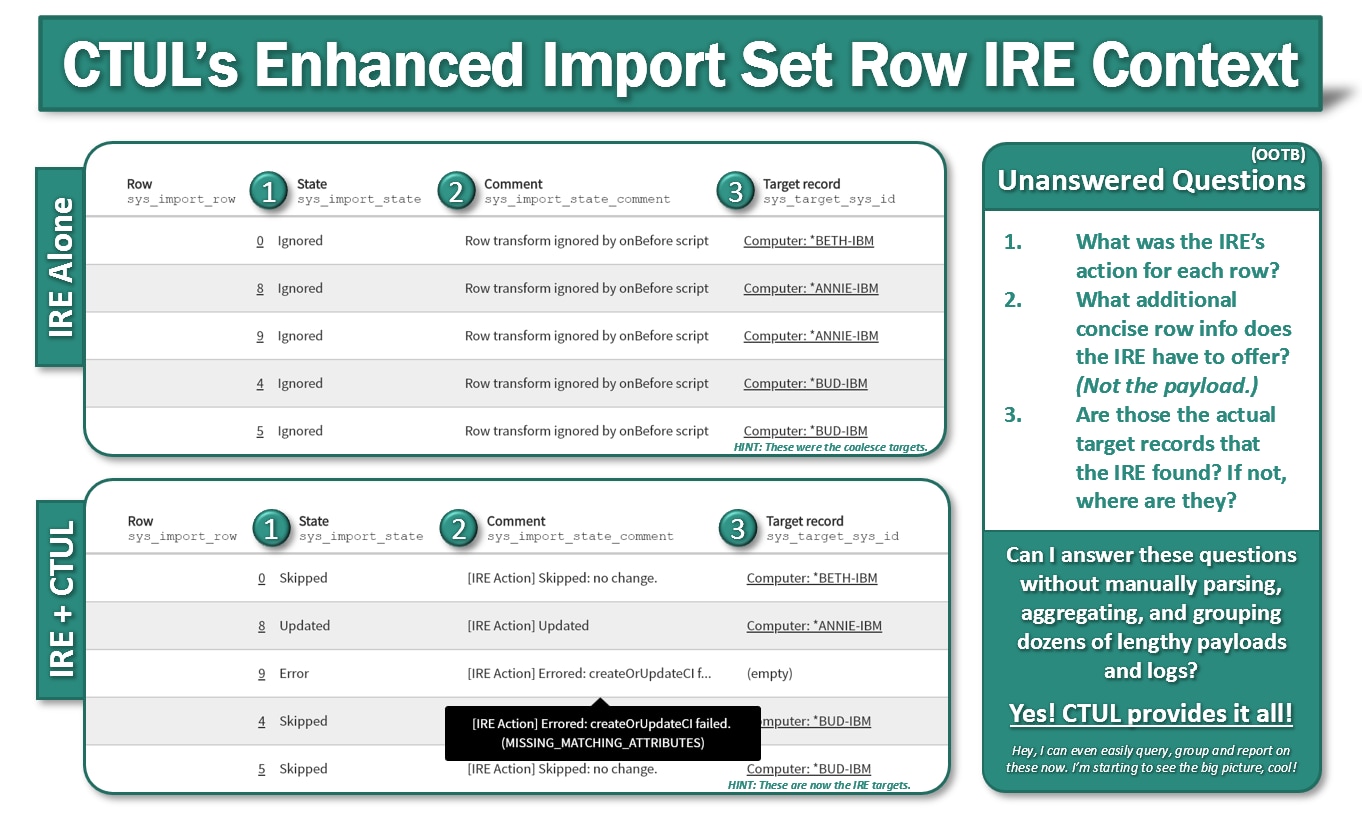
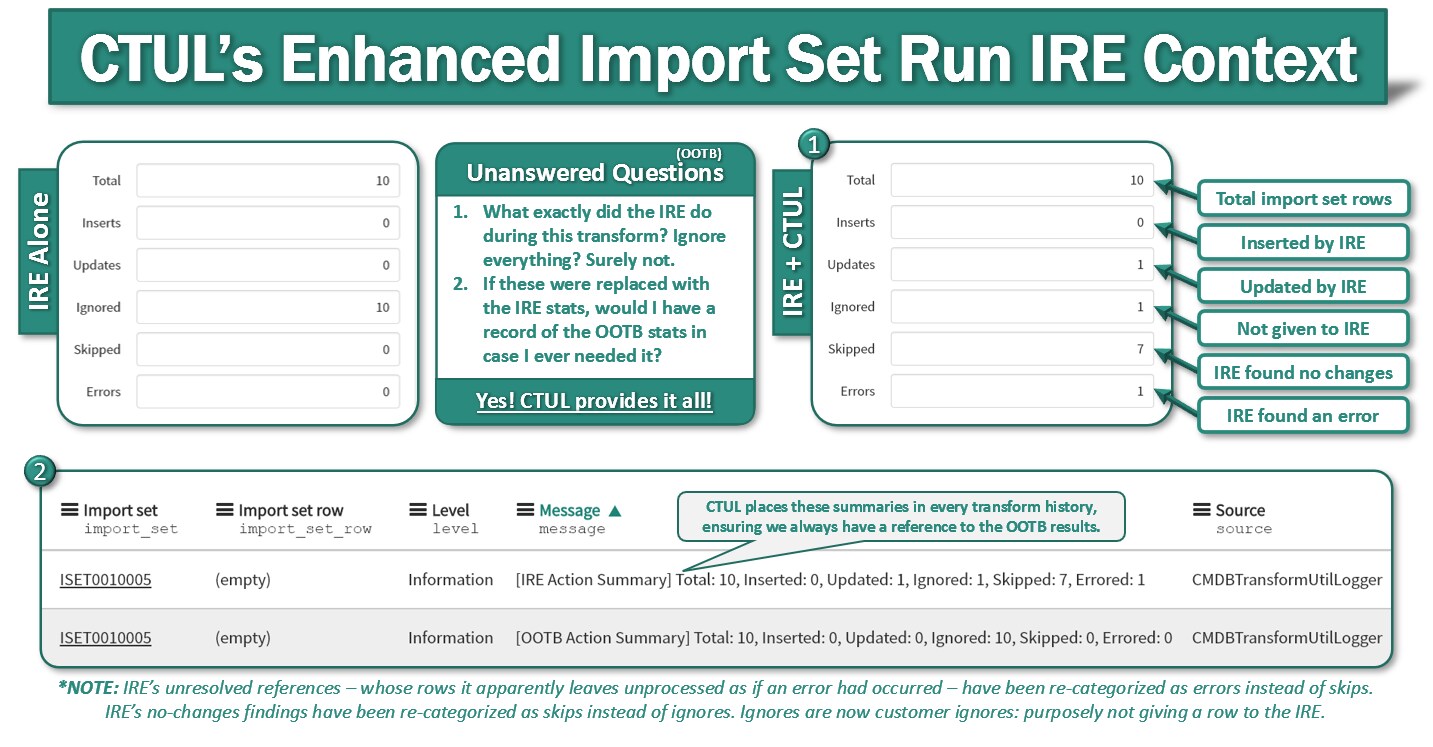
This utility enhances the audit trail left behind by transform map IRE integrations in order to hopefully make analyzing and troubleshooting the IRE results more intuitive, informed, and empowering. This is accomplished by linking import set rows to their IRE outcomes and by repurposing the transform history stats to reflect the five potential IRE results rather than just an across-the-board ignored count. By bringing all the context - both the raw data and a concise summary of the IRE's findings - into the same picture, an informed analysis and understanding is more easily obtained.


Compatibility
If you are using Transform Maps to evoke the SN Identification and Reconciliation engine in onBefore Transform Scripts via utilizing SN's OOTB CMDBTransformUtil, then this project is designed for you. This is NOT designed for IntegrationHub ETL implementations.
Installation Instructions
Step 1 of 3: Download & Install the Latest CTUL Update Set from ServiceNow Share
Step 2 of 3: Update Your onBefore Transform Script
In your onBefore transform script that is calling the CMDBTransformUtil and update it to follow this design.
(function runTransformScript(source, map, log, target /*undefined onStart*/) {

	// Call CMDB API to do Identification and Reconciliation of current row
	var ctu = new global.CMDBTransformUtil();
	global.ctul = global.ctul || new CMDBTransformUtilLogger(); //establishes a persistent variable
	if (source.u_discovery_source != 'SomeSourceYouIgnoreHere') {
		ctu.setDataSource(source.u_discovery_source.toString());
		ctu.identifyAndReconcile(source, map, log);
	}
	global.ctul.observeResultsOnBefore(ctu);
	ignore = true; //NOTE: this also causes the map's run script not to run

})(source, map, log, target);
Step 3 of 3: Create/Update an onAfter Transform Script
In a new or existing onAfter transform script, add this code.
// CMDBTransformUtilLogger OnAfter Integration
(function runTransformScript(source, map, log, target /*undefined onStart*/ ) {
	if (global.ctul) {
		global.ctul.updateSourceOnAfter();
	}
})(source, map, log, target);
That's all it should take to implement CTUL in your environment, given you're using the OOTB CMDBTransformUtils to call the IRE from an onBefore script!
Empowered Troubleshooting
This could be for you if you are looking for a deeper understanding of the outcomes of your IRE-integrated transforms and their transform histories, such as if you are looking to know exactly what action the IRE took on each import set row, along with added context such as more granular error codes than "createOrUpdateCI failed."
By placing the IRE result, comment, and target on the import set rows, troubleshooting IRE issues becomes easier because - instead of having to go through the ardor of parsing and cross referencing thousands of log statements to their import set rows - now you can directly query for the errored import set rows (couldn't do that before), see the concise error code for any given row (couldn't do that before), and see this all alongside the import set row's raw data and its context, helping you to easily see what needs to change. Great! Also, you will no more will you see false-negative target records - empty target record fields on rows that the coalesce failed to match but the IRE succeeded to - or false-positives - coalesce-matched rows that the IRE errored out on and therefore targeted nothing for - when looking through the target records column of your import set rows. Great!
CTUL makes the import set rows themselves - rather than verbose import logs - become a very powerful troubleshooting and analytical resource. This is especially helped along by the fact that the import set row records are, by nature, easier to query and group by than the message column of the import logs.
Reporting & Analytics Potential
Not only does this tool allow us to more tangibly see the IRE outcomes, it easily allows the same to enter into the reporting realm. It's much easier to report on this sanitized data - the import set rows state & comment - than it is to report on import logs, after all. This data could be utilized to monitor and trend your IRE-integrated transform outcomes to serve to fuel transform health KPIs. I could see this being valuable for vendors who offer IRE-integrated importing services as their product, to help them to monitor the health of their products; the imports.
Here are just a few rudimentary analytics example scenarios.

Local Documentation
A great deal of local documentation has been provided in-line in the script includes in the update set. Again, this can be viewed or downloaded on this project's share page. Please take a look if interested.

Feedback
Please leave any relevant feedback if you have any.
Aside from logging payloads and target sys_ids to import logs for every import set row, I would especially like more information on existing OOTB solutions for gaining this sort of context from CMDBTransformUtil's IRE actions, as I may have overlooked comparable existing OOTB analysis methods. If so, I would like to know. Thanks!
I would also especially appreciate any improvements that could be suggested.
Thank you for reading, I hope you can find some use for this!
Kind Regards,
Joseph
- 3,638 Views

- Mark as Read
- Mark as New
- Bookmark
- Permalink
- Report Inappropriate Content
Thanks & this article really helps to understand the actual operations taking place on the import set & target tables.
But when I try to map it to any reference table, I get the below error.
Ignored: not processed.: Reference value field name is not an identifier for the cmdb table u_market_type which is the parent for reference field u_market_type. Skipping this record. (CTUL_UNSPECIFIED_BY_PAYLOAD) in servicenow.
As ServiceNow have published the below article to overcome this error but we will end up in square one,
https://support.servicenow.com/kb?id=kb_article_view&sysparm_article=KB0722407
- Mark as Read
- Mark as New
- Bookmark
- Permalink
- Report Inappropriate Content
Hi @JosephW1 ,
Thank you for the detailed article.
I have implemented this in our instance, however the transformation is failing with the error, '[IRE Action] Errored: createOrUpdateCI failed. (INVALID_INPUT_DATA)' and I am not sure why?
When I revert the changes to OOB CMDBTransformUtil, the data gets transformed successfully.
Do you know what am I doing wrong?
,