- Post History
- Subscribe to RSS Feed
- Mark as New
- Mark as Read
- Bookmark
- Subscribe
- Printer Friendly Page
- Report Inappropriate Content
on 04-03-2020 03:35 PM
Recently we implemented Emergency Outreach application for one of the client which enables HR to quickly notify employees of occurring emergency and which enable employees to self-report their health status via email or mobile push notifications.
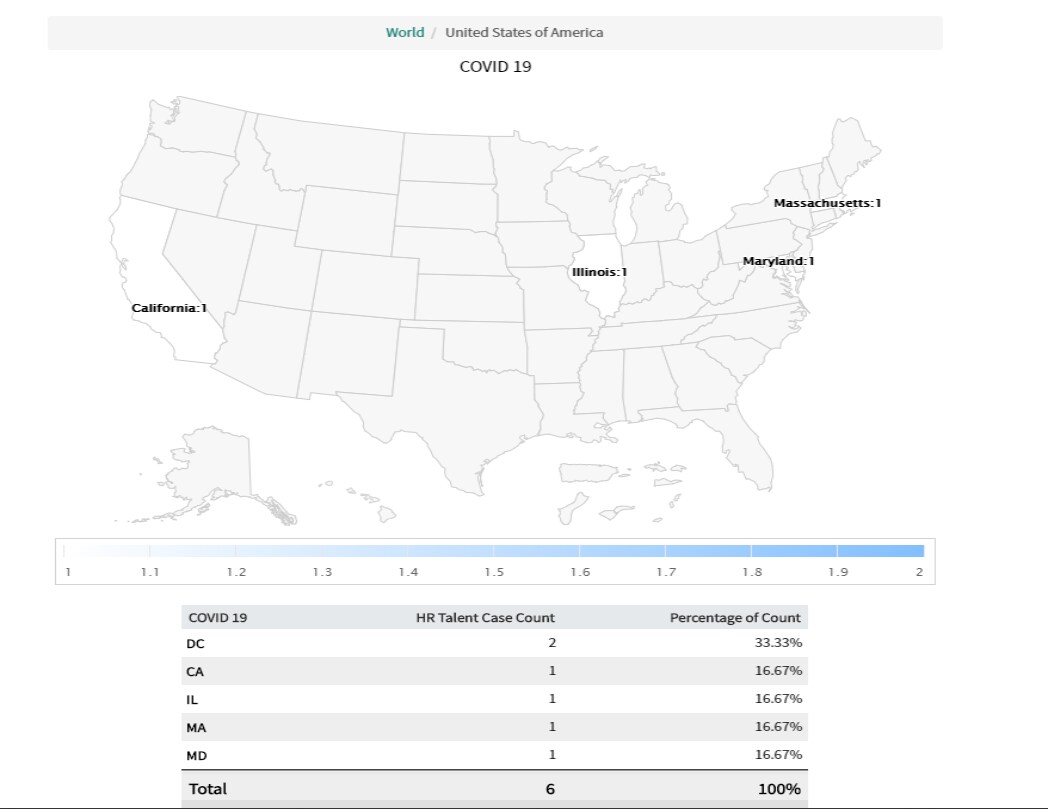
Once they started creating HR cases in production for COVID-19 cases, they wanted to report on these cases for each state using the data on a Map report. Below I have attached a sample report and how the cases are plotted on a map.

Data requirements:
- Latitude and Longitude data should be populated on each Location record
- The value in the "Country" field in the location record should be consistent, out of box it is USA (we cannot have record with Country=USA, Country=US and Country=United States)
Components to set up:
Role required: report_admin
Under Reports, create a "Map Source" which lets us pick a field that will reference the location table (in our case we used Subject Persons location,)
Generate hierarchy of levels (country/ State / City), this can be done manually or using the related link "Generate map source levels"
The above step will create a mapping for country and state using out of box location mapping (for example for country the name/value pair is "USA/us" and for state it is "MA/us-ma")
At the City level the mapping is based on latitude/longitude (use this level on if you plan on drilling down to the city level and has confirmed the location records have latitude/longitude)
Create a new report
- Under "Type" select "Other" and select "Maps"
- Under "Configure" → in the "Map this data" select the map source created in previous step
- Run, Save and share if necessary
Do we need Latitude and Longitude?
Latitude/Longitude is needed only if we need to drill down to city/zip code level, if we only need to show reports based at a state level on a country map, or at country level on world map then we don’t need latitude/longitude. As far as country code is concerned all ServiceNow out of box maps and mappings use the geoJSON hc-key and ISO 3166 standard values, (united states has the value/pair as “USA/us”). So the country in all the location records should be consistent (it can be USA or US), if we plan on using USA then we don’t need to update out of box mapping of value/pair, if we plan on using "US" then we will have to update this value/pair.
Business rules to populate latitude and longitude automatically
There is a business rule on the Locations table called 'get_lat_long'. It is inactive by default. If this enabled, then any change to the location table will request the latitude and longitude from the Google Geocoder web service and update the location record. The Google Geocoder service is not perfect, but does a pretty good job of finding lat/long for addresses.
Limitations of using Map Reports
- Maps are not supported on Internet Explorer versions 7 and 8.
- Map reports cannot be saved as images on Internet Explorer versions 7 to 9, Firefox versions 31 to 37, Safari 5, or all versions of the Edge browser. For best results, use Chrome to work with map reports.
- Map reports cannot be exported as PDFs, but can be saved as images.
- This report type cannot be run as a scheduled report.
Hope this helps.
- 3,073 Views