- Post History
- Subscribe to RSS Feed
- Mark as New
- Mark as Read
- Bookmark
- Subscribe
- Printer Friendly Page
- Report Inappropriate Content
on 09-20-2020 06:04 AM
Get XML wait
For those of you that are not familiar with GlideAjax. getXMLWait() is a Synchronous GlideAjax call. Meaning your script cannot continue without the GlideAjax response. This stops the session until the response is received.
How to use getXMLWait
Scenario
If we look at a scripting example. Lets say we want to do some checks onSubmit of a Catalog item. In our case, we want to validate the user is part of a company. If the user is not part of the company, we want to abort the Catalog Item request and show an error message. To do this, we can use a Script Include to handle the Server lookup and an onSubmit Catalog Client script that prevents submission. We do not want to continue submission until we get a response from the Server back, stating it is alright.
The script
To do this we can write the following Client Callable script include. If you want to do a different validation, you can change it.
var catItemHelper = Class.create();
catItemHelper.prototype = Object.extendsObject(AbstractAjaxProcessor, {

    checkCompany: function () {
        var answer = false;
        var user = this.getParameter('sysparm_user');
        var gr = new GlideRecord('sys_user');
        gr.addQuery('sys_id', user);
        gr.addQuery('company.name', "ACME North America");
        gr.query();
        if (gr.next()) {
            answer = true;
        }
        return answer;
    },

    type: 'catItemHelper'
});
As an onSubmit client script we have the following script:
function onSubmit() {
    var user = g_user.userID;
    var ga = new GlideAjax('catItemHelper'); //Name of the Script Include
    ga.addParam('sysparm_name', 'checkCompany'); //name of function in script include
    ga.addParam('sysparm_user', user);
    ga.getXMLWait();
    var answer = ga.getAnswer();
    if (answer == 'false') {
        g_form.addErrorMessage('Only users from company ACME North America are allowed');
        return false;
    }
}
The result
User has company "ACME North America":

User does not have company "ACME North America":

The issue
getXMLWait() is not supported by the Service Portal:
When we try the same item in the Service Portal we get the following:

In the console:

To prevent the error from appearing we can set our Client Script as UI Type Desktop. Because that is where the script is working:

We do not get the popup anymore, but the validation is also not happening anymore on the Service Portal.
Asynchronous Ajax call
In the Service Portal Asynchronous Ajax calls are supported.
The issue with these Asynchronous Ajax calls however, is that the script will not wait for the Server response. Meaning the Catalog Item will continue to be submitted, before we have a response back from the Server. So the validation we want will not work.
The solution
When the user clicks the submit button, we can return false, which will stop submission. We also trigger the Ajax call to the server. In the Callback function that handles the response (asynchronous) we can trigger the Submit from script again. But this time, if the response from the Server is not false, we set g_scratchpad.isFormValid to true. Which results in the script returning true and allowing us to submit the item.
To do this we add the following onSubmit Catalog Client Script. UI Type: Mobile/Service Portal:
function onSubmit() {
    if (g_scratchpad.isFormValid)
        return true;
    var user = g_user.userID;
    var ga = new GlideAjax('catItemHelper'); //Name of the Script Include
    ga.addParam('sysparm_name', 'checkCompany'); //name of function in script include
    ga.addParam('sysparm_user', user);
    ga.getXMLAnswer(setAnswer);
    return false;


    function setAnswer(answer) {
        if (answer == 'false') {
            g_form.addErrorMessage('Only users from company ACME North America are allowed');
            return false;
        }
        var actionName = g_form.getActionName();
        g_scratchpad.isFormValid = true;
        g_form.submit(actionName);

    }
}
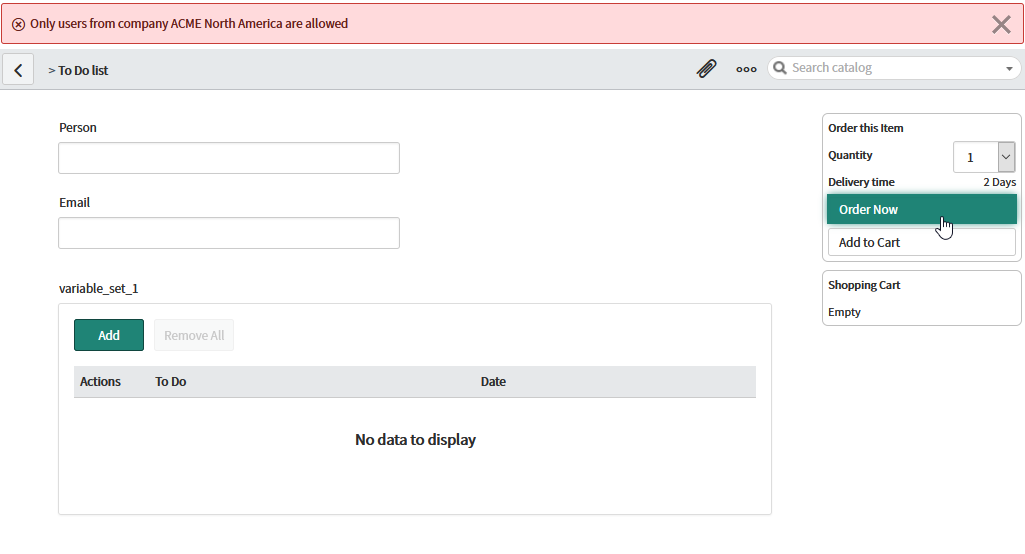
The result
User has company "ACME North America":

User does not have company "ACME North America":

- 98,362 Views

- Mark as Read
- Mark as New
- Bookmark
- Permalink
- Report Inappropriate Content
Hi Team,
i am used below on submit client script(Catalog iteam )
using that script one instance it's working fine and other instance its showing bellow error. If any one know this kind of issue na could pls help me on this
Error MessageonSubmit script error: ReferenceError: g_scratchpad is not defined:
function () { [native code] }
- Mark as Read
- Mark as New
- Bookmark
- Permalink
- Report Inappropriate Content
@Willem , i am getting the error when creating tickets from ServiceNow platform
error is : "onSubmit script error: ReferenceError: g_scratchpad is not defined:
function () { [native code] } "
but in the Service Portal it's working fine.
May I know the full on-submit client script which can work in ServiceNow Platform and SP also.
- Mark as Read
- Mark as New
- Bookmark
- Permalink
- Report Inappropriate Content
@Willem - Can you please help me with almost a similar query, please
https://www.servicenow.com/community/developer-forum/logged-in-user-should-be-a-part-of-a-group-then...
I have tagged you in the same post
- Mark as Read
- Mark as New
- Bookmark
- Permalink
- Report Inappropriate Content
Helpful article.
- Mark as Read
- Mark as New
- Bookmark
- Permalink
- Report Inappropriate Content
If you are having problems with g_scratchpad, just use g_form instead.
Works just as well and available to anything on that form
- « Previous
-
- 1
- 2
- Next »