- Post History
- Subscribe to RSS Feed
- Mark as New
- Mark as Read
- Bookmark
- Subscribe
- Printer Friendly Page
- Report Inappropriate Content
on 05-06-2021 10:59 PM
Why can't you write ES6 code now?
Turns out you could've been writing ES6 Code all this time, but a typo is what's been preventing you from doing it.
ServiceNow have known about this for 4 years and have recorded it in PRB733616, but have deemed it "too risky to fix". So if you are okay with some minor customisation to enable this feature, feel free to proceed onwards.
2022 Update: Step 1 below has been fixed as of San Diego RTP.
Step 1: Update Validation Scripts
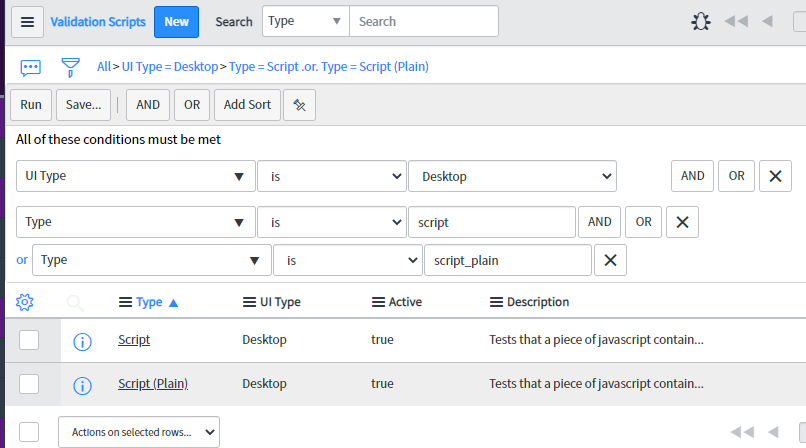
The following 2 records in your instance control the server-side validation of Script fields in ServiceNow.
https://[instancename].service-now.com/nav_to.do?uri=sys_script_validator.do?sys_id=279c99440a0a0a6f00872ceab0e759ed
https://[instancename].service-now.com/nav_to.do?uri=sys_script_validator.do?sys_id=2780cf700a0a0a6f0060332eba6ab860
Note: if those links dont work, here's the url:
Table: sys_script_validator
Filter: https://[instancename].service-now.com/sys_script_validator_list.do?sysparm_query=ui_type%3D0%5EGOTOinternal_type%3Dscript%5EORinternal_type%3Dscript_plain

Both of these validators run the same validation script but for the 2 different field types, Script and Script (Plain).
If you open them, you will see the following code:
function validate(value) {
	if(g_form.getTableName() === 'sys_ui_script' || g_form.getTableName === 'sys_client_script')
		return true;

	var ajax = new GlideAjax('JSValidator');
    ajax.addParam('sysparm_name','validate');
    ajax.addParam('sysparm_js_expression',value);
    ajax.getXMLWait();
    var answer = ajax.getAnswer();
    if (answer === null)
        return true;

	answer = getMessage("Could not save record because of a compile error: " + answer);
    return answer;
}
If you look at line 2, there are 2 typos.
- sys_client_script is the incorrect table name for Client Script, the correct name is sys_script_client
- the second g_form.getTableName function is not invoked with parentheses
If you fix both of these typos, your fixed script should look like this:
function validate(value) {
	if(g_form.getTableName() === 'sys_ui_script' || g_form.getTableName() === 'sys_script_client')
		return true;

	var ajax = new GlideAjax('JSValidator');
    ajax.addParam('sysparm_name','validate');
    ajax.addParam('sysparm_js_expression',value);
    ajax.getXMLWait();
    var answer = ajax.getAnswer();
    if (answer === null)
        return true;

	answer = getMessage("Could not save record because of a compile error: " + answer);
    return answer;
}
Save both records with the updated scripts.
Step 2: Write ES6 Client Scripts
Now you can go to any Client Script and start scripting in ES6, ES7, or any new version of JavaScript. If your browser supports it, it will run.

Note: You have to disable the Syntax Checker on the script field or it will give you errors.
Thats it, happy coding.
Bonus: Adding ES6 support for Service Portal widgets
You can also add support for saving ES6 code within Service Portal widgets by further updating the code to read as below. However, it will disable all server-side syntax checking for all Script fields on the SP Widget record, and it will not prevent the Widget Editor UI from showing Syntax Errors when you use patterns such as 'let', 'const', and arrow functions.
function validate(value) {
	if(g_form.getTableName() === 'sys_ui_script' || g_form.getTableName() === 'sys_script_client' || g_form.getTableName() === 'sp_widget')
		return true;

	var ajax = new GlideAjax('JSValidator');
    ajax.addParam('sysparm_name','validate');
    ajax.addParam('sysparm_js_expression',value);
    ajax.getXMLWait();
    var answer = ajax.getAnswer();
    if (answer === null)
        return true;

	answer = getMessage("Could not save record because of a compile error: " + answer);
    return answer;
}
- 14,412 Views

- Mark as Read
- Mark as New
- Bookmark
- Permalink
- Report Inappropriate Content
Well that's embarassing!

- Mark as Read
- Mark as New
- Bookmark
- Permalink
- Report Inappropriate Content
Interesting. I wonder if a similar fix also could enable ES6 in Service portal widgets?
- Mark as Read
- Mark as New
- Bookmark
- Permalink
- Report Inappropriate Content
Yes it does, just add
|| g_form.getTableName() === "sp_widget"
To the existing filter on line 2 of the validation scripts, that allows saving ES6 code within the Client Controller field of a Service Portal widget. However, it wont prevent the Syntax Checker from throwing errors at you inside the widget editor if you start using ES6 code patterns like 'let' and 'const'.

- Mark as Read
- Mark as New
- Bookmark
- Permalink
- Report Inappropriate Content
Wow, this is great! Do you know if the syntax checker can be configured? Is it something built by SN or is it a third-party tool?

- Mark as Read
- Mark as New
- Bookmark
- Permalink
- Report Inappropriate Content
You can turn off code linting to get hide the errors by setting this property to false: glide.ui.syntax_editor.linter
Please be warned that this will turn off all errors and may be harder for you to track down bugs.
- Mark as Read
- Mark as New
- Bookmark
- Permalink
- Report Inappropriate Content
If you want to enable syntax checker you have to update a couple things. For the standard UI you need to update the system property "glide.ui.syntax_editor.linter.eslint_config". This controls the ESlint configuration of the script field. It's referred to in the documentation. You have to change it to:
{
  "env": {
    "es6": true
  }
  "rules": {
    ...
  }
}
To get the widget editor in Service Portal to work you have to update the version of JSHint that is loaded. Unfortunately the widget editor CodeMirror is configured differently than the script field in the standard UI. It's using an old version of JSHint.
To update JSHint I downloaded JSHint from here. Then loaded that into a UI Script. I did have a problem when the script ran though. For some reason it looks like "jsdbx" files have a problem with the string sequence '${'. You have to replace that string sequence in the JSHint file with the unicode equivalent of '\u0024\u007b'. It only occurs one time on line 19855.
Once the JSHint UI Script is loaded I updated the widget dependencies for the "Widget Edit Panel" in Service Portal. I added the JSHint dependency as another dependency to the "Widget Edit Panel"
When I want to use ES6 in ServicePortal I add the JSHint configuration comment to my code:
/* jshint esversion: 6 */
api.controller = function ($scope, $window, spUtil) {
    $scope.log = () => spUtil.addInfoMessage('testing ES6');
};
The script editor in ServicePortal is controlled by the "spScriptEditor" directive. You could probably override the directive directly and modify the configuration of JSHint, but that would require you to clone the "Widget Edit Panel" page and the "Widget Edit Panel" widget as well, so probably easiest to just use the in line comment configuration.

- Mark as Read
- Mark as New
- Bookmark
- Permalink
- Report Inappropriate Content
How do these typos/syntax errors still exist in the latest Quebec release?
- Mark as Read
- Mark as New
- Bookmark
- Permalink
- Report Inappropriate Content
Appreciate the extra insight, although I'm guessing these properties apply to both server-side and client-side script fields, since SN doesn't really make a distiction between the two?
For the sake of not confusing things for junior devs, I personally would rather the editor producer more errors and warnings, and let someone who knows what they're doing override it.
Each to their own though, if you're the only dev in the instance, then these look like great workarounds.

- Mark as Read
- Mark as New
- Bookmark
- Permalink
- Report Inappropriate Content
What about customer's browsers? I assume this is why the fix was marked as too risky to fix. You write that if my browser can run it, it will run. But still, in my browser. We have no control over customer's browsers. A piece of advice from me - if you plan on using new JS features, make sure it is supported in customer's environment (this is especially important in big corporate clients that have their own strict browser scripting rules).
Here is a nice summary table.
- Mark as Read
- Mark as New
- Bookmark
- Permalink
- Report Inappropriate Content
That's the problem. We don't get a choice as developers. In my customers environment we only use modern browsers, so I know I can safely use es6. I'd like ServiceNow to allow me to opt in to using it. I wouldn't call es6 a new JS feature. We're talking about a standard that's fairly widely supported at this point and came out over 6 years ago.
- Mark as Read
- Mark as New
- Bookmark
- Permalink
- Report Inappropriate Content
ServiceNow have encouraged customers to migrate away from IE 11, which is the only common browser that doesn't widely support ES6. Source: https://support.servicenow.com/kb?id=kb_article_view&sysparm_article=KB0683275
Keep in mind that ES6 was made the ECMA Script standard version in 2015. If the customer's browser doesn't support that, it's the developer's responsibility to accommodate, and luckily for us as javascript developers, we can do this very easily with polyfills that can be deployed to suit ES5-only environments.
The platform shouldn't be holding itself back when backwards compatibility is so easy for the developer to implement.
If that's still a serious problem for a customer environment, the platform should provide linting options to force ES5 development via linting rules, rather than enforcing a strict server-side ban on all ES6 code "just in case"
- Mark as Read
- Mark as New
- Bookmark
- Permalink
- Report Inappropriate Content
For some reason it looks like "jsdbx" files have a problem with the string sequence '${'.
This bit me right in the pants today. Did you find a good general way of solving this or are you just handling it by editing files on a case by case basis?
- Mark as Read
- Mark as New
- Bookmark
- Permalink
- Report Inappropriate Content
Update: The script validator typo mentioned is fixed in San Diego, however as of RTP testing the client side script validator still throws warnings at you if you use ES6 syntax. This may or may not be fixed by the time general availability rolls around.