Lukasz_Krzaczko
Tera Expert
Options
- Post History
- Subscribe to RSS Feed
- Mark as New
- Mark as Read
- Bookmark
- Subscribe
- Printer Friendly Page
- Report Inappropriate Content
on 09-30-2018 01:54 AM
1. Install and configure SwissNow
Details described here: https://community.servicenow.com/community?id=community_article&sys_id=72d65bd0db34a7048e7c2926ca961...
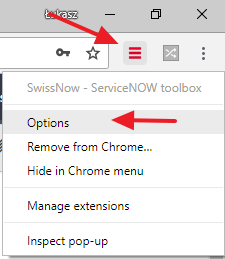
2. Open options
Right click on SwissNow icon and select Optons.

3. In "Configuration packages" section click "New"

4. Define relationships of your configuration tables
In this example, we will be exporting data from sys_user table and all corresponding sys_user_has_role records.
- Provide configuration package name (to describe the content being exported), e.g. User with roles
- Provide main table exact name. In out case, the main table is sys_user
- Define parent-child relationships of your configuration records
-
- Enter parent table name, e.g. sys_user
- Enter child table name, e.g. sys_user_has_role
- Enter a relationship qualification, e.g. user=${sys_id} (The qualification is applied to the child table - sys_user_has_role. In the qualification you should use fields from the parent table - sys_user - to define relationship between records. Use $[field} syntax to refer to parent record fields. In this example, "user" is a field from child table and "${sys_id}" will be replaced with the sys_id of a record from parent table - sys_user).
- Click "Add". (You can add as many parent-child relationships as you want. You can also add self-relationship, e.g. cmn_location --> cmn_location)
- Click "Save"

5. Open a record to export with all its relationships

You can also open a list of records - just remember to apply a filter to the list of records.
6. Click on SwissNow icon and switch to "Compare / Copy" tab

7. Click on the name of your newly defined configuration package

8. Wait for the records to be downloaded into memory

9. Download XML file or add all your records to the current update set
- To download all configuration records in single XML file, click Generate file
- To add all configuration records to the current update set, click Add all to UpdateSet (note that sys_user table exceptionally cannot be added to an update set due to security constraints)
- 3,728 Views