- Post History
- Subscribe to RSS Feed
- Mark as New
- Mark as Read
- Bookmark
- Subscribe
- Printer Friendly Page
- Report Inappropriate Content
on 04-07-2018 11:45 AM
Working without updateset becomes sometimes cumbersome. Specially when moving choice set to another distance. I am not sure if there is an easy way of doing this. But, I find this way quite easy to implement. An example would be the state field choices for incident table as follows.

When I work in the DEV environment with the new choices without updateset I have to export to excel and generate insert script and run the script in PROD environment but it is just wasting the time.
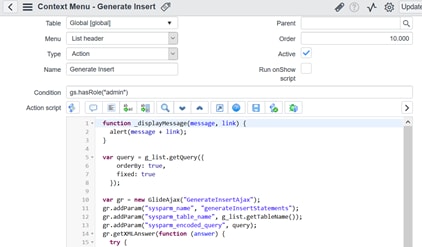
To get over this, I’ve developed some script and used in UI Context Menus.


First of all, we need to create a table with a field which holds the generated script.
Let’s call it u_temporary as follows.

Scripts
In order to implement we need 3 scripts.
- UI Context Menu script
- Script Includes:
- Server side: GenerateInsert.js
- Client side: GenerateInsertAjax.js
- Server side: StringBuilder.js
Implementation
Let’s generate the insert statements for the state fields for incident table.


If we go to the link we get the result as follows. And run the script in another instance in Scripts – Background.

Scripts are attached.
Comments
- It doesn’t escape the “ character so doesn’t work with the field values that have “ character.
- You can generate insert statements for any table.
- Any comments are welcome.
Regards
Yusuf
- Mark as Read
- Mark as New
- Bookmark
- Permalink
- Report Inappropriate Content
Why don't you use the "Export XML" feature, am I missing something?
- Mark as Read
- Mark as New
- Bookmark
- Permalink
- Report Inappropriate Content
I guess Exporting XML is no different than Exporting Excel as long as you manipulate the raw data.
Maybe I am missing something ? That would be great if you shed a light on me.
Thanks
- Mark as Read
- Mark as New
- Bookmark
- Permalink
- Report Inappropriate Content
From what I see, you just want to move records from table to the same table on another instance.
This is exactly what "Export XML" is for. This will export payload with selected records data.
On the target instance, you just go to the list of the table a make "Import XML" from hamburger menu, you can also see that on you screenshots.
And that's it.
- Mark as Read
- Mark as New
- Bookmark
- Permalink
- Report Inappropriate Content
I think this is the menu you are referring to, but couldn't find the import XML menu.

And tried the field headers, and there is import but just excel.

- Mark as Read
- Mark as New
- Bookmark
- Permalink
- Report Inappropriate Content
You can read more here: Import an XML file
- Mark as Read
- Mark as New
- Bookmark
- Permalink
- Report Inappropriate Content
Thank you very much it is very helpful.
So, my method is another way of skinning a cat.
OOB is much more easy but don't know if it is customizable.
My method is stronger in customizable ways, you may say that I reinvent the wheel.
Anyway, let the developers decide which way to use. And it was my pleasure to discuss with you.
Regards
Yusuf
- Mark as Read
- Mark as New
- Bookmark
- Permalink
- Report Inappropriate Content
Hey yusuf.celik,
instead of doing all those things, you can easily Export them right?
follow below screen shot:

Let me know if you need more help..!!
Thanks,
Rajashekhar Mushke
Community Leader-18
- Mark as Read
- Mark as New
- Bookmark
- Permalink
- Report Inappropriate Content
Thanks Rajashekhar,
We already discussed this with @bishopx.