

- Post History
- Subscribe to RSS Feed
- Mark as New
- Mark as Read
- Bookmark
- Subscribe
- Printer Friendly Page
- Report Inappropriate Content
06-07-2020 02:28 AM - edited 08-08-2024 11:17 AM
Articles, Blogs, Videos, Podcasts, Share projects - Experiences from the field
Hi there,
When working with List Controls, out-of-the-box, it looks like the Omit options are just limited to a checkbox condition, true or false. A hidden gem some of you might already know, so not completely new, out-of-the-box there are "Omit * condition" fields available! They are just not on the out-of-the-box form layout. Having conditional Omit options gives great new possibilities.
Out-of-the-box
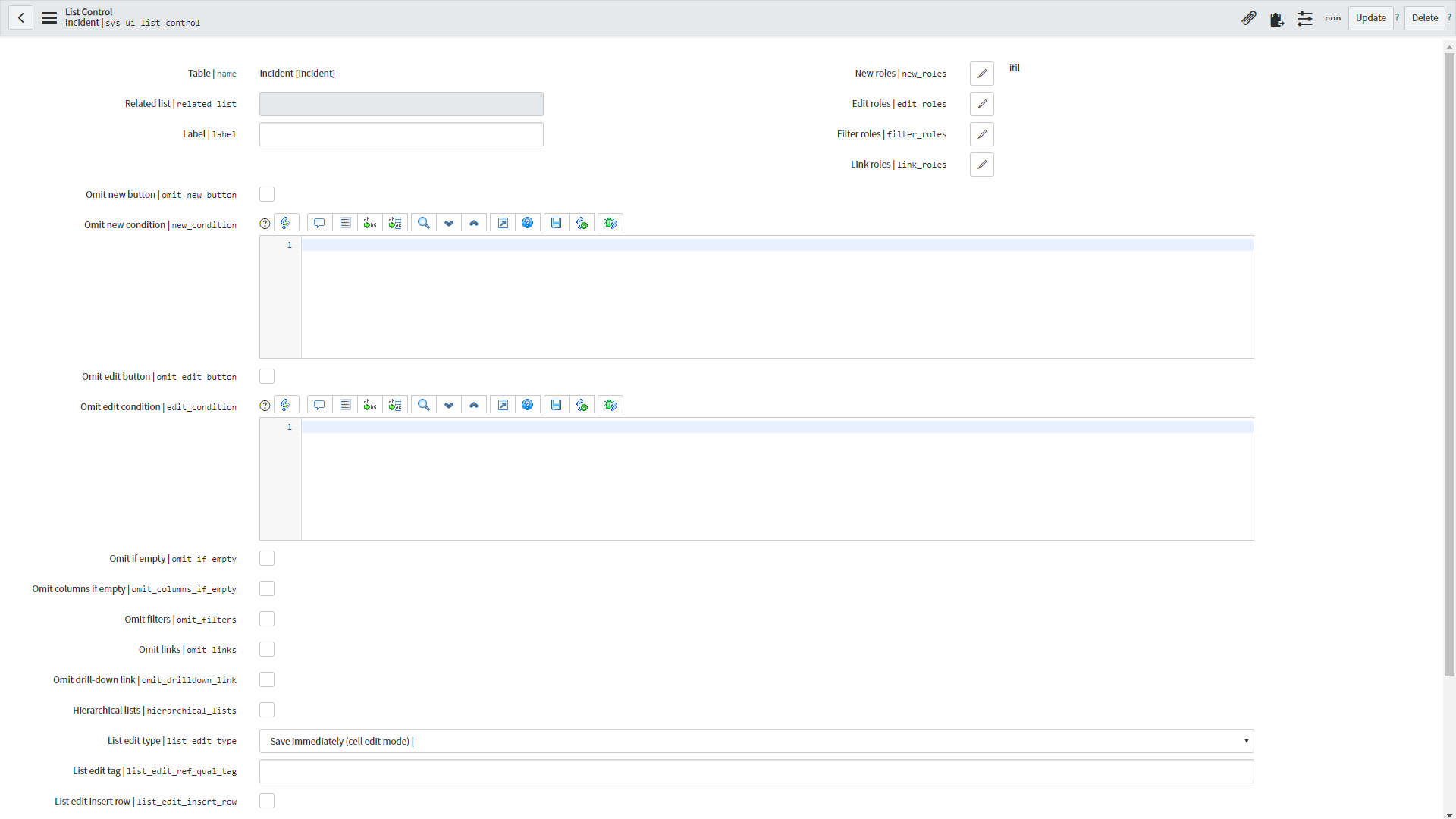
Out-of-the-box [Orlando] the form lay-out for List Control looks like below. Only checkboxes "Omit * button" and lists "* roles" available.

Available "Omit * condition" fields
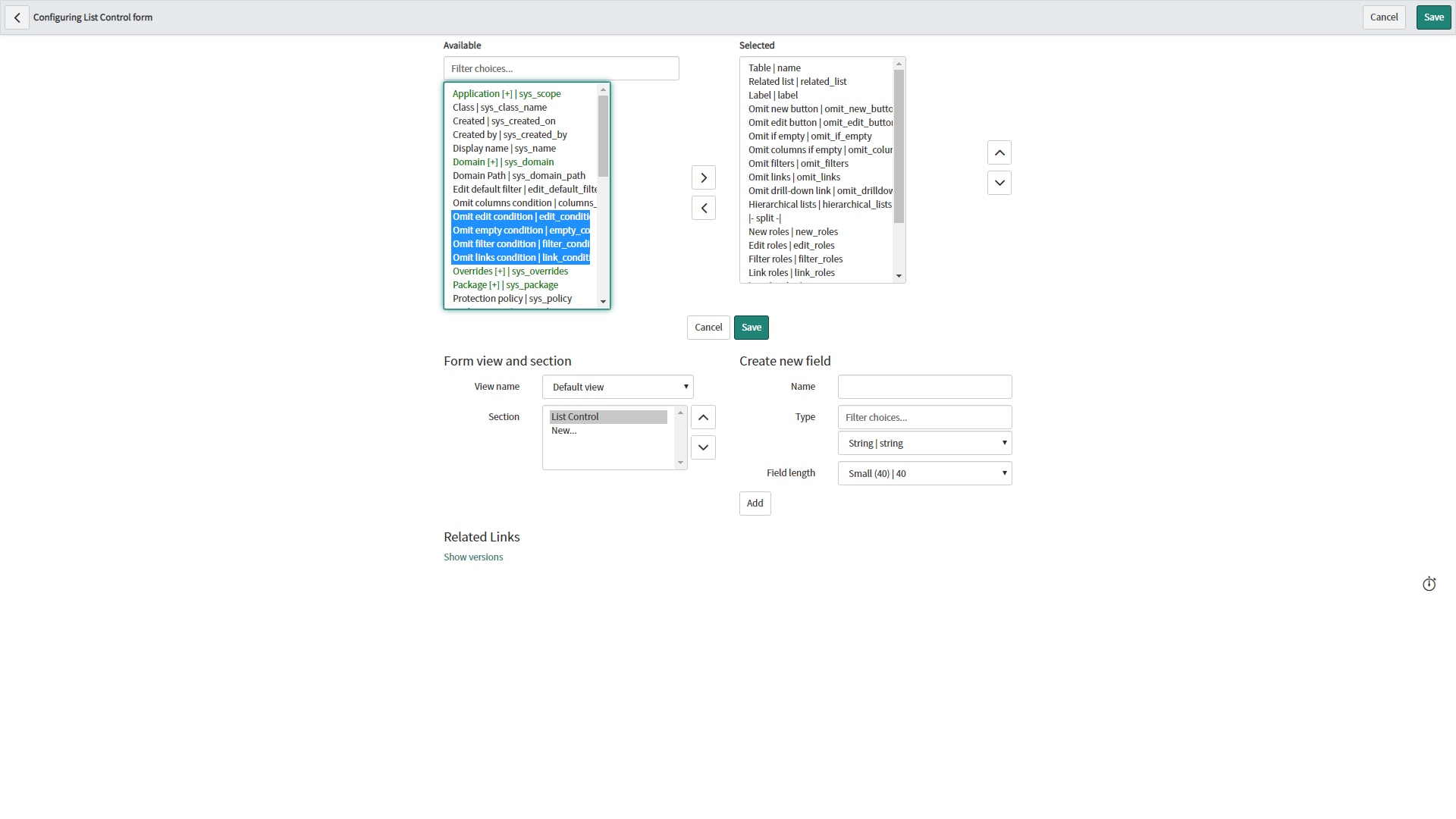
Six (6) other Omit * condition fields are available out-of-the-box:
- "Omit new condition"
- "Omit edit condition"
- "Omit empty condition"
- "Omit columns condition"
- "Omit filter condition"
- "Omit links condition"

Adding the "Omit * condition" fields
… to your instance or to your company implementation best practice a.s.a.p.! More advanced conditions could be made with these condition fields, instead of being limited to the "Omit * button" and "* roles" fields.

Note: Be aware that changing the form layout does affect future patches/upgrades. If a change by ServiceNow might be done on the List Control form lay-out, this will result in a Skipped Update.
To finish off, let's just add UI Policies to hide the "Omit * condition" fields, if the associated checkbox is checked. Below an example for "Omit new condition".

---
And that's it actually. Hope you like it. If any questions or remarks, let me know!
| C |
If this content helped you, I would appreciate it if you hit bookmark or mark it as helpful.
Interested in more Articles, Blogs, Videos, Podcasts, Share projects I shared/participated in? |
Kind regards,
Mark Roethof
ServiceNow Technical Consultant @ Quint Technology
1x ServiceNow Developer MVP
1x ServiceNow Community MVP
---
- 7,803 Views

- Mark as Read
- Mark as New
- Bookmark
- Permalink
- Report Inappropriate Content
Congratulations Mark for continuously posting articles and sharing a knowledge with Now Community. kudos to You "

- Mark as Read
- Mark as New
- Bookmark
- Permalink
- Report Inappropriate Content
It is really a helpful Article
Thanks
Tanushree

- Mark as Read
- Mark as New
- Bookmark
- Permalink
- Report Inappropriate Content
Hi Mark,
Great article! A similar feature that comes in Orlando is the "Remove pagination count" checkbox. It also must be added to the form.
The goal of this feature is to save list load time by omitting the result count from the pagination header. Instead of saying "1 to 20 of 12,023,234" it will now just say "1 to 20".
This saves the time of running a COUNT(*) query that could potentially take 10's of seconds or even minutes.
Here's a knowledge base article about it:
https://hi.service-now.com/kb_view.do?sysparm_article=KB0817996
Please mark 👍 if Helpful
- Mark as Read
- Mark as New
- Bookmark
- Permalink
- Report Inappropriate Content
Tnx.
Good HI document. I noticed the Remove pagination count a few days ago when I was writing down this article, noticed it because of the difference between New York and Orlando. Didn't see it before in any release notes, etc..
Looks like a nice addition!
Kind regards,
Mark

.png)

.png)

.png)