- Post History
- Subscribe to RSS Feed
- Mark as New
- Mark as Read
- Bookmark
- Subscribe
- Printer Friendly Page
- Report Inappropriate Content
06-07-2019 12:21 AM - edited 08-31-2025 04:20 AM
Articles, Blogs, Videos, Podcasts, Share projects - Experiences from the field
| The issue described in this content, has been fixed by ServiceNow in Patch 4 of the Madrid family release. |
Hi there,
A short article about gained knowledge concerning the incorrect Date format in submitted variables through Multi-Row Variable Sets. Out-of-the-box, for date settings other than yyyy-MM-dd, this does not seem to work as expected. It's listed as a Problem, targeted to be fixed in New York (PRB1325027). Because not every instance will be on New York within 3 / 6 / 9 months, a temporary workaround could be more than welcome.
The Issue
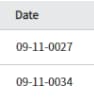
When your system has a date format that differs from yyyy-MM-dd, submitted Date variables through Multi-Row Variable Sets display as (for example) 09-11-0027, 09-11-0034, 09-11-0035, etc.. This occurs while entering the date through the date picker, manually, etc..
Looking at the submitted variables (Multi-Row Question Anwers table) though, the values do look oke. It's just not represented well in Requested Items.

Workaround
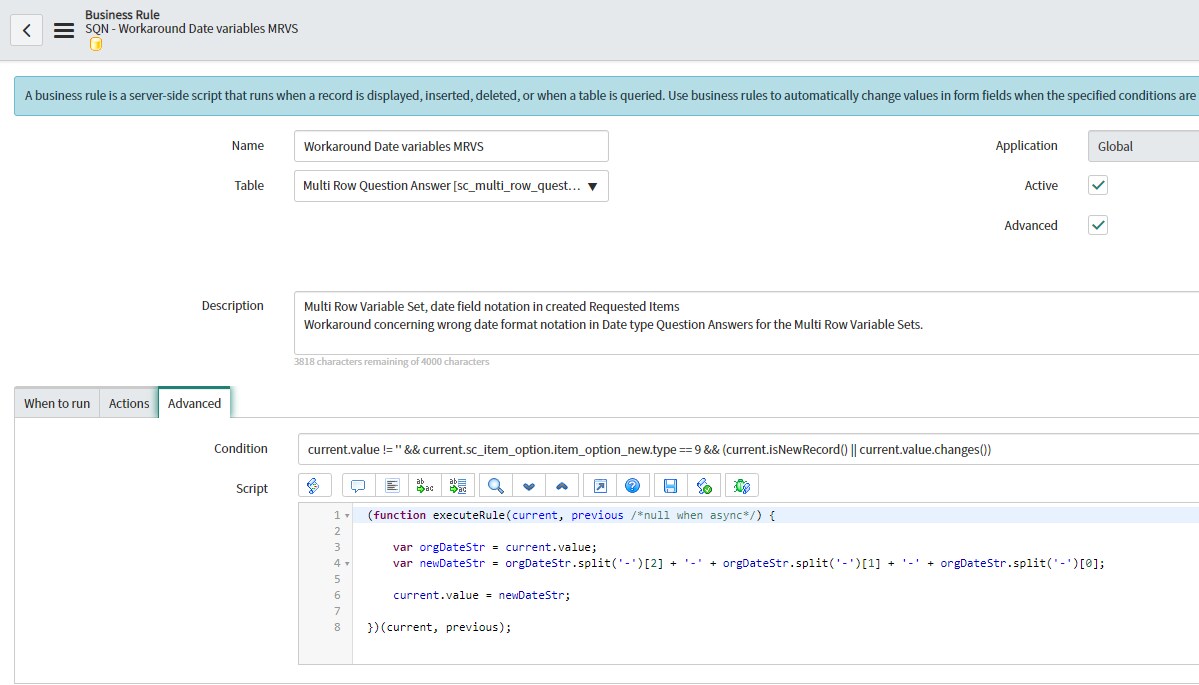
The issue is that the values in the Multi-Row Question Answers table are stored exactly like what the user entered through the Catalog Item / Record Producer. The values should actually be stored as yyyy-MM-dd! Changing the values manually would already fix the issue.
So... updating the values automatically 😀. Just create a Business Rule and follow these steps:


---
And that's it actually. Hope you like it. If any questions or remarks, let me know!
| C |
If this content helped you, I would appreciate it if you hit bookmark or mark it as helpful.
Interested in more Articles, Blogs, Videos, Podcasts, Share projects I shared/participated in? |
Kind regards,
Mark Roethof
ServiceNow Technical Consultant @ Paphos Group
---
- 2,676 Views
- Mark as Read
- Mark as New
- Bookmark
- Permalink
- Report Inappropriate Content
"It's listed as a Problem, targeted to be fixed in New York (PRB1325027)"...
Just noticed, this is already fixed in Madrid patch 4! No need for a workaround anymore with this patch.
Kind regards,
Mark
---

- Mark as Read
- Mark as New
- Bookmark
- Permalink
- Report Inappropriate Content
Great work Mark! Kudos!!! That is really helpful