- Post History
- Subscribe to RSS Feed
- Mark as New
- Mark as Read
- Bookmark
- Subscribe
- Printer Friendly Page
- Report Inappropriate Content
on 05-14-2018 05:39 PM
I have uploaded a new widget to the share site:
https://share.servicenow.com/app.do#/detailV2/4775d202db4ad700b960a6e51b961940/overview
This widget can give you a progress bar UI to track the progress of any background jobs that were started using the sys_execution_tracker. Examples include Plugin installation and update set installation where you generally see a popup with a progress bar showing the status of the work. But more importantly, you can create your own Background processes using the sys_execution_tracker table.
A good use case for this is if you have a long running process that needs to be kicked off by the user in the portal. If you try to do this through a regular REST call, it is subject to the transaction quota rules and could be cancelled before your code completes.
With this method, you can offload the work to a tracker and show the progress on the UI as it completes.
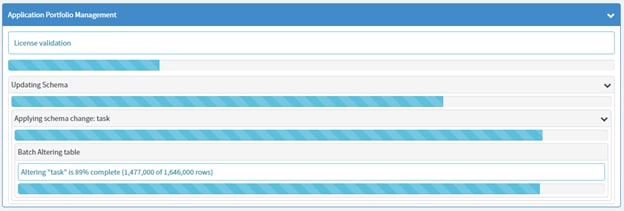
Screen shot of a multi-hierarchy job (plugin installation):

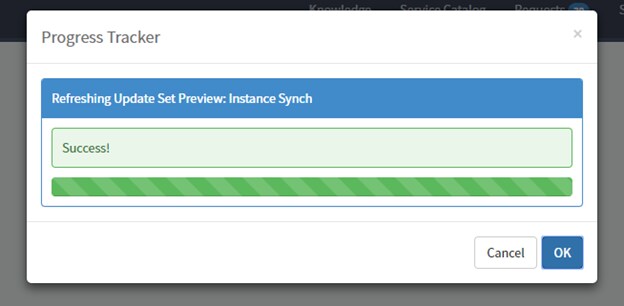
Screen shot in a modal window:

There is documentation attached to the share site as well, and a working sample in the update set, so you can see how it works.
- 4,961 Views

- Mark as Read
- Mark as New
- Bookmark
- Permalink
- Report Inappropriate Content
Hey Jon,
Haven’t downloaded yet but looks great - been thinking about doing something similar for some time now.
Just a heads up as well: Share has moved/relaunched as Share v2 over at https://developer.servicenow.com/app.do#!/share. It’s not been widely publicised yet as it was only launched last week at K18, but you’ll want to put it there. It’s a big improvement.
Cheers!
James
- Mark as Read
- Mark as New
- Bookmark
- Permalink
- Report Inappropriate Content

- Mark as Read
- Mark as New
- Bookmark
- Permalink
- Report Inappropriate Content
Hey Jon,
Awesome work! I've looked into it and tested the indicator. The tester is working like a charm and it's something I was looking for, for quite some time now. Yet I've got a question as I can't get it to work in the following use case:
On a custom portal page, a user can attach a .csv file. After they submit the request, it will create a RITM and a workflow will then copy the attachment from the requested item to a datasource record and then executes said record. Meanwhile the user is redirected to a 'Thanks-for-uploading, press-button-to-return-to-the-homepage' page while the transformer transforms the .csv file into records in the background.
This all works great so far. Now what I would like to do next is to have the progress indicator run the moment the user submits the form until the transformer is done processing the .csv file.
Just plopping the widget on the portal page (either the request form or the 'Thank you' page) doesn't work.
What do you advice I do to make it work in my use case?
Thanks in advance and thank you for the awesome indicator!
Kind regards,
Mike