- Post History
- Subscribe to RSS Feed
- Mark as New
- Mark as Read
- Bookmark
- Subscribe
- Printer Friendly Page
- Report Inappropriate Content
on 07-31-2019 03:01 AM
"not supported calendar message.ics"
Hello all,
After wasting too much time on this problem, I decided to share with the community the solution I used to correct the "not supported calendar message.ics" bug.
When this problem happens
I was working on change request, and my needs was simple: when a change state go to "Scheduled" I want to send an email to some peoples to create an event in their Outlook Calendar.
To do it, I used the ServiceNow OOTB (Out Of The Box) Email Template named "change.calendar.integration" in my notification sended to the users.

Content of the Outlook Email
As you can see, the users receive the mail and the OOTB template did the job, an event is created.
But now, when a change is canceled, I want to CANCEL this event, it's really important to not leave a obsolete event in user calendar.
To do it, I used the ServiceNow OOTB (Out Of The Box) Email Template named "change.calendar.integration.remove" in my notification sended to the users when a change is canceled.
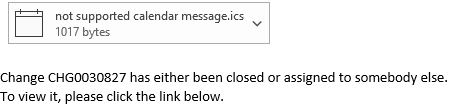
And here is the problem: when the email arrives in Outlook the content of the email template is not supported:

Content of the Outlook Email
How to solve it
After longs hours of search, I didn't found any solution for this bug. And since it's a ServiceNow OOTB feature I decided to create ticket to the support, but they don't found any solution too.
But finally, I found it.
The problem is in the mail content-type.
ServiceNow automatically set the content-type to "text/calendar; method=REQUEST;", but if we have a look at the template script we can see the line "METHOD:CANCEL", and that's why Outlook can't open the iCal script.
Here is the steps to correct it:
- Go to the "System Mailboxs" => "Outbound" => "Sent"
- Configure => Business Rules
- Click "New"
- Set it like that:
Name: Change Header Cancel
Table: Email [sys_email]
Advanced: Checked
When to run =>
When: before
Insert: Checked
Filter Conditions =>
"Body text" - "contains" - "METHOD:CANCEL"
Actions =>
Set field values =>
"Content type" - "To" - "text/calendar; method=CANCEL" - Click "Save"
And here it is.
Now, when you will use the OOTB Template "change.calendar.integration.remove", juste before sending the mail, the Business Rules will modify the content-type to "text/calendar; method=CANCEL" and Outlook will read the iCal script, like he did for the "change.calendar.integration" template.

The content appear perfectly, here you can't see the event because I deleted it by clicking on "Remove from Calendar" button.

Hope this will help all the people who was in the same situation than me !
Best regards,
Fabien
- 3,391 Views

- Mark as Read
- Mark as New
- Bookmark
- Permalink
- Report Inappropriate Content
Thank you so much for posting! Did you happen to already report this as a bug to ServiceNow? If not I can submit a case for this.
- Mark as Read
- Mark as New
- Bookmark
- Permalink
- Report Inappropriate Content
Hello,
No I didn't so feel free if you think it can be useful.
Best regards