- Post History
- Subscribe to RSS Feed
- Mark as New
- Mark as Read
- Bookmark
- Subscribe
- Printer Friendly Page
- Report Inappropriate Content
on 06-18-2021 08:54 AM
I thought this might be helpful to someone. We noticed that when you set up a Major Incident Trigger Rule, once it marks something as a Major Incident Candidate, it never checks again to see if it still meets the criteria. We had several instances where changes were made after an Incident was created as a Candidate that would have made it not a viable Candidate, and they didn’t want to keep seeing those in the Candidate view.
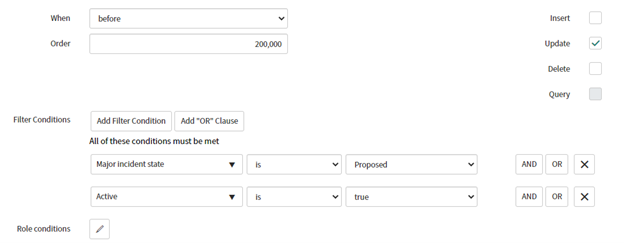
So I created a business rule to Re-Evaluate Major Incident Candidates that runs on the Incident table.

Click on the Advanced checkbox and enter the following in the Script field:
(function executeRule(current, previous /*null when async*/ ) {

    var mimTriggerRulesGr = new GlideRecord('major_incident_trigger_rule');
    mimTriggerRulesGr.addActiveQuery();
    mimTriggerRulesGr.orderBy('order');
    mimTriggerRulesGr.query();

    var matches = false;

    while (mimTriggerRulesGr.next()) {

        if (mimTriggerRulesGr.getValue('conditions'))
            matches = GlideFilter.checkRecord(current, mimTriggerRulesGr.getValue('conditions'));
        if (matches) {
            //do nothing but stop searching
            break;
        }
    }
	if(!matches){ //this no longer meets the criteria
		current.work_notes = "Removed as a Major Incident as none of the Major Incident Rules have matched.";
		current.major_incident_state = '';
		current.trigger_rule = '';
	}

})(current, previous);
This will re-evaluate any time an Incident is updated that is already a Proposed Candidate to make sure it still meets the criteria to be a Candidate. If it does, then the BR does nothing. If it doesn't, it clears out the major_incident_state field and the trigger_rule field and adds a work note to note when it was removed as a candidate. I hope this helps someone! 🙂
- 723 Views