- Post History
- Subscribe to RSS Feed
- Mark as New
- Mark as Read
- Bookmark
- Subscribe
- Printer Friendly Page
- Report Inappropriate Content
on 04-08-2022 08:56 PM
Let’s see how to import data automatically with scheduled imports,
First open your google sheet and go to File -> Share -> Publish to Web

Now select sheet which contains data in my example it’s sheet1 and select comma separated values (.csv) in next checkbox.

Now copy link from below box, which looks like docs.google.com
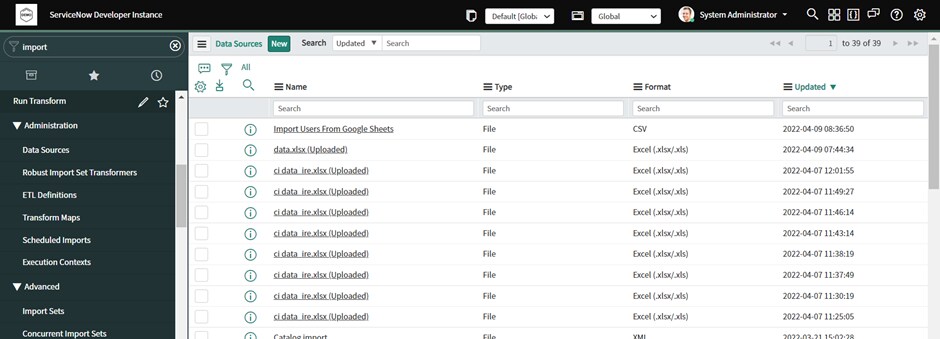
Now open your instance Filter Navigator-> Administration -> Data sources

Click new
Now select file retrieval method as HTTPS and then right click file path and go to config dictionary and change max length to 200, as Google sheet published URL is more than 100 characters,

if you skip this step, you will face errors.

Now Go back to data source form and complete fields as below

Notes: Do not use http or https before server name, it should be only docs.google.com and remaining url (after /spreadsheet ), put in file path, Now click load test 20 records, If records are fetched successfully, then go to next step, else check what you missed in above steps,
Now Lets create transform map for this, scroll down and click on new in transform map

Now create transform map as per your requirements

Here in my case, I am generating email ids for my users automatically, if you want any script to be written, please write it.
After this click auto-mapping assist, it will map some fields,

you can map remaining fields as per your requirements, Do not forgot to create coalesce field, else it will keep creating new records after the data is imported.
Now this part is completed Now visit scheduled imports

& Click on new select data source and make schedule as per your requirements, in this case for testing purpose I am running it periodically after 5 minutes.

Now save this record & done.
From now any changes made in the sheets will we auto inserted/updated in our tables after the specified time, please make sure if you add new column in Google sheet, please map it in transform map again, or if removed then remove from transform map also.
Now let’s check
Data in Google Sheet

User’s table when data imported

Regards,
Kaustubh Kulkarni
If you found this article useful, please mark this helpful.
- 3,664 Views

- Mark as Read
- Mark as New
- Bookmark
- Permalink
- Report Inappropriate Content
There's a Google Sheets Spoke in IntegrationHub and you can use flow designer to create records on your import set table. Just another option 🙂