- Post History
- Subscribe to RSS Feed
- Mark as New
- Mark as Read
- Bookmark
- Subscribe
- Printer Friendly Page
- Report Inappropriate Content
on 08-26-2021 12:40 PM
Hello,
I had a task to create a process where an automated email would go out to many risk holders, the subject line would be dynamic, and there would be a list of completed items in the letter.
The When to Send logic to me seemed too complex for a no-code solution. I would be interested to hear if otherwise.
When to send: When more than one RITEM (App Server, Database Server, or Web Server) was closed complete, and all other RITEMS of these types were closed or complete for the same request. There are other RITEM types in the same request, that do not contribute to the email notification or it's logic when to send. I also had to careful not to have the notification triggered over and over, once all the RITEMS were closed.
I have converted the catalog items and code to my personal dev instance, to be used as examples in this article.
Attached txt file has source code for the Business rule, and email scripts.
Components:
- Business Rule
On After Update of the sc_req_item table. If the conditions are correct to send the email, the event is fired. Also in this Business Rule, there is logic to obtain the email recipient list, and build the subject line. This information is then send as event parameters. - Event
An event in the Event Registry that links the Business Rule to the Email Notice - Email Notification
The email that is triggered by the above event. Calls below email scripts to build the subject line and email body. - Email Scripts
1. Script that renders the subject line
2. Script that renders the body of the email, including the list of completed servers
The Objects:
Class to store the requestor and project information. Used to create the subject line, and email recipient list.
function MainRequest(number, owning_entity, app_name,
        mirp_requestor_name, ci_owner, business_owner, technical_owner, mirp_owner, mirp_business_owner) {
        this.owning_entity = owning_entity;
        this.app_name = app_name;
        this.mirp_requestor_name = mirp_requestor_name;
        this.ci_owner = ci_owner;
        this.business_owner = business_owner;
        this.technical_owner = technical_owner;
        this.number = number;
        this.mirp_owner = mirp_owner;
        this.mirp_business_owner = mirp_business_owner;

    }
Class to store the Server information.
function Server(name, serverType, vendorAccess) {
        this.name = name;
        this.serverType = serverType;
        this.vendorAccess = vendorAccess;
    }
Code Snips:
Inside the Business rule, when to fire the event that will send the email notice. We want to make sure all server request items are closed, at least one is closed complete, and the current active flag is false and the previous active flag is true. This will prevent any updates to a closed item from sending out extra emails.
 function sendLetterNow() {

        var sendLetter = false;

        var serverItemsStilOpen = false;
        var oneRitemCompleted = false;


        var grScReqItem = new GlideRecord('sc_req_item');
        grScReqItem.addEncodedQuery("request.number=" + current.request.number + "^cat_item=e1d5f1831b423010aac9ece4604bcb01");
        grScReqItem.orderByDesc('number');
        grScReqItem.query();
        while (grScReqItem.next()) {

            //If there are no remaining open server ritems
            if (grScReqItem.getValue('active') == true) {
                serverItemsStilOpen = true;
            }

            //At least one ritem is closed complete
            if (grScReqItem.getValue('state') == 3) {
                oneRitemCompleted = true;

            }


        }

        if (current.active == false && previous.active == true && !serverItemsStilOpen && oneRitemCompleted) {
            sendLetter = true;
        }


        return sendLetter;

    }
Calling the event from the Business Rule with parameter one and two, for the email recipient list, and the email subject.
 var mainReq = loadMainRequest();
    var emailSendToList = getEmailReceipents();

    var sub = mainReq.owning_entity + ' ' +
        mainReq.app_name + ' ' +
        mainReq.number + ' – Server Builds Completed';


    if (sendLetterNow()) {
        gs.eventQueue('x_309761_demo_even.serverTurnOverLetter', current, emailSendToList, sub);
    }
In the email script, we collect the completed servers, and load them into an array.
 function getServers() {


        var ret = [];

        var grScReqItem = new GlideRecord('sc_req_item');
        grScReqItem.addEncodedQuery("request.number=" + current.request.number + "^state=3^cat_item=e1d5f1831b423010aac9ece4604bcb01");
        grScReqItem.orderByDesc('number');
        grScReqItem.query();
        while (grScReqItem.next()) {
            var ritem = grScReqItem.getValue('number');

            var st = getServerType(ritem);
            var va = getVedorAccess(ritem);
            var sn = getServerName(ritem);


            ret.push(new Server(sn, st, va));


        }

        return ret;

    }
In the email script, we render the HTML table that lists the completed server request items. Some logic is in this loop, to handle if we need to print a block of text regarding vendor access.
var servers = getServers();

    var vendorAccessRequested = false;

    template.print(addStyle());

    template.print(buildServerTableHeader());

    for (var i = 0; i < servers.length; i++) {

        template.print('<tr>');
        template.print(buildTableCell(servers[i].name));
        template.print(buildTableCell(servers[i].serverType));
        template.print(buildTableCell(servers[i].vendorAccess));
        template.print('</tr>');


        if (servers[i].vendorAccess == 'Yes') {
            vendorAccessRequested = true;
        }
    }


    template.print(buildServerTableFooter());

    if (vendorAccessRequested) {
        template.print(buildVendorTextBlock());
    }
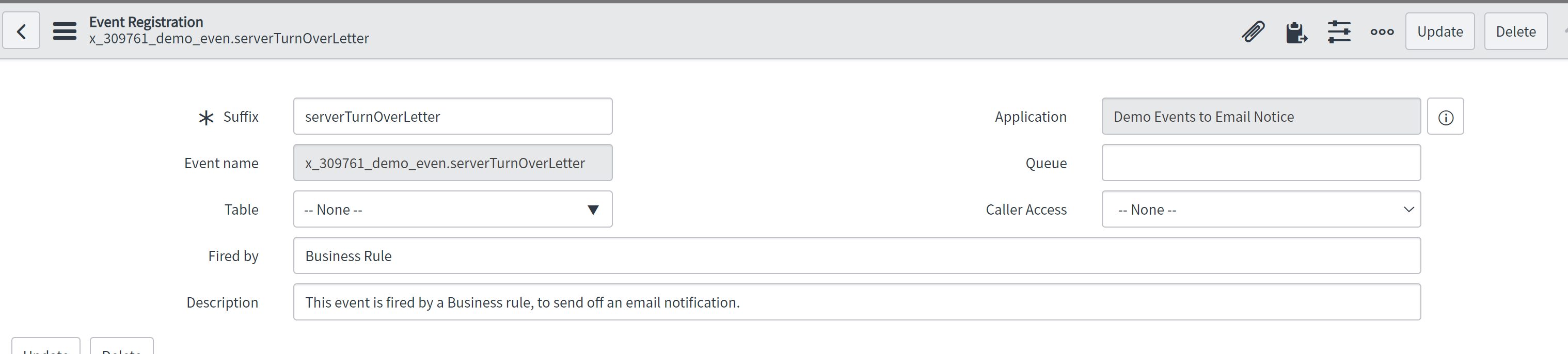
Event Registration:
The event record is simple. It's your link from the Business rule, or Workflow, to in this case, an email notification.

Email Notification Record:
Here in the notification record (When to Send tab), we set it to an event (then one that's called by the Business Rule).

For the Who Will Receive tab, we check off the Event parm 1 contains recipient checkbox.

Finally, for the What it will contain tab, we enter in the following in the message text box. These call email scripts that render the subject line, the server list, and other elements of the email body.
${mail_script:server_turnOverLetter_setSubject}
Hello,

The following server(s) has been built and is available for your use:

${mail_script:server_turnOverLetter_getServers}
Results:
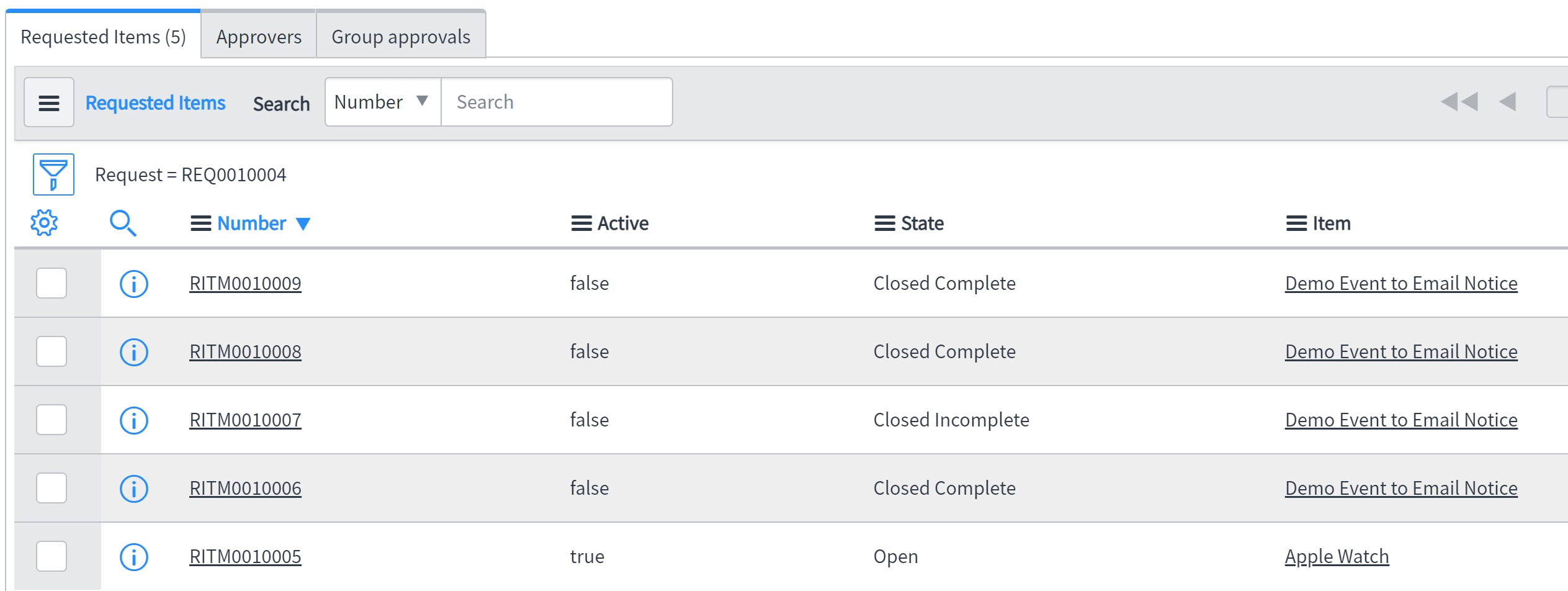
Here is the list of Items for a Request. Some of the request and not server requests, and one server request is Closed Incomplete. The letter (email notification) should only list the three completed servers.

The email recipients, sent as sys_ids of users, or groups, and in my case at work, actual emails, passed into event parameter number 1:

Subject from event parameter number 2:

Email body, with the closed complete server list

TODO:// Refactoring
Place objects and common code in script includes
Thank You for reading this article. I hope it's useful to you. Also I would like to learn if there are newer ways to solve this.
Jay
- 3,398 Views