- Post History
- Subscribe to RSS Feed
- Mark as New
- Mark as Read
- Bookmark
- Subscribe
- Printer Friendly Page
- Report Inappropriate Content
on 06-06-2017 08:46 AM
Hello ,
I have seen few questions on community for adding close note in service portal ticket Service portal:Add closed notes field in closed Ticket .
Here is the solution :
If you are trying with form view it won't help here because in SP, "Ticket Fields" widget can only show 'number,state,priority,sys_created_on' fields but if you want Close Notes field then you need to clone this widget("Ticket Fields") and add additional script as described below :
I hope you are looking for below result :

If yes, you can follow below steps :
1. From left navigation. Select "Service Portal Configuration âžš"
2. New tab should open and then select "Widget Editor"
3. Select "Ticket Fields" in Edit an existing widget list.

4. Select "Clone "Ticket Fields" option.

5. Provide name/id for your new custom widget.

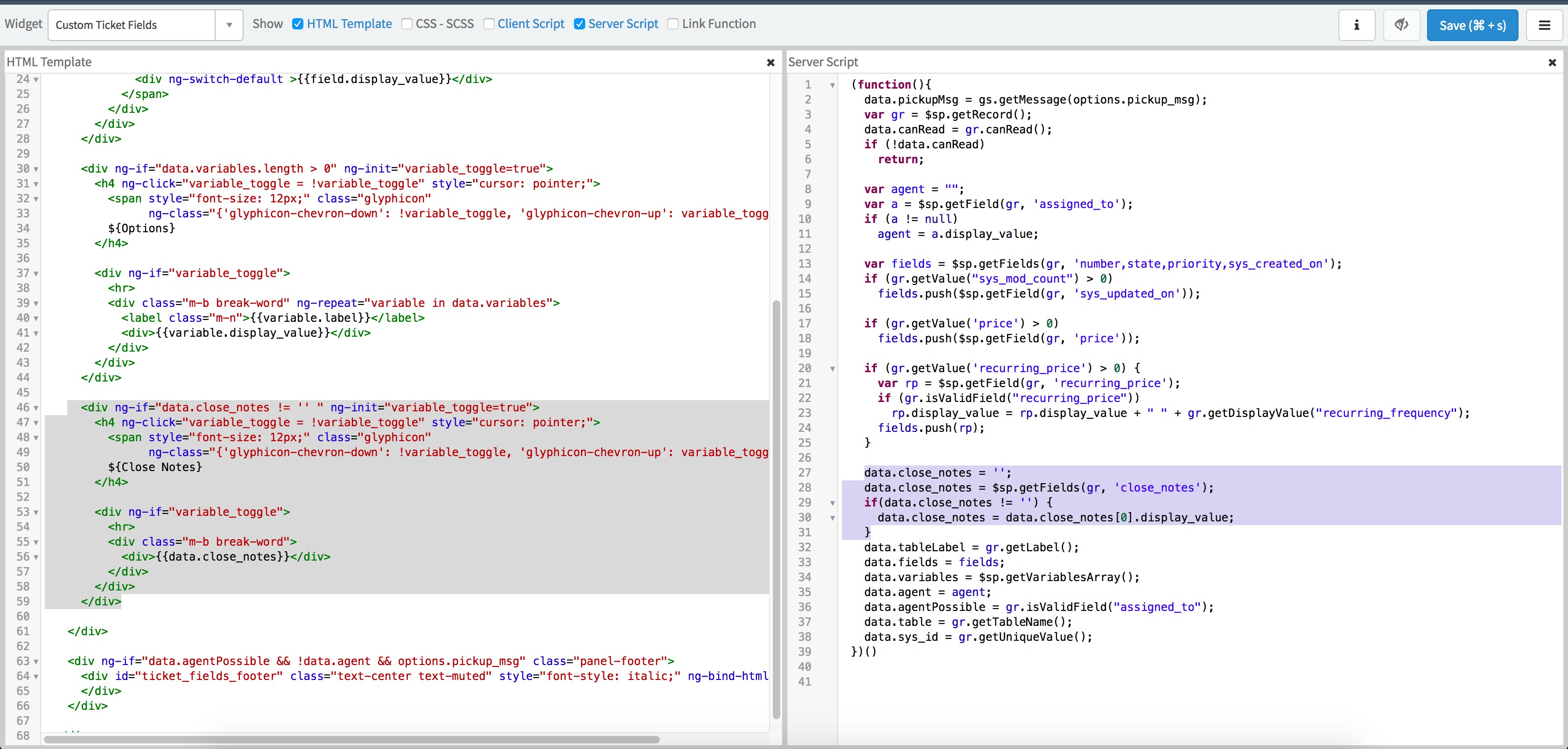
6. You need to make changes in "HTML Template" and in "Server Script" (script changes are selected as below):

here is the script which you can copy:
HTML Template:
<div ng-if="data.close_notes != '' " ng-init="variable_toggle=true">
<h4 ng-click="variable_toggle = !variable_toggle" style="cursor: pointer;">
<span style="font-size: 12px;" class="glyphicon"
ng-class="{'glyphicon-chevron-down': !variable_toggle, 'glyphicon-chevron-up': variable_toggle}"></span>
${Close Notes}
</h4>
<div ng-if="variable_toggle">
<hr>
<div class="m-b break-word">
<div>{{data.close_notes}}</div>
</div>
</div>
</div>
Server Side Script:
data.close_notes = '';
data.close_notes = $sp.getFields(gr, 'close_notes');
if(data.close_notes != '') {
data.close_notes = data.close_notes[0].display_value;
}
7. You can replace OOB "Ticket Fields" widget from ticket page with your custom widget.
7.1 - Goto "Service Portal Configuration" from left navigation and select "Page Editor".
7.2 - Select "Ticket" page from the search list.
7.3 - Select "Instance 2" and update Ticket Fields widget with new widget :

8. Now all required changes are complete.
Please test and share result
Also, this was for close notes field, you can also add other fields based on your requirement.
Let me know if you find any difficulties/question.
- 17,490 Views
- Mark as Read
- Mark as New
- Bookmark
- Permalink
- Report Inappropriate Content
Thanks chirag.bagdai ... this really helps!!

- Mark as Read
- Mark as New
- Bookmark
- Permalink
- Report Inappropriate Content
Hi Chirag,
I tried the suggestion above and it works, but the expand arrow is missing for the close notes.

Here is the HTML and Server Script. What do you think it could be?
HTML TEMPLATE
<div ng-if="data.canRead" class="panel b">
<div class="panel-heading bg-primary">
<div ng-init="spSearch.targetRequests()">
<sp-c-link target="form" table="data.table" id="data.sys_id"/>
</div>
<span ng-if="data.agent" >
${Agent working on this {{data.tableLabel}}}:
<div>{{data.agent}}</div>
</span>
<span ng-if="!data.agent && data.agentPossible" >${Your request has been submitted}</span>
<span ng-if="!data.agentPossible">${{{data.tableLabel}} record details}</span>
</div>
<div class="panel-body">
<div ng-if="data.fields.length > 0">
<div class="row">
<div class="col-md-6 col-sm-12 col-xs-6 m-b break-word" ng-repeat="field in data.fields"
ng-if="field.value && (field.type != 'decimal' || field.type == 'decimal' && field.value != 0)" >
<label class="m-n">{{field.label}}</label>
<span ng-switch="field.type">
<div ng-switch-when="glide_date_time" title="{{field.display_value}}">
<sn-time-ago timestamp="::field.value" />
</div>
<div ng-switch-default >{{field.display_value}}</div>
</span>
</div>
</div>
</div>
<div ng-if="data.variables.length > 0" ng-init="variable_toggle=true">
<h4 ng-click="variable_toggle = !variable_toggle" style="cursor: pointer;">
<span style="font-size: 12px;" class="glyphicon"
ng-class="{'glyphicon-chevron-down': !variable_toggle, 'glyphicon-chevron-up': variable_toggle}"></span>
${Options}
</h4>
<div ng-if="variable_toggle">
<hr>
<div class="m-b break-word" ng-repeat="variable in data.variables">
<label class="m-n">{{variable.label}}</label>
<div>{{variable.display_value}}</div>
</div>
</div>
</div>
SERVER SCRIPT
<div ng-if="data.close_notes != '' " ng-init="variable_toggle=true">
<h4 ng-click="variable_toggle = !variable_toggle" style="cursor: pointer;">
<span style="font-size: 12px;" class="glyphicon"
ng-class="{'glyphicon-chevron-down': !variable_toggle, 'glyphicon-chevron-up': variable_toggle}"></span>
${Close Notes}
</h4>
<div ng-if="variable_toggle">
<hr>
<div class="m-b break-word">
<div>{{data.close_notes}}</div>
</div>
</div>
</div>
</div>
<div ng-if="data.agentPossible && !data.agent && options.pickup_msg" class="panel-footer">
<div id="ticket_fields_footer" class="text-center text-muted" style="font-style: italic;" ng-bind-html="data.pickupMsg">
</div>
</div>
</div>
(function(){
data.pickupMsg = gs.getMessage(options.pickup_msg);
var gr = $sp.getRecord();
data.canRead = gr.canRead();
if (!data.canRead)
return;
var agent = "";
var a = $sp.getField(gr, 'assigned_to');
if (a != null)
agent = a.display_value;
var fields = $sp.getFields(gr, 'number,state,priority,sys_created_on');
if (gr.getValue("sys_mod_count") > 0)
fields.push($sp.getField(gr, 'sys_updated_on'));
if (gr.getValue('price') > 0)
fields.push($sp.getField(gr, 'price'));
if (gr.getValue('recurring_price') > 0) {
var rp = $sp.getField(gr, 'recurring_price');
if (gr.isValidField("recurring_price"))
rp.display_value = rp.display_value + " " + gr.getDisplayValue("recurring_frequency");
fields.push(rp);
}
data.close_notes = '';
data.close_notes = $sp.getFields(gr, 'close_notes');
if(data.close_notes != '') {
data.close_notes = data.close_notes[0].display_value;
}
data.tableLabel = gr.getLabel();
data.fields = fields;
data.variables = $sp.getVariablesArray();
data.agent = agent;
data.agentPossible = gr.isValidField("assigned_to");
data.table = gr.getTableName();
data.sys_id = gr.getUniqueValue();
})()
Thanks,
Chris
- Mark as Read
- Mark as New
- Bookmark
- Permalink
- Report Inappropriate Content
Hi Chris,
Sorry for late reply, I just saw your comment.
I tried exactly same script which you have provided and it's working for me.
However, I suspect that there should be some issue with HTML elements sequence (please compare your widget HTML with the screenshot)
Let me know if you still face this issue.

- Mark as Read
- Mark as New
- Bookmark
- Permalink
- Report Inappropriate Content
Thanks for this. It seems though that the close notes shown have lost the paragraph lines as seen on the incident form from fulfiller view. Do you have an idea how to retain the paragraph lines as is?
- Mark as Read
- Mark as New
- Bookmark
- Permalink
- Report Inappropriate Content
Hi jimboy,
For getting HTML format of your text you can take reference from HTML widget,for example:
You may try by replacing in HTML template:
"<div>{{data.close_notes}}</div>" with <div ng-if="c.close_notes" ng-bind-html="c.close_notes"></div>
and in Server side :
1. Include $sce in function()
2. replace data.close_notes = data.close_notes[0].display_value;
c.close_notes = $sce.trustAsHtml(c.data.close_notes[0].value);
$scope.$watch('c.close_notes',function(){
c.close_notes = $sce.trustAsHtml(c.close_notes);
});
}
Try above solution, let me know in-case if you get any challenge.
- Mark as Read
- Mark as New
- Bookmark
- Permalink
- Report Inappropriate Content
I am kind of confused here, seems like the code you mentioned on the Server side is a Client Side code. Can you clarify how the setup would be for client, server side codes.
- Mark as Read
- Mark as New
- Bookmark
- Permalink
- Report Inappropriate Content
Hi jimboy
True.
Please modify your script accordingly below suggested solution.
Step 1:
Replace HTML - "<div>{{data.close_notes}}</div>" with <div ng-if="c.close_notes" ng-bind-html="c.close_notes"></div>
Step 2:
In Client controller, add $sce in function()
Step 3:
In client controller: replace data.close_notes = data.close_notes[0].display_value;
with below script :
c.close_notes = $sce.trustAsHtml(c.data.close_notes[0].value);
$scope.$watch('c.close_notes',function(){
c.close_notes = $sce.trustAsHtml(c.close_notes);
});
Please let me know in-case of any question.
- Mark as Read
- Mark as New
- Bookmark
- Permalink
- Report Inappropriate Content
We're getting no output on this. There is no client script defined on your original post. This code is on the server script on your original post: data.close_notes = data.close_notes[0].display_value;
- Mark as Read
- Mark as New
- Bookmark
- Permalink
- Report Inappropriate Content
Hi jimboy
My bad, this time I tested - can you please try below solution :

Client Controller :
c.data.close_notes = c.data.close_notes.replace(/\r\n/g, "</br>");
c.close_notes = $sce.trustAsHtml(c.data.close_notes.toString());
$scope.$watch('c.close_notes',function(){
c.close_notes = $sce.trustAsHtml(c.close_notes);
});
Server Side:
data.close_notes = '';
data.close_notes = $sp.getFields(gr, 'close_notes');
if(data.close_notes != '') {
data.close_notes = "<p>"+data.close_notes[0].value+"</p>";
}
Output which I am getting :

- Mark as Read
- Mark as New
- Bookmark
- Permalink
- Report Inappropriate Content
This worked like a charm! Thank you.
- Mark as Read
- Mark as New
- Bookmark
- Permalink
- Report Inappropriate Content
Have you checked this new code when Incident is not in Resolved/Closed State, seems like there is a null value being displayed always and the div does not hide because of this null value.
- Mark as Read
- Mark as New
- Bookmark
- Permalink
- Report Inappropriate Content
I didn't checked/test that - Good point jimboy Thanks!
I think, the script needs if condition in the server side to check if the variable contains null value then change the value from null to false.
- Mark as Read
- Mark as New
- Bookmark
- Permalink
- Report Inappropriate Content
I did another approach to hide the Close Notes div.
I removed this part of server script data.CloseNotes = ''; then replaced it with data.state = gr.getValue('state'); then after that I modified the div condition to show the div only when state is Resolved or Closed (where we are sure that there is value for Close Notes).
Server Script:
data.state = gr.getValue('state');
data.CloseNotes = $sp.getFields(gr, 'close_notes');
if(data.CloseNotes != '') {
data.CloseNotes = "<p>"+data.CloseNotes[0].value+"</p>";
}
HTML:
<div ng-if="data.state == 6 || data.state == 7" ng-init="variable_toggle=true">
- Mark as Read
- Mark as New
- Bookmark
- Permalink
- Report Inappropriate Content
Hi Chirag,
I do have the same requirement and I have gone through the same. I cloned the existing widget and pasted the same code in HTML Template as well as Server Side Script. But the problem I am facing is previously under options tab it was reflecting all the options of the ticket as below screenshot.

But after pasting the script in the new cloned widget its no more displaying rather it only displays only one variable.

Below is my script which I have added.
HTML Template:

Server Side Script:

Please kindly let me know if I need to modify somewhere?
And also when the ticket is resolved, it's not getting captured in Ticket Conversations Widget on the form.