- Post History
- Subscribe to RSS Feed
- Mark as New
- Mark as Read
- Bookmark
- Subscribe
- Printer Friendly Page
- Report Inappropriate Content
on 09-21-2018 02:33 AM
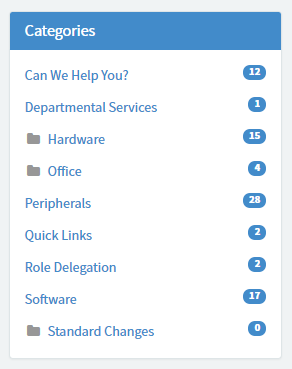
I'm working on the release of a Service Portal which contains mostly OOB functionality. However there are a couple of small improvements that I've worked on that might help others. The changes in this article are just relating to the SC Category widget which displays in the Service Catalog:

The changes I'll go over are:
- changing the folder icon on parent categories
- opening the parent category on page load if that is the selected category
1. Before making changes
It's best practice not to alter the OOB code so before you begin you'll need to:
- make copies of:
-
- 'SC Catalog' widget
- 'spCategoryListItem' angular provider
-
- N.B. names for providers must start with a lowercase letter and be camelCase
- replace the 'spCategoryListItem' with your copy on your copied 'SC Catalog' widget
- swap out 'SC Catalog' widget instances on pages:
-
- sc_home
- sc_category
- N.B careful to note any options before you delete the old ones and copy them on to the new instances
The new widgets will not work straight away and I'll explain why below.
This is where the magic of angular providers comes in.
You'll notice there is a custom html element <sp-category-list-item>. This element injects the html template held within the angular template, passing the custom properties you see within the opening <sp-category-list-item> tag.
The problem is that the way the custom element / angular template relationship works is based on the name of each. To make the injection work again you must:
- in the widget
-
- rename the tag in the html to match the name of the copied angular provider, adding [-] and all lowercase
-
- eg if you name your copied provider 'myclientSpCategoryListItem the html element would be <myclient-sp-category-list-item>
- don't forget the closing tag as well
- in the angular provider
-
- rename the widget as above in the template html
- notice the template uses the widget twice so it can have multiple levels of nested categories. It needs renaming in both places.
- don't forget the closing tag as well
If you save these changes and reload the sc_home or sc_category page you should see the widget working as previously.
2. Change the folder icon
My client just didn't like this folder icon and found that people didn't think to click on it. They wanted a [+] or [x] depending on whether the category was closed or open respectively.
Ultimately the folder icon is just a font-awesome icon applied with an html class attribute, so making the change is very simple. What is a bit more difficult is locating the code to change in the first place!
If you inspect the widget code (your copied widget), in the html you will notice that there are no fa- classes or any other implementation of the icon. So where is it? The code for each line of the category menu is held in the angular template to allow subcategories to be parents as well.
Within the template section you'll find the following <i> element
<i tabindex="0" aria-label="{{category.showSubcategories ? \'${Collapse subcategories}\' : \'${Expand subcategories}\'}}" class="fa fa-fw text-muted" ng-class="{\'fa-folder\': !category.showSubcategories, \'fa-folder-open\': category.showSubcategories}" ng-if="category.isParentCategory" ng-click="toggleShowSubcategories($event)"></i>Here there are two properties setting classes, 'class' and 'ng-class'. You can see that the current fa-folder and fa-folder-open classes are set in ng-class so all we need to do is replace those fa- classes with the ones we want to use. As a side note, ng-class is holding an object which sets the class dependent on the value of category.showSubcategories. This is another simple and powerful piece of angularJS magic!
Save your changes to the angular provider and refresh sc_home or sc_category to see your new icon.
2.b Moving the icon
A very small change but my client also wanted the icon on the right of the category title so that the text lined up. This is a simple case of cutting the <i> tag and moving it to after the {{category.title}} data binding.
If you would like to make a change like this you will also need to find the fa-fw class in the widget css and change margin-right to margin-left. This adds margin between the title and icon and prevents it form looking rubbish.
3. Opening a parent category on page load
I think this is an obvious thing to have included in the OOB widget and I'm really surprised that ServiceNow didn't think to put it in. The requirement is:
"When I click on a parent category, the items in that category are shown to the right and the subcategories are shown in the category menu"
Perhaps the tricky or misleading part here is that when you select a category the page refreshes and so passing that information with click of the category is quite long winded and complicated.
Fortunately we do not need to do that!
When the catalog loads the sc_category page the url contains a parameter sys_id which tells us which category has been selected. This is great! All we need to do is open the category in the menu which matches that sys_id and ServiceNow have given all the tools and data we need to do that already.
I've broken up how I worked on this to try and make it simpler.
Data
The widget server script already has all the objects and properties we need to complete this task.
- var categoryID - set to the sys_id parameter in the url
- data.categories - an array of objects holding the category data
- data.categories[cat].subcategories - an array of objects holding the subcategory data
- data.catagories[cat].isParent - a boolean. true if the category has children
- data.catagories[cat].showSubcategories - a boolean, is used in the angular provider to show the subcategories with ng-if
Functions
Also in the widget server script there is a function retrieveCategoriesFromArr(arr) which takes an array of category objects with a property sys_id and returns a fully populated array of category objects, including other values we need like subcategory.count.
The solution
We want to open the category when the page loads so we need to effect the data object populated by the widget server script when the widget refreshes. To do this we must put our code inside the function at the start of the script, but after the existing code has run to populate the objects we need. In the OOB code this is around line 38.
Then we build our code:
1. Check if there is a category in the url. This is already held in var categoryID
if(categoryID){

}
2. Iterate through the sys_ids of the loaded categories and check if any of them match that sys_id
if(categoryID){
       for(var cat in data.categories){
              if(data.categories[cat].sys_id == categoryID){

              }
       }
}
3. also check if the categoryID is a parent
if (categoryID) {
	for(var cat in data.categories){
		if(data.categories[cat].sys_id==categoryID && data.categories[cat].isParentCategory){

		}
	}
}
4. set the value of showSubcategories to true for the matching category
if (categoryID) {
	for(var cat in data.categories){
		if(data.categories[cat].sys_id==categoryID && data.categories[cat].isParentCategory){
			data.categories[cat].showSubcategories = true;

		}
	}
}
5. fill the subcategories array with fully populated objects by calling retrieveCategoriesFromArr()
if (categoryID) {
	for(var cat in data.categories){
		if(data.categories[cat].sys_id==categoryID && data.categories[cat].isParentCategory){
			data.categories[cat].showSubcategories = true;
			data.categories[cat].subcategories = retrieveCategoriesFromArr(data.categories[cat].subcategories);
		}
	}
}
And that's it! Save your work and reload the sc_home or sc_category page. Now when you click on a parent category it will load the cat items on the right and also show the subcategories in the menu. The icon will work as before to open/close the menu if you want.
Please mark as helpful if you liked this. I'm relatively new to angularJS and ServiceNow as a whole so any feedback or advice for further improvements to my methods are welcome as well. 😄
- 4,899 Views
- Mark as Read
- Mark as New
- Bookmark
- Permalink
- Report Inappropriate Content
Hi,
I tried the solution to display the catalog items and subcategories on the left when you click on the Parent category but it's not working. I am working on a Jakarta patch 10 instance. I cloned and modified the SC Categories widget but nothing is happening when I click on the Parent category. Did I modify the correct widget? Do I need to modify anything else? Here is a snippet of my server script where I added your piece of code:
var selectedCategoryItem = findElementBySysID(parentArr, input.cur_category);
if (selectedCategoryItem)
selectedCategoryItem.selected = true;
}
else {
data.categories = [];
data.selected_category = $sp.getParameter("sys_id");
}
if (categoryID) {
for(var cat in data.categories){
if(data.categories[cat].sys_id==categoryID && data.categories[cat].isParentCategory){
data.categories[cat].showSubcategories = true;
data.categories[cat].subcategories = retrieveCategoriesFromArr(data.categories[cat].subcategories);
}
}
}
})();
Thanks.
Phuong
- Mark as Read
- Mark as New
- Bookmark
- Permalink
- Report Inappropriate Content
Hi Phuong,
You seem to be missing an opening curly brace after if(selectedCategoryItem) towards the start of your script?
Thanks
Rob
- Mark as Read
- Mark as New
- Bookmark
- Permalink
- Report Inappropriate Content
Hi Rob,
cool post, thanks for sharing. I've got a question maybe you can help with? A client has 21 catetories in their catalog being shown in the portal on their [sc_home] page...so the list vertically is long. What I need is for the [sc_category] page to always open at the top of the page. Right now if I click the last category in the categories widget, I have to manually scroll to the top or the [sc_category] page. Can I make it do this automatically when a category is chosen? thanks for any help. I've already cloned the "SC Categories" widget...so just tickering with the code now to get it to work.
- Mark as Read
- Mark as New
- Bookmark
- Permalink
- Report Inappropriate Content
Hi,
I haven't used this myself but AngularJS provides a $anchorScroll() function which scrolls the page to the current $location.hash
You can try setting $location.hash('sp-nav-bar'), or to the ID of any element on the page, and then calling $anchorScroll() as part of the toggleShowSubcategories() function that runs when you click a category.
Hope that helps
Cheers
Rob
- Mark as Read
- Mark as New
- Bookmark
- Permalink
- Report Inappropriate Content
Hi Rob,
thanks for the response. I opened a HI ticket for this issue and their fix was that the "SC Categories" widget in place was not the most recently updated version. They imported the new version released in London and the issue is fixed without needing to clone and update the widget.
- Mark as Read
- Mark as New
- Bookmark
- Permalink
- Report Inappropriate Content
Hi