- Post History
- Subscribe to RSS Feed
- Mark as New
- Mark as Read
- Bookmark
- Subscribe
- Printer Friendly Page
- Report Inappropriate Content
on 10-28-2020 11:48 PM
CODES BELOW ARE PICKED UP FROM MULTIPLE SOURCES IN THE COMMUNITY, SOME ARE SELF IMAGINED SCENARIOS AND TESTED. USE THEM IN YOUR CONTEXT ACCORDINGLY.
CLIENT SCRIPT - Get Row count of Multi row variable set or to validate by row count.
function onSubmit()
{
    //get the MRVS
    var multiRowVariableSet = JSON.parse(g_form.getValue('<VARIABLE_SET_NAME>'));

    //Get number of rows
    var numberOfRows = multiRowVariableSet.length;

    //If lower then 5 abort and show message
    if (numberOfRows < 5) {
        g_form.addErrorMessage('<CUSTOM_ERROR_MESSAGE>');
        return false;
    }

}
BACKGROUND SCRIPT - to concatenate and store in the same String field.
var gr = new GlideRecord('<TABLE_NAME>');
gr.addQuery('<FIELD_NAME>',"<FIELD_VALUE>");
gr.query();

while(gr._next())
{
gr.<TARGET_FIELD> += " " + gr.<INPUT_FIELD>;
gr.update();

}

//Replace:
//<TABLE_NAME> - with the table you are querying;
//<FIELD_NAME> and <FIELD_VALUE> to filter your search.
//We are doing A = A+B here.
//<TARGET_FIELD> - Input A and also the output field.
//<INPUT_FIELD> - the input B in this case.
//<TARGET_FIELD> and <INPUT_FIELD> should be String.
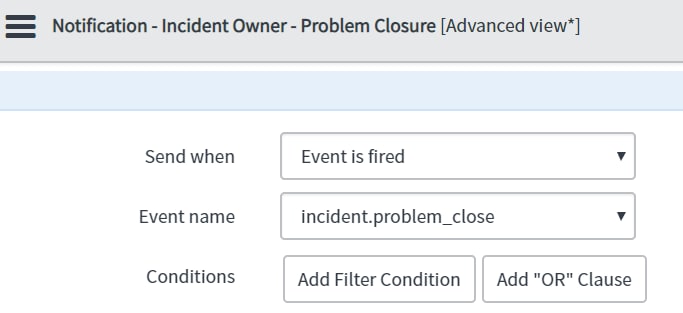
Send notification to users in incident, when Problem record Closed or (any state change)
Event:
Event name - incident.problem_closed
Table name - incident
Fired by - BR on problem table when Problem is closed.
Description - Notify Incident owner.

Configure when and whom to send the notification - Here is where you tell the notification that your recipients are in the event parameters.

//BUSINESS RULE - AFTER - Condition - State changes to Closed.

(function executeRule(current, previous /*null when async*/) {

//Declare the arrays where you need to store the recipients
//Array because more than 1 user.

var incidentOwners = [];
var incidentAssignee = [];

//Query the incident table to fetch the recipients.

var incidentGR = new GlideRecord("incident");

// problem_id - FIELD ON INCIDENT TABLE.
//current.sys_id - REFERRING TO PROBLEM RECORD SYS ID.
//'current' is PROBLEM BECAUSE BR IS DEFINED ON PROBLEM TABLE.


incidentGR.addQuery("problem_id", current.sys_id);
incidentGR.addActiveQuery();

//DEFINE YOUR OWN QUERY FOLLOWING THE SYNTAX ABOVE.

//DON'T FORGET THIS, OR ELSE IT IS LIKE NOT PRESSING THE
//'RUN' BUTTON AFTER SETTING THE SOFT FILTER.

incidentGR.query();

//YOUR QUERY FETCHED RESULTS.
//NOW ACCESS THEM USING THE next() method.

//USE THE push() METHOD TO PUSH THE DATA INTO THE ARRAY.
//SERVICENOW RETURNS SYS_ID - THE DATABASE VALUE FOR ANY RECORD.
//HENCE WE USE METHODS LIKE getValue() TO RETRIEVE THE USER DEFINED NAMES OF THAT RECORD.

while (incidentGR.next())
{
incidentAssignee.push(incidentGR.getValue('assigned_to'));
incidentOwners.push(incidentGR.getValue('caller_id'));
}

//USING THE LENGTH VARIABLE OF THE ARRAY WE ASSESS WHETHER THE ARRAY HAS ELEMENTS IN IT.
//IF YES, TRIGGER THE EVENT USING gs.eventQueue() METHOD.

if (incidentOwners.length >0 || incidentAssignee.length >0)
gs.eventQueue('incident.problem_close', current, incidentAssignee.toString(), incidentOwners.toString(), '');

})(current, previous);
BUSINESS RULE: To update Problem ticket when 'Problem' reference field (OOTB) is FILLED, EMPTIED, CHANGED on an incident.
BEFORE BUSINESS RULE - UPDATE.
CONDITION BUILDER - Problem Changes.
CONDITION - EMPTY
(function executeRule(current, previous /*null when async*/ ) {

    // Add your code here
    var gr = new GlideRecord('problem');
    var newNum, oldNum;

	//VARIABLES TO STORE NEW AND OLD problem_id FIELD VALUES.
	//OR ELSE WE WILL HAVE TO QUERY DISPLAY VALUE EVERY TIME, WE NEED IT.
    newNum = current.problem_id.getDisplayValue();
    oldNum = previous.problem_id.getDisplayValue();

	//DEFINING STRING VARIABLES AND STORING MESSAGE TO BE PASSED ON WORK NOTES OR LOGS.
    var data = "Incident " + current.number + " is now linked to the problem ticket " + newNum + "."; //linked
    var remData = "Incident " + current.number + " is NO MORE LINKED to the problem ticket" + oldNum; //removed
    var newData = "Incident " + current.number + " is NEWLY LINKED to the problem ticket " + newNum + " from " + oldNum; //Changed

	//Below IF-ELSE-IF validation is to check which input to query with.
	// Use newNum if Problem field is filled in,
	//Else use oldNum if field is emptied.

    if ((newNum != "") || (newNum != "" && oldNum != ""))
        gr.query('gr.number', newNum);
    else if (newNum == "" && oldNum != "")
        gr.query('gr.number', oldNum);


    while (gr.next()) {

        if (gr.number == (oldNum || newNum))
		{
			//If you put a log inside this loop, if the above IF validation is not done,
			// the log will be generated for every record while loop passes through.

            if ((previous.problem_id == "") && (current.problem_id != ""))               //SCENARIO 1
			{
                gr.work_notes = data;
                gr.update();

            }
			else if ((current.problem_id == "") && (previous.problem_id != ""))          //SCENARIO 2
			{
                gr.work_notes = remData;
                gr.update();
            }
			else if ((current.problem_id != "") && (previous.problem_id != ""))          //SCENARIO 3
			{
                gr.work_notes = newData;
                gr.update();
            }

        }
    }

})(current, previous);
FUNCTIONAL CASE:
** User inputs caller_id on the incident form - reference field - sys_user.
** Query the cmn_location table for Location name and fetch that string.
** Using the string, query the user group table to fetch a matching group record.
** If multiple groups are listed, fetch the recently created record ordered by Created by.
Solution:
Client Script and Script include used.
/***********CLIENT SCRIPT************/

function onChange(control, oldValue, newValue, isLoading, isTemplate) {
   if (isLoading || newValue === '') {
      return;
   }

	var name = g_form.getValue('caller_id');

	var ga = new GlideAjax('CSTM_GroupName');        //Replace with Script Include name
	ga.addParam('sysparm_name','fetchGrpName');      //Param 1 - Script include Method
	ga.addParam('sysparm_caller_id',name);           //Param2 - Parameter to pass to Script include from Client script
	ga.getXML(getResponse);

	function getResponse(response) {
	var answer = response.responseXML.documentElement.getAttribute("answer");
	//alert(answer);
	g_form.setValue('assignment_group',answer);
}
/****************SCRIPT INCLUDE - CLIENT CALLABLE - TRUE**************/

var CSTM_GroupName = Class.create();
CSTM_GroupName.prototype = Object.extendsObject(AbstractAjaxProcessor, {

	fetchGrpName : function() {

        //Fetch the Parameter from CS
	var pm = this.getParameter('sysparm_caller_id');

        //Defined a variable to store location name.
	var locName;

        /******QUERY User Record and Search for the user passed from CS*****/
	var usrGr = new GlideRecord('sys_user');
	usrGr.addQuery('sys_id',pm);
	usrGr.query();

        /*******DOT WALK AND STORE LOCATION 'STRING VALUE' IN THE VARIABLE*****/
	if(usrGr.next())
	{
          locName = usrGr.location.getDisplayValue();
	  gs.log("ANI location"+locName);
	}


	/**********UNTIL NOW FETCHED THE LOCATION - AS A STRING**********/

        /**********FURTHER IN GROUP TABLE ********/
        /*******QUERY - FOR RECORD THAT CONTAINS LOCATION STRING*****/

	var gr = new GlideRecord('sys_user_group');
	gr.addQuery('name', 'CONTAINS', locName);
	gr.query();
	gr.setLimit(1);

	/***********IF RECORD EXISTS - RETURN THE GROUP NAME**************/
	if(gr.next())
		var ans = gr.name;
		//gs.log("ANISH:"+ ans);
		return ans;


	},

//NOTE - THIS WILL ONLY RETRIEVE THE LATEST (CREATED) GROUP AND ASSIGN IT TO THE ASSIGNMENT GROUP FIELD ON THE INCIDENT.


    type: 'CSTM_GroupName'
});
MORE USE CASES COMING UP ...
Let's build a beautiful repository of codes.
Cheers and Happy coding,
Anish
- 6,012 Views